Bandwidth and Filters
OpenHPSDR Zeus offers three connected ways to set the RX filter:
- The BANDWIDTH block — quick mode-appropriate presets and a Custom Hz input.
- The FILTER block — a 10-slot filter bank plus two user-editable slots (
VAR1/VAR2). - The Advanced filter ribbon — a graphical passband editor reached from the
≡button at the end of the FILTER bank.
All three operate on the same underlying filter; whichever one you touch last wins.
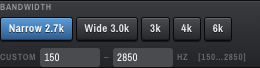
Five quick presets at the top, plus a CUSTOM <low> – <high> Hz input. The presets are mode-dependent:
| Mode group | Presets |
|---|---|
| SSB / DIG (USB/LSB/DIGU/DIGL) |
Narrow 2.7k, Wide 3.0k, 3k, 4k, 6k
|
| CW (CWL/CWU) |
CW 250, CW 500 only |
| AM / SAM / DSB / FM |
AM 6.6k, Wide 8.0k, 3k, 4k, 6k
|
The Custom field accepts an absolute audio-domain range of 0–10 000 Hz, in 50 Hz steps. Press Enter to commit, Escape to cancel. For asymmetric modes (SSB / DIG / CW) you can edit both the low and high cut independently; for symmetric modes (AM / SAM / DSB / FM) the second edge mirrors the first.
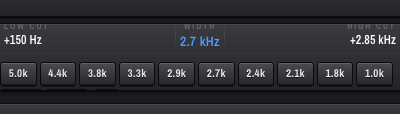
A graphical strip showing the current passband — LOW CUT +150 Hz / WIDTH 2.7 kHz / HIGH CUT +2.85 kHz — and a 12-button filter bank:
-
Ten fixed F-slots per mode. For SSB this is
5.0k / 4.4k / 3.8k / 3.3k / 2.9k / 2.7k / 2.4k / 2.1k / 1.8k / 1.0k. AM / FM / CW have their own equivalents (e.g. CW slots cluster around 250–500 Hz). -
VAR1/VAR2— two persistent user-editable slots saved per mode on the server. Tune the passband to taste, then leave it onVAR1orVAR2and OpenHPSDR Zeus will remember it for next time. -
≡(hamburger) — opens the Advanced filter ribbon.

A wide ribbon that drops in above the panadapter, giving a much richer passband editor:
-
Graphical passband editor —
LOW CUT/PASSBAND/HIGH CUTread-outs at the top, draggable handles on a frequency tape underneath. Drag edges to adjust · Drag inside to move. -
PRESET BANDWIDTHS chips on the right — six widths chosen to suit the current mode group. For SSB the widths are
2.4 / 2.7 / 3.6 / 6.0 / 9.0 / 12.0 kHz. CW / AM / FM each have their own preset set. -
CUSTOM ✎button — clicking the pencil armsVAR1so the next graphical drag writes into theVAR1slot. Repeat forVAR2. -
×at the top-right closes the ribbon.
The graphical editor and the BANDWIDTH/FILTER blocks edit the same filter — the ribbon is just a roomier UI surface for the same control.
- Pick the closest preset in the FILTER bank (e.g.
2.7kfor SSB). - For occasional fine-tuning, drag the edges of the passband on the panadapter.
- For a personally-tuned filter you'll use over and over (say
+200 / +2900 Hzfor narrowed-up SSB on a noisy day), tune to taste with the Advanced ribbon, then clickCUSTOM ✎to bake it intoVAR1/VAR2. From then on, one click onVAR1recalls it.