DSP
The DSP panel on the right column groups the receive-side noise controls. All of them use the same engine (WDSP) that Thetis users already know.
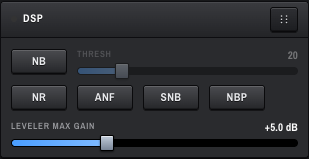
A single button that cycles through three states:
- Off — no blanking.
-
NB1 — time-domain blanker (WDSP's
xanbEXT). Good for pulse-type noise like ignition or electric fence. -
NB2 — stronger time-domain blanker (WDSP's
xnobEXT). Try this when NB1 is not enough.
Next to the button is the THRESH slider — range 0–100, default 20. It is greyed out when NB is off. Higher = more aggressive blanking; too high can chop the wanted signal.
A single button that cycles through four states:
- Off
- NR — NR1 / ANR, an adaptive LMS filter in the time domain. Cheaper, but can introduce a "fluttery" artefact on SSB. No operator-tunable knobs in this release; defaults match Thetis (64 taps, 16-sample delay, gain 1e-4, leakage 0.1).
- NR2 — EMNR, Ephraim–Malah spectral noise reduction. Usually the more natural choice on SSB. Operator-tunable end-to-end (Method, Trained-method thresholds, Post-Process comfort-noise stage) — see "NR2 settings" below.
- NR4 — SBNR, libspecbleach-based spectral bleaching. Selectable as a preview in this release; the underlying algorithm and adjustable parameters ship with the next libwdsp rebuild. Selecting NR4 today leaves NR effectively off — choose NR1 or NR2 for active noise reduction.
These four modes are mutually exclusive in WDSP — only one runs at a time. The cycle: Off → NR → NR2 → NR4 → Off.
When NR2 is selected, the inline panel below the NR row exposes the same controls Thetis surfaces on its Setup → DSP tab, organised into three subsections:
The core EMNR algorithm selectors. Defaults match Thetis exactly; for most operators these stay where they are.
-
Gain — gain-calculation method. Four options:
- Linear — linear amplitude scale.
- Log — logarithmic amplitude scale.
- Gamma (default) — Gamma distribution of speech amplitudes. The Thetis factory choice and the right starting point.
-
Trained — uses the trained
zetaHatlookup table (shipped alongside the binary). When selected, the Trained subsection below appears with the two threshold knobs.
-
NPE — noise power estimation method. Three options:
- OSMS (default) — Optimal Smoothing Minimal Statistics.
- MMSE — Minimum Mean Squared Error.
- NSTAT — Non-Stationary noise estimator.
- AE Filter (default ON) — the artifact eliminator. A post-mask smoothing pass that suppresses the "musical-noise" warble typical of frequency-domain noise reduction. Leave it on unless you specifically want to hear the raw spectral subtraction.
Two thresholds the Trained gain method consults against the lookup table:
-
T1 — main threshold (
zetaThresh), range-5.0 .. +5.0, default-0.5. Higher values restrict noise more aggressively. -
T2 — secondary threshold, range
0.02 .. 3.5, default2.0. Lower values let very weak signals through.
These two have no effect when the Gain method is anything other than Trained.
EMNR's comfort-noise injection stage (post2). ON gives the smoother "Thetis-like" NR2 hiss; OFF gives raw EMNR output. This is not the master NR2 on/off — that's the NR cycle button.
- Enable (default ON) — toggles the comfort-noise injection.
-
Factor (default 15) — comfort-noise blend weight, range
0..100. WDSP divides by 100 internally, so this is the same NumericUpDown scale Thetis uses on its Setup form. -
Nlevel (default 15) — comfort-noise level reference, range
0..100. - Rate (default 5.0 s) — time-constant for the noise-floor follower.
- Taper (bins) (default 12) — spectral edge taper that softens the boundary between the subtracted region and the comfort region.
Every control in the panel auto-persists as you drag, with a 120 ms debounce. There's no Save button — let go of the gauge or click a button and the new value is on its way to WDSP and to disk. The Defaults button at the bottom resets both Method (Gain, NPE, AE Filter, T1/T2) and Post-Process to the Thetis-parity factory values.
Settings persist globally — they apply regardless of band, mode, or VFO, and survive an OpenHPSDR Zeus restart. Stored in the same LiteDB the rest of the DSP config uses.
The Trained gain method consults two lookup tables — zetaHat.bin (43 KB) and calculus (929 KB) — that Thetis ships in its lib/Thetis-resources/ folder. OpenHPSDR Zeus ships the same files (in Zeus.Server/wdsp-data/) and copies them next to the binary at build time so libwdsp's fopen() finds them at runtime. Boot log line confirms they're loaded:
wdsp.nr2.models cwd=… zetaHat.bin=loaded calculus=loaded
If the line shows missing→compiled-fallback instead, the lookup tables built into libwdsp itself take over — numerically equivalent today, but you'd miss any future retrained .bin from upstream.
Toggle button. An adaptive time-domain filter that finds and notches steady carriers (heterodynes). Adapts quickly, so several carriers can be removed at once.
Toggle button. Frequency-domain blanker — aimed at wideband impulse noise that the time-domain NB1 / NB2 miss.
Toggle button. A second auto-notch that uses the RXA frequency-domain notch filter. Different from ANF (time-domain) — it can stack with ANF on particularly busy bands.
A slider at the bottom of the panel, range 0 – 15 dB in 0.5 dB steps, default +5.0 dB. POSTs are debounced 100 ms after the last drag.
The Leveler lives in the TX chain — it evens out voice peaks before the ALC. The Max Gain setting caps how hard the Leveler will push quiet syllables. Community-recommended starting point is +5 dB; raise it for more voice-evening, but watch the ALC GR meter — sustained gain reduction over 10 dB means the input is over-driving the limiter.
These are not defaults — they are what most operators settle on:
| Condition | Setting |
|---|---|
| Quiet band, weak signals | NR2 on, ANF on, NB off |
| Urban noise / powerline hash | NB1 on, SNB on |
| Nearby lightning | NB2 on, threshold ≈ 60–80 |
| Narrow CW | NR2 off (avoid artifacts), ANF off |
NR4 is a preview slot for now — pick NR1 or NR2 for the noise-reduction examples above until the next release.