Frequency and VFO
The FREQUENCY · VFO panel is the large, high-contrast frequency display at the top of the right-hand column. It shows the current VFO A frequency as individual decade digits, e.g. 14.254.000 MHz.
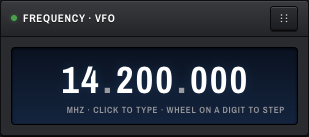
Digits are grouped MHz . kHz . Hz. The caption underneath reads:
MHz · click to type · wheel on a digit to step
The smaller VFO A display in the top bar mirrors the same frequency in MHz.
There are four ways:
Click anywhere on the digits. The display flips into a single text input.
- Type a frequency in kHz — plain (
14200), decimal (14200.5), or with European comma (14200,5). Leading/trailing whitespace is ignored. - Press Enter to commit, Escape to cancel.
Hover the mouse over any single digit and scroll the wheel.
- Scroll up — that decade increments by 1.
- Scroll down — that decade decrements by 1.
- E.g. scrolling on the
5in14.254.000changes the 10-kHz digit, so each notch moves 10 kHz.
The display updates instantly; the radio is commanded after about 80 ms of wheel idleness, which means rapid scrolling feels smooth.
Click or scroll the spectrum — see Panadapter and Waterfall.
- ← / → — nudge VFO ±500 Hz. Coalesces to one POST per animation frame, so holding the key produces smooth tuning.
- ↑ / ↓ — zoom panadapter one integer step (these do not tune).
The frequency display is clamped to the range 0–60 MHz on the type-input path.
When you leave a band and come back, OpenHPSDR Zeus restores your last frequency and mode on that band. Band memory is saved server-side with a small debounce so a rapid session of band-hopping only writes once the dust settles.
A SPLIT button and a RIT button live on the transport bar, but they are placeholders in the current build — they render but do not yet affect the radio. See TX Controls for status.