CW Keyer
The CW KEYER panel on the right column shows up when you are operating CW modes (CWL / CWU). It gives you a speed control, a set of common macro buttons, and a Morse preview strip.
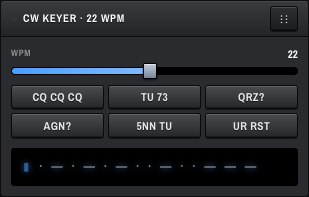
A slider sets keying speed, 5 – 40 WPM. The numeric readout above the slider shows the current value, e.g. 22 WPM. The panel title also shows it (CW KEYER · 22 WPM).
Typical speeds:
- 10–15 WPM — comfortable for learning and rag-chew.
- 18–22 WPM — standard contest / casual work.
- 25+ WPM — pileups and experienced CW ops.
Six one-click macros, hard-coded for now (not yet user-editable in the UI):
| Button | Sends |
|---|---|
| CQ CQ CQ | CQ call. |
| TU 73 | Thanks + 73. |
| QRZ? | QRZ? (the "?" asks who called). |
| AGN? | Again? (asks for a repeat). |
| 5NN TU | 599 + Thanks (contest exchange). |
| UR RST | Sends "UR RST" — ready to dictate the received report. |
Note: Macro send is wired through the workspace context but is not yet sending Morse to the transmitter end-to-end. The visible buttons fire a callback; backend keying is on the roadmap.
Below the macros is a single-line display rendering dots and dashes. In the current build this strip is decorative placeholder text (· — · — · — · · — · · — — —) — it is not yet driven by the live keyer state. Treat it as a reminder of the panel's purpose; live Morse rendering will follow once macro sending is wired.
Not yet exposed in the UI — there is no popover or menu for picking iambic A / B / straight-key mode in the current build. WDSP supports it; the front-end controls will appear once macro send lands.
The CW keyer panel is visible on all screen sizes but the macro button labels may wrap on narrow screens.