Repository navigation
Web UI Issuers and Trust
Documentation for the image tag 1.0.0-rc1. See Versions for the documentation of a release.
Part of Using the Web UI. An issuer is a CA key and certificate that signs other certificates: a root, or an intermediate below it. This page covers setting up the first CA, the Issuers page, and getting the trust anchors to the machines that need them. The Issuers page and the CA key operations are for the admin role.
An administrator who signs in to a Qertum with no CA lands on Set Up Certificate Authority. No certificate can be issued until this is done, and you can skip it and come back.
| Choice | What it does |
|---|---|
| Offline root + online intermediate (recommended) | The root key never touches this server. Qertum creates an intermediate and hands you a request file; you sign it on an offline machine (with qca root sign or OpenSSL) and upload the result |
| Generate new CA | Creates a fresh root key and self-signed certificate on this server |
| Upload existing CA | Imports a PEM certificate and private key (or a PFX) from an existing CA |
| Skip for now | Leaves the CA unconfigured |
Generate new CA asks for the identity of the CA (common name, and optionally organisation, unit, country, state and locality) and for the key algorithm, the PQC enforcement stage and the validity (3650 days by default). A post-quantum algorithm, ML-DSA-65, is proposed by default, and the page explains why: classical RSA and ECDSA have the broadest client support but are refused when the stage is Enforce, which is the default. If you choose a classical root you must first lower the stage, and the page tells you so. Composite algorithms ask you to confirm that you understand the clients they need.
Generating the CA files a root CA request, and the page then says Root CA Awaiting Approval: approving that request is what creates the key and certificate, so the root goes through the same approval step as every certificate. Until an administrator approves it, nothing can be issued.
Issuing CAs lists the roots and intermediates this server knows.
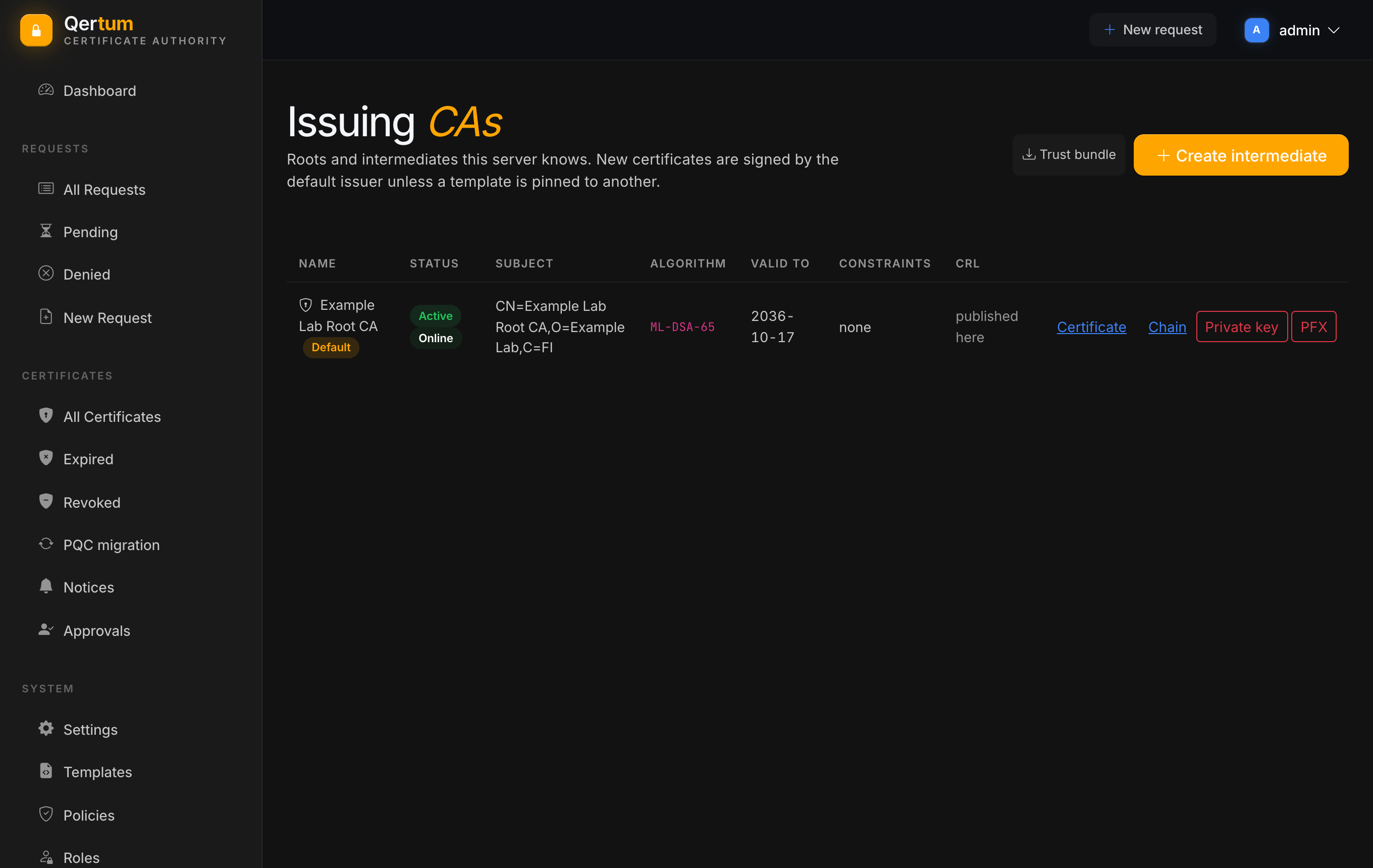
Each row shows the name (a Default badge marks the issuer that signs new certificates unless a template is pinned to another), the status (Active or retired, and Online if Qertum holds its key), subject, algorithm, valid-to date, name constraints, and whether its CRL is published here or has to be uploaded.
Per issuer you can download the Certificate, the Chain up to the root, and, as an administrator, the Private key or a PFX. Those last two are marked in red on purpose: exporting a CA private key is audited, can require step-up authentication and a second administrator, and is described in the dialog as not a safe way to manage a CA private key. Prefer an offline root.
Create intermediate opens a form for a new intermediate CA:
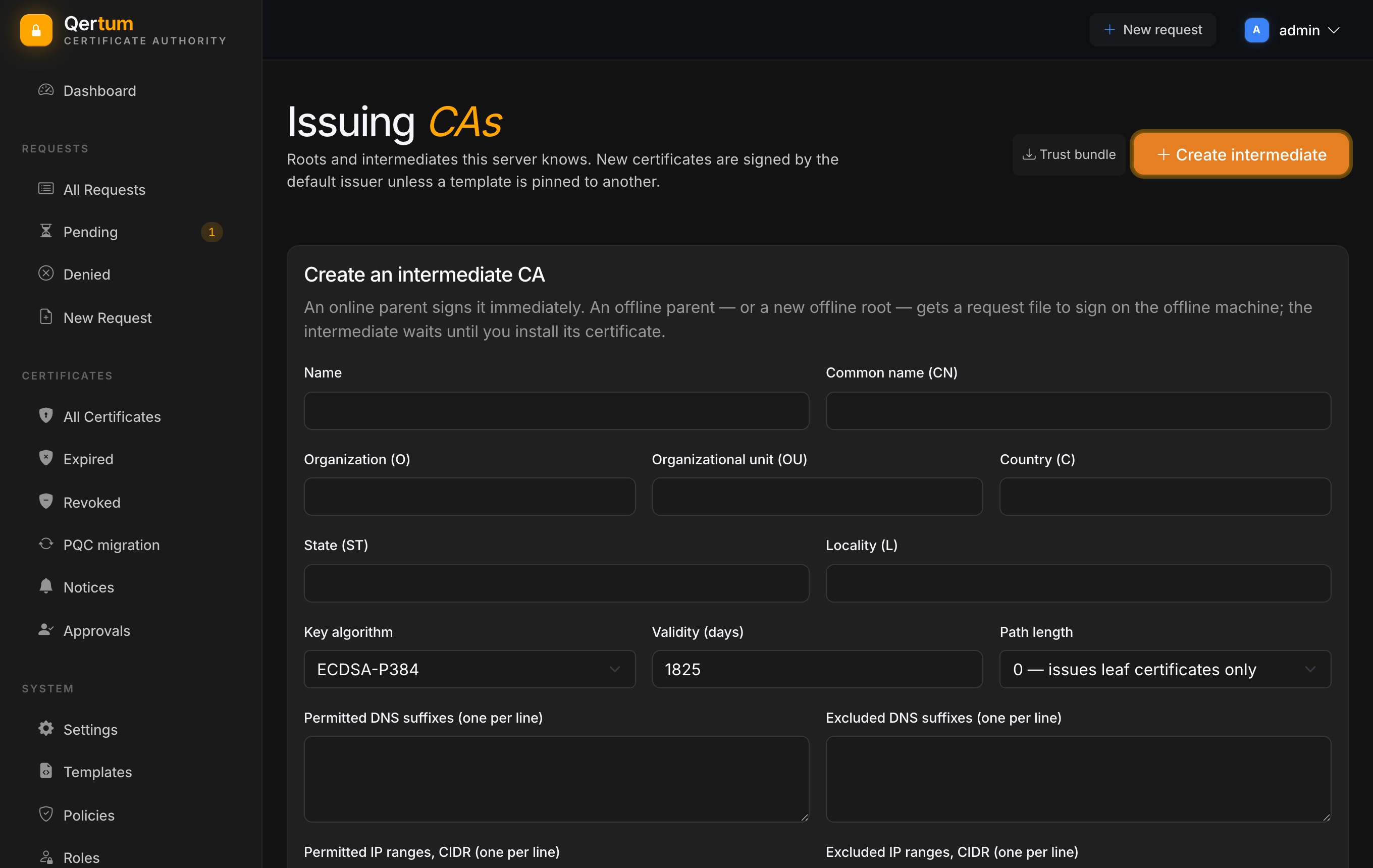
- Identity (name, common name, organisation, unit, country, state, locality), the key algorithm (RSA, ECDSA, ML-DSA, SLH-DSA or one of the composite combinations) and validity in days.
- Path length: how many CA levels may sit below it. 0 means it issues leaf certificates only.
- Name constraints: permitted and excluded DNS suffixes and IP ranges (CIDR), one per line, that restrict what the intermediate may ever sign.
- Parent: an online parent signs it now; an offline parent, or a new offline root, gets a request file you sign on the offline machine. The intermediate waits as pending until you install the signed certificate with its chain.
The same page lets you, with buttons that appear on a row when they apply to that issuer, make it the default, retire it (it stops signing new certificates but its certificates stay valid), archive a retired one once nothing it signed is still valid, upload the CRL of an offline issuer so Qertum serves it, and abandon a pending intermediate. Each of these is an administrator action recorded in the audit log.
Trust bundle downloads the root certificates of every active or retired issuer as one file. That is what you install on clients so they trust everything Qertum issues, including after a rollover. Nothing validates a Qertum certificate until its root is a trust anchor on the relying party; see TLS and Reverse Proxy.
The trust bundle, an issuer's certificate and its chain are public downloads (no sign-in), so you can fetch them from a script or a provisioning image.
Each issuer publishes a CRL, and the API also serves an OCSP responder. Where clients should fetch them is set in Settings, which also controls whether the URLs are embedded in the certificates you issue.
- Settings for the CA's certificate and identity fields.
-
Backup and Restore: the CA key lives in
/data.