Repository navigation
Advanced Settings
ShadePlay guide › Advanced settings
What Show advanced settings changes in the settings window, the tray menu and the status texts. You don't need any of it for normal use.
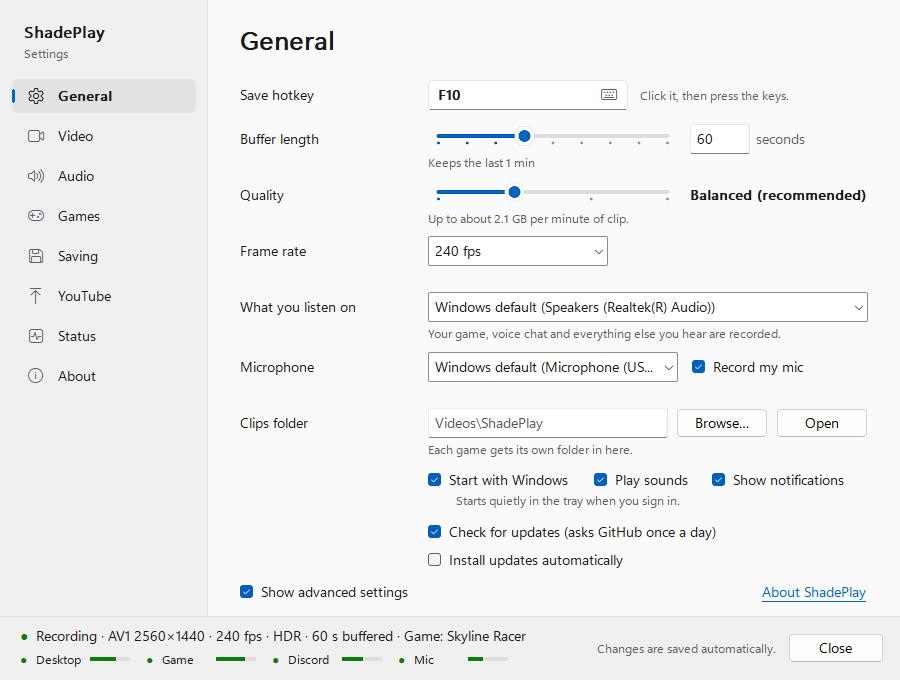
Tick Show advanced settings at the bottom of the settings page. It is saved at once, like every setting, and you can untick it any time. The advanced settings keep working while they are hidden: switching back to the simple view changes nothing about how ShadePlay records.
- A page list on the left: General, Video, Audio, Games, Saving, YouTube, Status and About. General is the simple page with a few additions; the others are described on the next pages.
-
On the General page:
- next to the Buffer length slider, a box for the exact length in seconds (5 to 600);
- Play sounds (the tick, the chime and the low tone) and Show notifications;
- Check for updates (asks GitHub once a day), on by default, and Install updates automatically, off by default and greyed while the check is off (Updates).
-
A status strip at the bottom instead of the plain status at the top: a coloured dot, a line such as
Recording · AV1 2560×1440 · 240 fps · HDR · 60 s buffered · Game: <game>, and small meters for the Desktop, Game, Discord and Mic sources. - Messages with details. Where the simple view says it in plain words, advanced mode gives the technical reason, for example the recorder's own error when a clip is not saved.
The tray menu gets its full form, top to bottom:
-
Status lines (grey, for reading only):
- the status, for example
Recording · AV1 1440p240 HDR · NVIDIA NVENC · 60 s buffered; - the sources, for example
Desktop ✓ Game ✓ Discord – Mic ✓: ✓ recording, – nothing to record (no game, Discord not running, no microphone), ✗ failing,offswitched off; - the detected game, for example
Game: <game>, and the last clip, for exampleLast clip: 21:07 <game>; - a YouTube copy's progress while one is being made.
- the status, for example
-
Warnings, starting with ⚠, including technical ones the simple menu leaves out, such as
Capture is falling behind (frames skipped),HDR metadata missing from clips,Screen capture unavailable (retrying)andGame plays on two devices (Mix may double it). - Save last 60 s now (with your hotkey), Settings…, Open clips folder, and the YouTube items while the YouTube helper is on.
- Quality: Lite, Default, High, Insane, then fixed bitrates Bitrate 50 Mb/s, 100, 150, 200 and 300 Mb/s.
-
Codec: AV1 (
AV1 (not supported by this GPU)and greyed when the card has none), HEVC, H.264 (SDR only). - Frame rate: 60, 120, 144, 240 and 360 fps.
- Buffer length: 15 s, 30 s, 60 s, 90 s, 2 min, 3 min and 5 min.
- HDR: Auto (follow Windows HDR) or Always SDR.
- Audio: switches for the Mix track, Discord and Microphone; Codec (AAC, Opus, FLAC (lossless)); Desktop device (the device you listen on; devices on the never-record list are greyed); Microphone device.
- Show cursor (records the mouse pointer).
- Sounds and notifications: Sounds and Notifications.
- Start with Windows, ticked only when it really works.
-
Open settings file (
config.jsonin your text editor) and Open logs folder. - Send feedback / report a bug and Exit, as in the simple menu.
A value set elsewhere that isn't in a submenu shows as ticked and greyed, for example 75 s (custom). When a newer
version is available, Update to X.Y.Z and What's new come first, as in the simple menu.
- The tray tooltip shows the technical status, for example
ShadePlay: AV1 1440p240 HDR, 60 s, 1.2 GB(codec, resolution and frame rate, seconds buffered, memory used), plus the detected game. - Warning notifications use their technical wording, for example Hotkey intercepted instead of Your hotkey didn't reach ShadePlay.
| Page | What it has |
|---|---|
| Video | codec, frame rate, quality or fixed bitrate, HDR, monitor, GPU priority, 10-bit SDR, mouse cursor, encoder preset, keyframe interval, spatial AQ |
| Audio | each track's switch, volume, timing and bitrate; the Desktop device, microphone, audio format, latency correction, never-record list and Discord programs |
| Games | the game the Game track follows right now, and your own clip names |
| Saving | fast start, the clip info file, and a command to run after each save |
| YouTube | the optional YouTube helper |
| Status | the recorder's details and live sound meters |
| About | as in the simple view (The settings window) |
A few settings exist only in the settings file: Settings file, logs and command line.
Next: Video settings
See also: The settings window · The tray menu and notifications · Settings file, logs and command line