Repository navigation
Settings Experience
Path · Settings → Experience
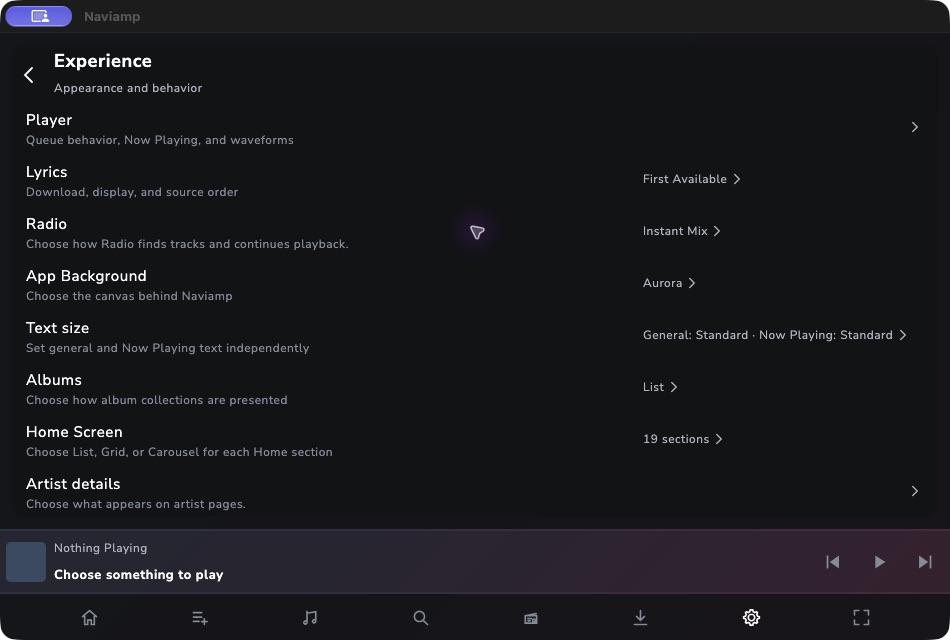
| Setting | What it changes |
|---|---|
| Previous Click | Restart first lets Previous restart the current song before going back. Always previous goes directly to the prior song. |
| Up Next Selection | Move selected plays the selected song now and preserves earlier upcoming songs. Skip to selected advances through the queue and moves the skipped items into Back To. |
| Remove played tracks from Back To | Keeps fewer completed tracks in the current queue history. |
| Waveforms | Enable visual waveform generation and choose Waveform Detail, which sets how finely the waveform is drawn. |
| Album year | Choose the original release year when known or the year of the current edition. |
| Setting | What it changes |
|---|---|
| Fill Now Playing artwork area | Crop the cover to fill the player with a darker fade behind its controls. |
| Show album year | Show or hide the year using the edition choice above. |
| Show track cover | Use track-specific artwork where supplied, with album artwork as the fallback. |
| Show bitrate and audio information | Put available audio properties in the player. |
| Show playback source | Identify the collection that started the current queue. |
| Show volume bar | Show the in-app volume control where supported. |
| Split-view background opacity | Change the background opacity of the split player. |
| Scroll track titles, Scroll artist names, Scroll album names | Choose which long text fields scroll independently. |
| Setting | What it changes |
|---|---|
| Download Timing | First Available, Plain, Line-Synced, or Word-Synced determines what timing detail Naviamp searches for and saves. Results depend on what sources provide. |
| Display Timing | Match the download preference or display plain, line-synced, or word-synced lyrics from available data. |
| Search Order | Reorder sources such as server lyrics, embedded tags, and enabled online sources. |
| Online lyrics | Allows lookups from enabled online lyrics services such as LRCLIB where available. |
For example, prefer Word-Synced in Download Timing while using Line-Synced for simpler display.
| Setting | What it changes |
|---|---|
| Radio method | Choose Instant Mix or, when supported, Sonic Similarity. |
| Radio batch size | Sets the requested track count for generated radio. |
| Radio Autoplay | Uses the radio method to continue listening after the queue finishes. |
| Autoplay batch size | Sets how many tracks Naviamp asks for when extending playback. Fewer tracks can be returned. |
| Similarity test | Checks available similarity support when you’re diagnosing a server or sparse results. |
| Setting | What it changes |
|---|---|
| App Background | Choose a background treatment such as Aurora, blurred album artwork, or a single color. Available controls include Aurora tone, color steps and angle, blur radius, and custom color. |
| Text size | Set general app text separately from the Now Playing, mini-player, queue, and lyrics text. |
| Albums | Choose a list or grid for album collections and the album sort order. Group releases by type where supported. The library’s Albums tab can use its own sort. |
| Square album artwork | Use right-angle corners on album and track covers. Artist portraits remain circular. |
| Show album information | Show available provider notes and artwork on album pages. |
| Artist details | Toggle biographies and artwork, top tracks, and playlists you created containing that artist. Set Maximum Top Tracks, Playlist layout, and Appears on album layout. |
| Home Screen | Reorder sections, change visibility, and set eligible Home layouts to list, grid, or carousel. Separate collection pages can offer list or grid. Home sections and example layouts |
| Swipe Actions | Choose left and right actions separately for Library, Queue, Related, Playlist editing, and Downloads where supported. For example, configure one Library swipe to queue a track and leave the other disabled. |
| Keyboard Shortcuts | View and configure available global desktop shortcuts. A shortcut can be unavailable when another app or the OS reserves it. |
| Show hover tooltips | Show the names of icon-only controls when hovering on desktop. |
- Start playing on launch resumes playback after the previous queue and position are restored.
- Keep screen awake requests that supported devices keep the display active while using Naviamp.
- Updates controls update checking and the release channel where supported by the installed distribution.