Audit Log
The audit log records significant actions taken on your TREK instance. Use it to monitor logins, admin changes, and integration configuration.
Admin Panel → Audit tab.
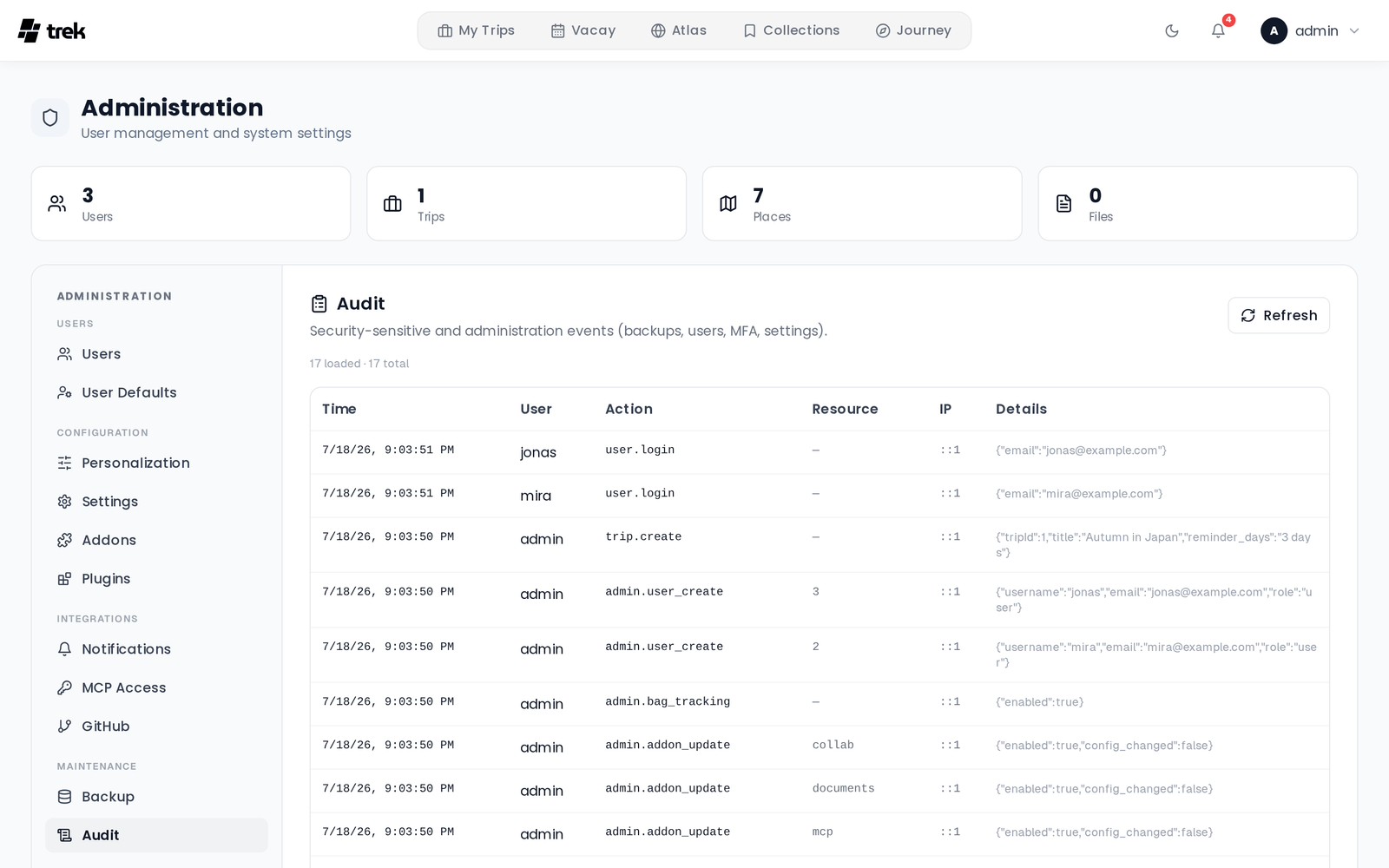
Actions are grouped by area below. The Action key is the raw value stored in the log.
| Action key | Description |
|---|---|
user.register |
User registered |
user.login |
User logged in |
user.login_failed |
Login attempt failed |
user.password_change |
User changed their password |
user.account_delete |
User deleted their account |
| Action key | Description |
|---|---|
user.mfa_enable |
MFA enabled on an account |
user.mfa_disable |
MFA disabled on an account |
| Action key | Description |
|---|---|
trip.create |
Trip created (includes title) |
trip.update |
Trip updated (includes changed fields) |
trip.copy |
Trip duplicated (includes source and new trip IDs) |
trip.delete |
Trip deleted (includes trip ID and title) |
| Action key | Description |
|---|---|
admin.user_create |
User created by admin |
admin.user_update |
User edited by admin (role, email, username, etc.) |
admin.user_delete |
User deleted by admin |
admin.invite_create |
Invite link created |
admin.invite_delete |
Invite link deleted |
admin.permissions_update |
Instance permissions updated |
admin.oidc_update |
OIDC/SSO settings updated |
admin.addon_update |
Addon enabled, disabled, or configured |
admin.oauth_session.revoke |
OAuth session revoked by admin |
admin.rotate_jwt_secret |
JWT secret rotated |
admin.bag_tracking |
Bag tracking feature toggled |
admin.places_photos |
Places photos feature toggled |
admin.places_autocomplete |
Places autocomplete feature toggled |
admin.places_details |
Places details feature toggled |
admin.collab_features |
Collaboration features updated |
admin.packing_template_delete |
Packing template deleted |
admin.default_user_settings_update |
Default user settings updated |
admin.demo_baseline_save |
Demo baseline snapshot saved |
settings.app_update |
App settings updated (SMTP, webhooks, MFA policy, etc.) |
| Action key | Description |
|---|---|
backup.create |
Manual backup created |
backup.restore |
Restore from stored backup |
backup.upload_restore |
Restore from uploaded ZIP |
backup.delete |
Backup deleted |
backup.auto_settings |
Auto-backup schedule saved |
| Action key | Description |
|---|---|
mcp.tool_call |
MCP tool invoked (resource = tool name) |
| Action key | Description |
|---|---|
oauth.client.create |
OAuth client application created |
oauth.client.rotate_secret |
OAuth client secret rotated |
oauth.client.delete |
OAuth client application deleted |
oauth.consent.grant |
User granted OAuth consent |
oauth.token.issue |
OAuth access token issued |
oauth.token.refresh |
OAuth access token refreshed |
oauth.token.revoke |
OAuth token revoked |
oauth.token.grant_failed |
OAuth token grant attempt failed |
oauth.token.client_auth_failed |
OAuth client authentication failed |
| Action key | Description |
|---|---|
immich.private_ip_configured |
Immich URL saved that resolves to a private IP |
| Column | Description |
|---|---|
| Time | Timestamp of the action |
| User | Username and email of the acting user (or anonymous for unauthenticated events) |
| Action | Action key (see tables above) |
| Resource | Affected resource (filename, trip ID, tool name, etc.) where applicable |
| IP | Client IP address |
| Details | Additional context in JSON format |
The panel loads 100 entries at a time by default. Click Load more at the bottom to fetch the next page. The total count is shown above the table.
The client IP is read from the X-Forwarded-For header. When TREK is behind a reverse proxy, set TRUST_PROXY=1 (the number of proxy hops) so the header is trusted and the real client IP is recorded. Without this setting, the proxy's own IP is logged instead. See Environment-Variables.
In addition to the database, audit events are written to a plain-text log file:
-
Path:
./data/logs/trek.log - Rotation: rotated when the file reaches 10 MB
-
Retention: the 4 most recent rotated files are kept (
trek.log.1throughtrek.log.4)
Audit entries in the database are never automatically deleted. They accumulate and are paginated in the UI.
Separate from the instance audit log above, TREK keeps a dedicated hash-chained capability audit for installed plugins. Every host-mediated action a plugin takes — core-data reads, WebSocket broadcasts, notifications, AI calls, cross-plugin calls — is recorded at the point the plugin cannot reach, together with the acting user (bound by the host, never supplied by the plugin), the resource touched, and the outcome.
Each plugin's entries form a per-plugin hash chain (hash = sha256(previous_hash + row)), so the log is tamper-evident: any altered or removed entry breaks the chain. Older rows are pruned per plugin once the row cap is reached (default 20,000 rows/plugin, tunable via TREK_PLUGIN_AUDIT_MAX_ROWS; 0 disables pruning). Pruning keeps the retained window verifiable.
Two views read this log:
| View | Who | Where | Shows |
|---|---|---|---|
| Per-plugin audit | Admins | Admin plugin management (GET /api/admin/plugins/:id/audit) |
Every action one plugin took, across all users |
| My plugin activity | Any user | Settings → Plugins (GET /api/plugin-activity) |
Every action any plugin took in that user's name |
The user-facing view is what makes broad read grants accountable to the person whose data a plugin reads, without needing admin access.