Repository navigation
Access cards and permissions
Give someone an Access Card if you want them to walk through a field. Invite them under Field management if you want them to edit it. You can grant either permission on its own.
- Craft a blank Access Card and hold it in either hand. Open a field you own. Card recipe
- Open Access → Access cards and turn on Allow card holders through.
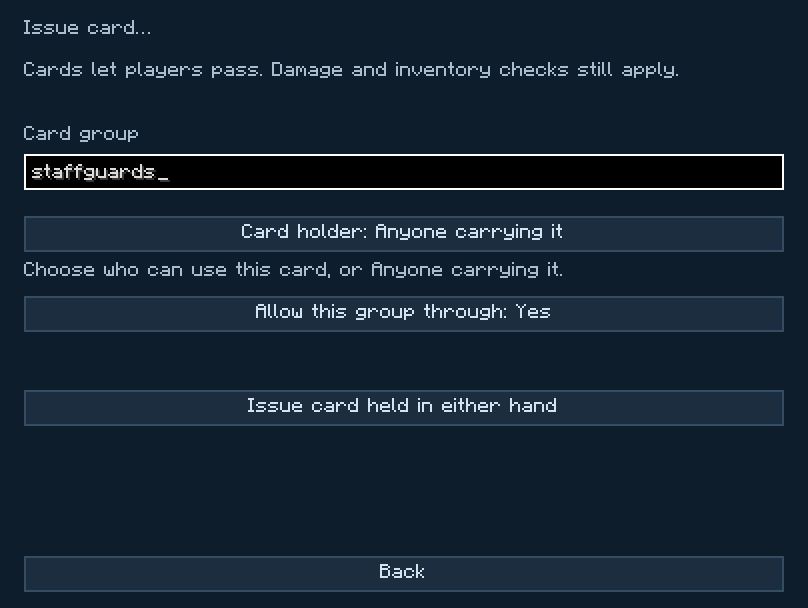
- Choose Issue card. Enter a group name, for example
builders. Choose Anyone carrying it for a card you can lend, or select the player's name for a card only they can use. - Set Allow this group through to Yes. Press Issue card held in either hand. The group should appear under Allowed card groups when you go back.
- Hand the card to your friend. Test with Players checked under Blocking. Have them approach once without the card, then again carrying it. They should only get through on the second attempt.
A card from another issuer with the same group name won't open your field. A player or card group explicitly listed under Always block can still be stopped. Cards grant passage through blocking. The field can still detect the player, deal damage or run an inventory checkpoint.
The holder carries 16 cards. Pick up a card with your cursor and right-click the holder in your inventory to put it inside. Right-click it with an empty cursor to take one out. Cards work from the holder while you carry it. Holder recipe
To close one field to the group, remove the group from that field's Allowed card groups. To cancel every card you issued for that group in this world, choose Revoke cards, enter the group and confirm. You can issue fresh cards afterward.
Open Access → Field management, enter the player's Minecraft account name or UUID, and add them as a manager. A manager can change filters and other field settings. Only the owner and server operators can change who manages the network. Public management lets any player configure it.
Save the field and its cards with the structure in 1.4.0. The field carries the issue records for its configured groups. Player-bound cards remain tied to the same Minecraft player. If the structure was saved before 1.4.0, export it again from the original world or issue new cards at the destination. Pasting an older copy cannot undo a revocation in the destination world.