Repository navigation
Inventory checkpoints
Use a checkpoint to inspect what players carry. For example, you can stop a player carrying TNT while letting the next player through. A filter under Blocking → Drops only sees loose items in the world.
- Open a powered field. Under Blocking, allow the players you want to inspect to reach and cross the field.
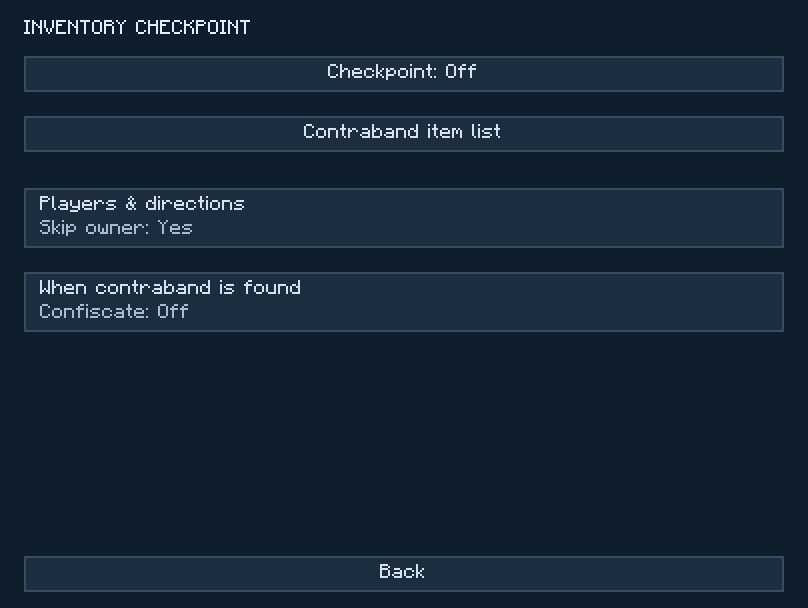
- Open Access → Inventory checkpoint and turn Checkpoint on.
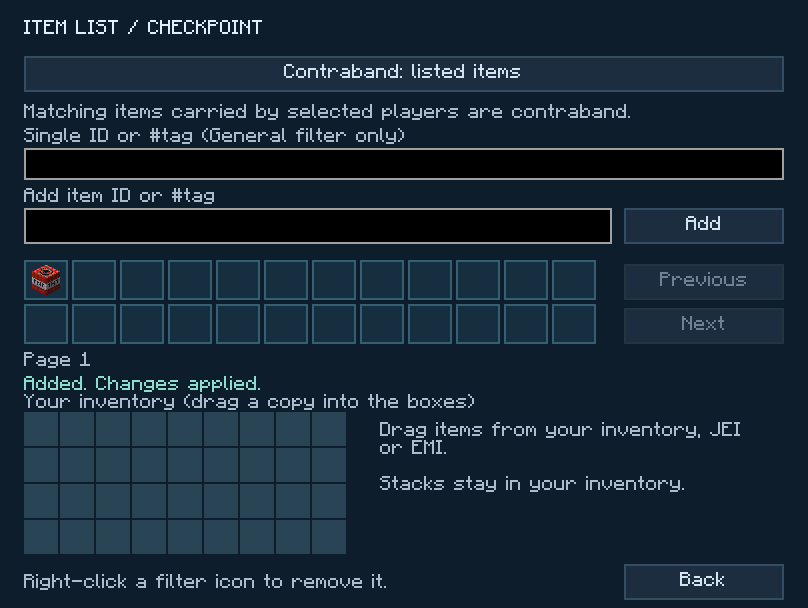
- Open Contraband item list and choose Contraband: listed items. Type
minecraft:tntinto Add item ID or #tag and press Add, or drag TNT into a filter slot. One TNT icon in the list matches any stack size. - Go back. Open Players & directions. Leave the shared rule in place for both directions. Set Skip owner to No if you're testing it yourself.
- Open When contraband is found. Turn Deny passage while carrying contraband to Yes. Leave Confiscate off to let the player keep the TNT.
- Try crossing once with TNT in your inventory and once after putting it away. Only the first attempt should be stopped.
- For a two-post wall, open Connections on each post. Place a chest against the base of the post that lists the other end under Field to.
- Under When contraband is found, set Confiscate to Send to adjacent storage. Set Storage side to the face touching the chest.
- Choose Stop player until space is available if you want untransferred items to stay in the player's inventory when the chest is full. Choose Drop on entry side for leftovers to land on the side the player came from.
- Carry one listed item through and look in the chest. Repeat with a full chest to check the overflow behavior you chose.
For an alarm, enable Redstone alert and set Sensor → Detection to Pulse on crossing. Wire a lamp to the configured output face. Clear the ordinary sensor categories and exception lists if you want the lamp to signal only a contraband match. Wire a sensor
The checkpoint scans the player's regular inventory, armor and offhand. Items inside a shulker box or another carried container are outside that scan.