Repository navigation
Contact damage
Contact damage starts off. You can make a field hurt a zombie while still allowing players, animals and items to cross safely. The Damage page has its own categories, exceptions and travel directions.
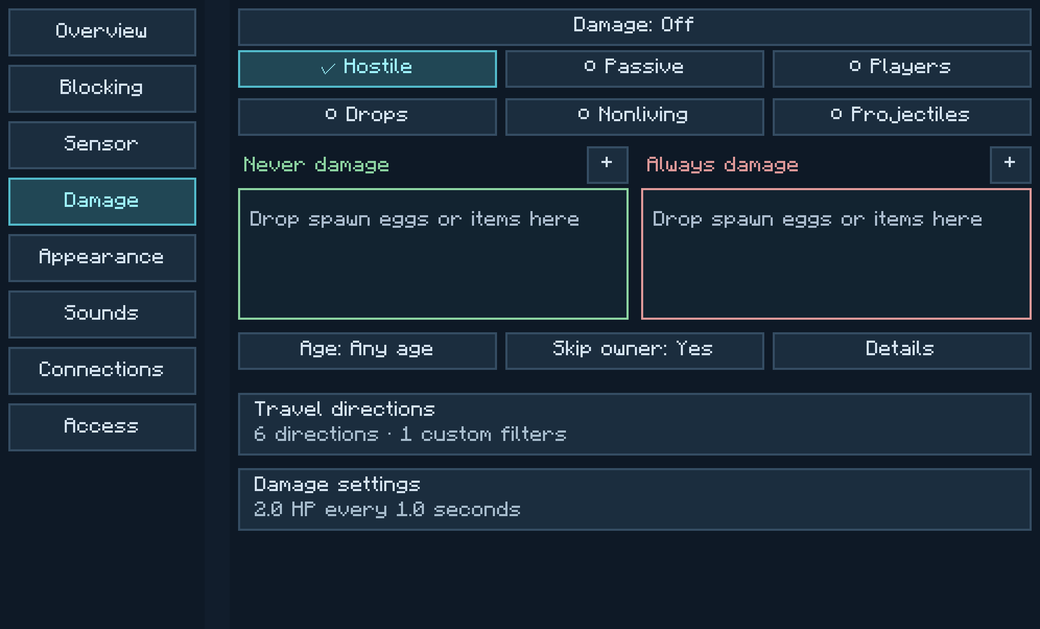
- Open a powered emitter and select Damage. Turn Damage on.
- Check Hostile and clear the other categories. Leave Skip owner set to Yes if you want to exempt yourself.
- Open Damage settings. Set Damage per hit to 2 HP and Hit interval to 1 second. Two HP is one heart before armor and other effects.
- Bring a hostile mob into contact with the field. While it stays in contact, it can take one hit per interval. To keep one kind of hostile mob safe, add its type to Never damage.
To make the wall physically stop the same mobs, check Hostile under Blocking as well. A passage card can get a player through a wall that still hurts them. Add the player or their card group to Never damage if they should cross safely.
Fizzle particles under Damage settings changes the visible effect of a hit. The Sounds tab has a separate Damage sounds switch. Appearance and sounds