Repository navigation
Using the Field Tuner
Right-click a post, rail or tower to open its controls. An empty hand works at the block. Carry a Field Tuner to reach a field from elsewhere in the same dimension or to pick a particular mob for a rule. Tuner recipe
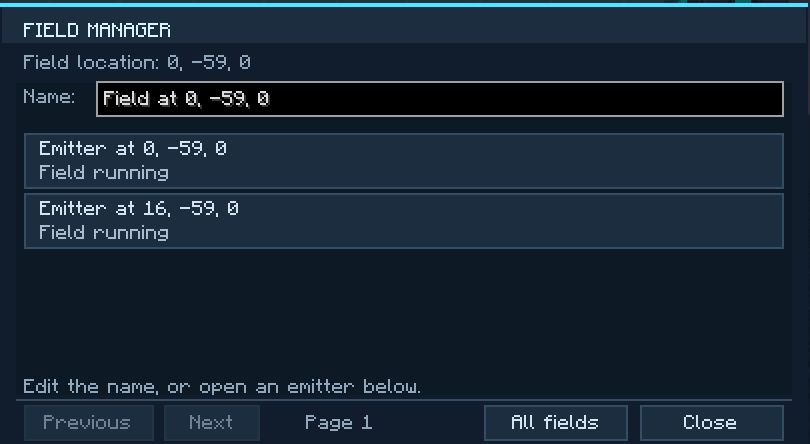
- Hold the tuner and right-click the air to open the Field Manager.
- Choose the network by name or coordinates. You can give it a name here, such as
North gate. - Select one of its emitters to open the controls. Fields that are off still appear. To appear in the list, a network must be loaded in your current dimension and you must have permission to manage it.
You can also assign Open Field Tuner under Minecraft's Options → Controls → Key Binds. With the tuner in your inventory, the key opens the emitter you are looking at or the Field Manager when you look away.
| Tuner tab | What you can change |
|---|---|
| Overview | Switch the network on, check its energy, or make it wait for a lever. Power |
| Blocking | Choose who can cross and from which direction. Filters |
| Sensor | Send a redstone signal or count crossings. Wire a lamp |
| Damage | Choose what gets hurt on contact and how often. Contact damage |
| Appearance | Change field colors, pattern, formation, light or visibility. Appearance |
| Sounds | Choose a sound set or switch off one kind of sound. Sounds |
| Connections | Select one link, turn a rail into a bridge, or change a tower's shape and radius. Bridges · Towers |
| Access | Give out cards, invite managers or inspect inventories. Cards · Checkpoints |
Sneak-right-click a mob to store its type and identity. Then open a filter, press + and choose Add sampled type or Add sampled individual. Sneak-right-clicking the air samples yourself. Sneak-right-clicking an emitter cycles its field color.
For an animated walkthrough, click Guide in the tuner. Choose a lesson and drag the timeline to the step you want. Space pauses, R replays the lesson and Done returns you to the controls.