Repository navigation
Blocking filters
Open Blocking on a post, rail or tower. A checked category tells the field what to stop. Always allow and Always block are exceptions. You can use several categories and both lists together.
- Under Blocking, check Hostile and Drops. Leave the other categories unchecked.
- Press + beside Always allow. Choose Mob, enter
minecraft:creeperand press Add. - Press + on the same list again. Choose Item, enter
minecraft:diamondand press Add. You can also drag a creeper spawn egg or a diamond straight onto the list from JEI or EMI. - Leave Age at Any age and all Travel directions checked.
- Drop a diamond toward the field, then try a piece of cobblestone. The diamond crosses and the cobblestone stops. A zombie is stopped, a creeper can pass, and carrying a diamond in your inventory has no effect on your own passage.
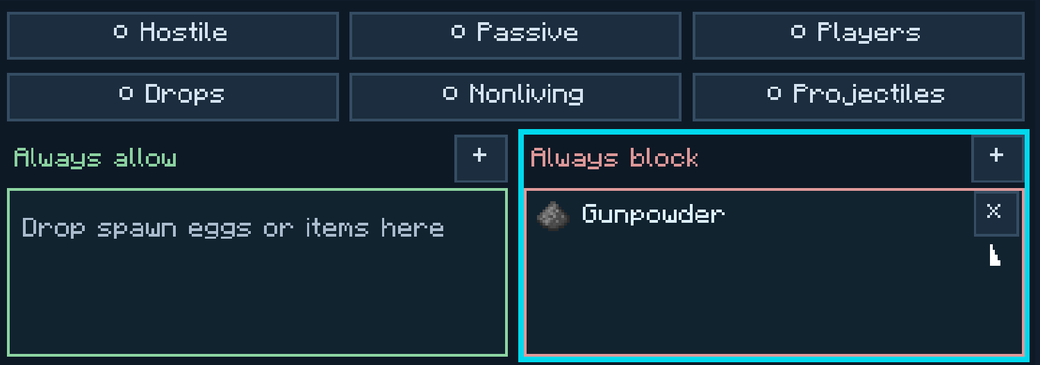
To do the reverse, clear the category buttons and add the targets you want to stop under Always block. The example below stops dropped gunpowder. It leaves every other loose item alone.
- Hold the Field Tuner and sneak-right-click the animal or player. To sample yourself, sneak-right-click the air.
- Open the field, press + on the list you want, and check the stored sample.
- Choose Add sampled individual for that one cow, for example, or Add sampled type for every cow. The individual follows the same animal even if you change its name.

| Button | Examples |
|---|---|
| Hostile | Zombies, skeletons, creepers |
| Passive | Cows, villagers and other living mobs outside Minecraft's monster category |
| Players | Player characters |
| Drops | Loose item stacks in the world |
| Projectiles | Arrows, tridents, snowballs and ender pearls in flight |
| Nonliving | Boats, minecarts, experience orbs and primed TNT |
Use an item ID for a dropped item and an entity ID for something in flight. For example, Drops can catch an ender pearl lying on the ground. Projectiles can catch a thrown one. To check a pearl in a player's pocket, use an inventory checkpoint.
Age and Details narrow the checked categories. They leave explicit list entries in effect. Each list holds 64 entries and accepts registry tags such as #minecraft:logs. Press × to remove an entry. If different entries match the same entity on both sides, Always allow wins. Skip owner: Yes lets the player who placed the field through.
If an older world shows Mob list or Item list instead, it has a saved rule from the earlier editor. For that screen, a blocking whitelist allows the listed entries and a blocking blacklist stops the listed entries. You can keep using that rule.