Repository navigation
Tournament Championship
A Championship tournament follows a bracket-style structure. Teams are distributed into pools in the first phase, and winners progress through subsequent phases until the final.
In the first phase:
- With 2 teams in a pool, a direct match is created.
- With more than 2 teams, the pool behaves as a small league.
The following example shows a two-phase championship flow.
| Phase | Group | Pairing | Result | Advances |
|---|---|---|---|---|
| 1 | A | Team 1 vs Team 2 | Team 1 wins | Team 1 |
| 1 | B | Team 3 vs Team 4 | Team 3 wins | Team 3 |
| 1 | C | Team 5 vs Team 6 | Team 6 wins | Team 6 |
| 1 | D | Team 7 vs Team 8 | Team 8 wins | Team 8 |
| 2 | A | Team 1 vs Team 3 | Team 1 wins | Team 1 |
| 2 | B | Team 6 vs Team 8 | Team 8 wins | Team 8 |
| 3 | Final | Team 1 vs Team 8 | Team 8 wins | Champion: Team 8 |
Various options are available to further tailor the championship tournament.
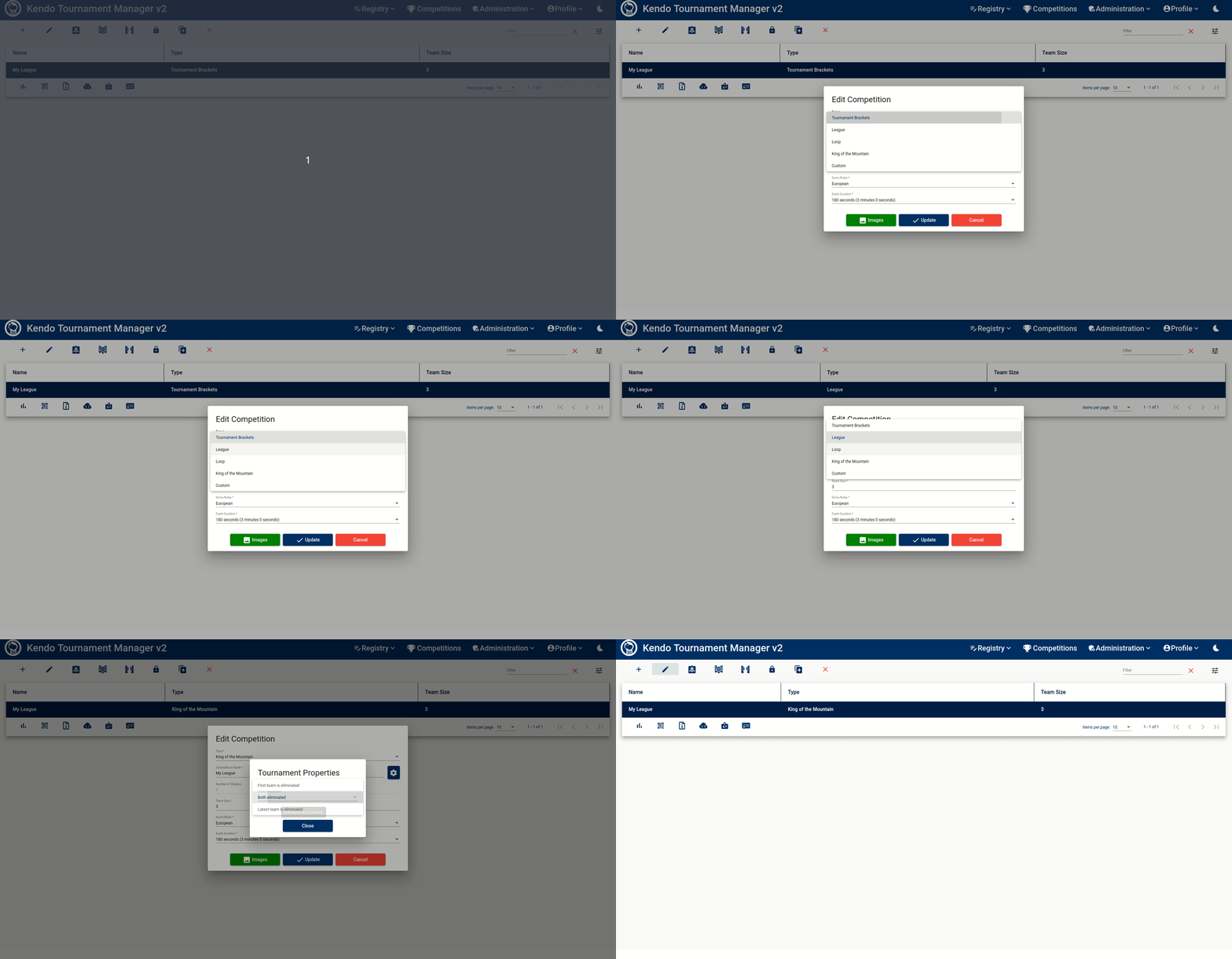
These options become accessible after saving the tournament initially. Therefore, one must create and subsequently edit the tournament to apply these changes.
One such option is to Generate the maximum number of matches.
When selected, it will produce a comprehensive league where every team competes against each other.
Conversely, if not chosen, each team will only face its immediate predecessor and successor (resulting in two matches
per team).
Another customization choice called Fist team will be the first out when generating the next match
involves determining which team initiates the match sequence.
In a three-team league scenario, if this option is disregarded, matches will follow this pattern: Team 1 vs. Team 2,
Team 3 vs. Team 2, Team 3 vs. Team 1—leaving Team 2 on standby after the first bout.
However, when selected, Team 1 will persist on the shiaijo and matchups will unfold as follows: Team 1 vs. Team 2, Team
1 vs. Team 3, Team 2 vs. Team 3.
Starting from version 2.15, a new feature has been introduced named Resolve team byes as soon as possible.
This option alters the algorithm responsible for creating the tournament's tree structure,
particularly in how it defines pools of matches.
Prior to this update, if the user-defined initial number of pools was not a power of two, some pools with only one team would be included in the tree. In sports, this is called byes. Bye refers to a team automatically advancing to the next round of tournament play without competing. These lone teams could potentially end up in advanced stages of the tournament, even reaching the semifinals unexpectedly. This scenario might not always be desirable as it could lead to a team securing a medal without having to play a crucial match.
By enabling this option, all pools without matches (byes) are guaranteed to be placed in the second phase of the tournament, away from its final stages. However, this adjustment may result in more pools being formed with just one team each, subsequently eliminating any possibility of a match taking place and increasing the number of byes.
To illustrate, let's consider a tournament with an initial setup of five pools. Below is an example showcasing how the tree structure appears when the aforementioned option is not selected.
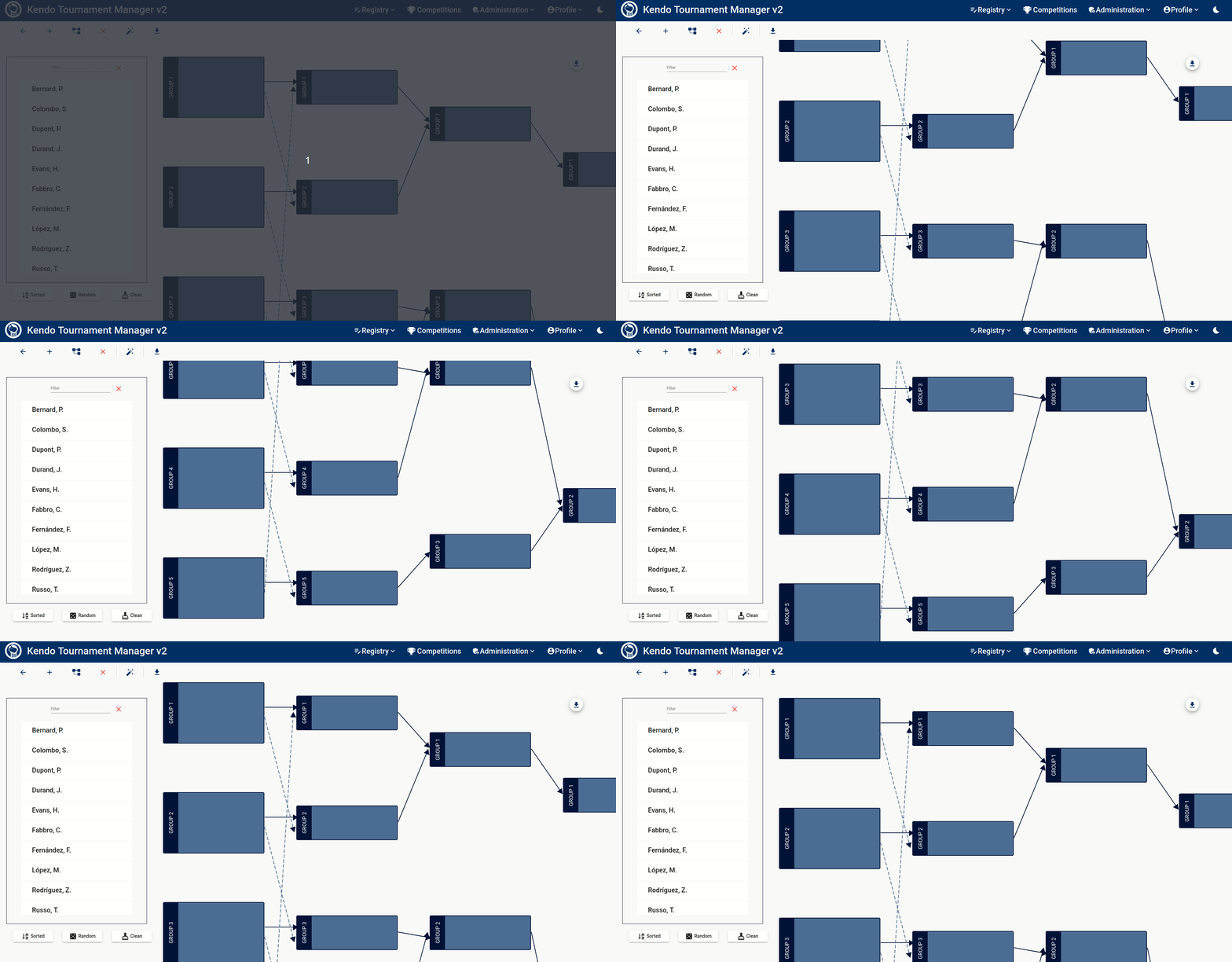
In this scenario, only five pools are formed in the second phase.
However, in the third phase, Pool 3 consists of just one team, making it impossible to hold a match, and the team that
reaches this pool will become a bye.
Consequently, this team automatically advances to the semifinals and wins a medal, which may not be an ideal outcome
compared to the alternative.

Now, if the option is selected, phase two comprises eight pools. Among these, only pools four and five have two teams each and thus will participate in matches. The remaining teams in the other pools are byes and will progress automatically to phase 3. Despite this structure, there are two notable benefits:
- No team advances directly to the later stages of the tournament, preventing a team from potentially winning a medal without facing crucial matches.
- Groups 4 and 5 are the exclusive ones with matches scheduled; however, they are assigned - whenever possible - teams that did not secure first place in their previous pool. This method only imposes penalties on teams that did not come out as the primary victors at the beginning.
It is essential to note that changing the setting to Resolve team byes as soon as possible after some
pools have already been created will result in those pools being deleted.
Tip: If you decide to create a specific number of pools in the initial phase that is not a power of two, it's crucial to understand that there won't be an ideal solution available. The decision to choose any of the generation options mentioned earlier is up to you. If none of these options meet your needs, you might want to consider forming fewer pools with more teams and ensuring that the total number of pools in the first phase is a power of two.
Warning: The system is tested until 16 pools. Avoid using a number of pools higher than 16.
In certain championships, it is preferable to advance two winners from the first pool. This option can be selected when creating the matches from the tournament.
If you prefer not to use the default groups, version 3.2.0 offers an option to customize your preferred groups and
bracket lines (arrows) distribution.
To do this, you need to provide a CSV file containing your desired configuration.
For example:
#source; winner; destination;
0;0;0;
0;1;0;
1;0;0;
1;1;1;
2;0;1;
2;1;1;
The first column should indicate the source pool of the bracket line, the second column specifies the winner order (either 1st or 2nd participant in the ranking), and the third column defines the destination pool. Note that bracket lines can only be defined at the first level; those for subsequent levels will be calculated automatically.
Tip: The number of total pools will be determined based on your input. In the previous example, three pools will be available on the first phase and two pools will be available on the second phase.
Using this setup, the next championship will be structured accordingly:

When matches are generated and completed, the system will update the pools based on results, concluding the championship as usual.

In this example, only one match per pool occurs in the first phase, due to the limited number of teams assigned to each pool. However, according to the defined matchups, each pool will have three matches in the second phase because three teams are present.

This simple example demonstrates how flexible this feature is. We encourage you to experiment with it and create any combination that meets your requirements.
 Created by: softwaremagico