wiring st25r3916b i2c
The same module changes pin functions after hardware mode selection.
Applies to: Same V0.3 Draft module as the SPI guide. Change the I2C solder bridge only with power removed.
Using the seven-pin module in the documented I2C configuration.
SDA is on contact 5, not contact 4.
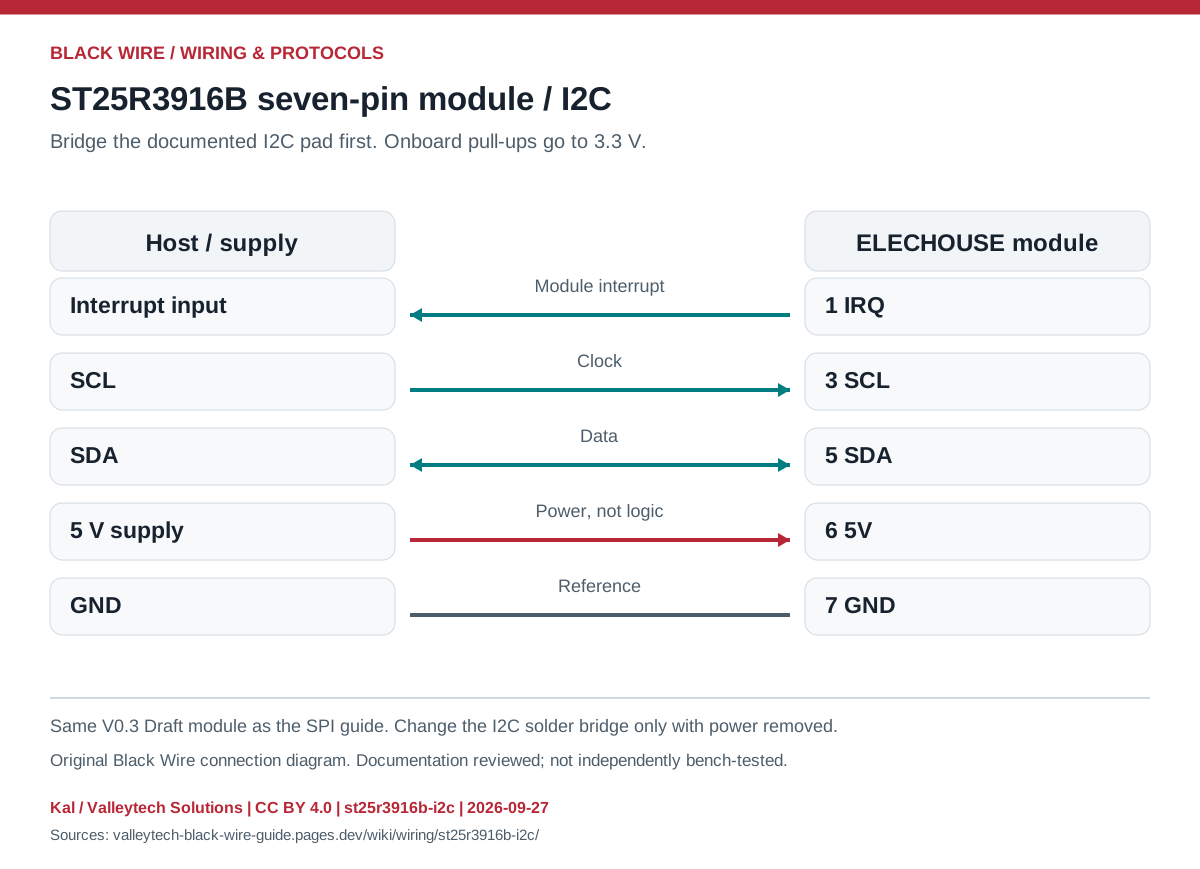
| Contact | I2C role | Connection |
|---|---|---|
| 1 | IRQ | Host interrupt input |
| 2 | Unused in standard I2C wiring | Leave unconnected |
| 3 | SCL | Host SCL |
| 4 | Unused in standard I2C wiring | Leave unconnected |
| 5 | SDA | Host SDA |
| 6 | 5V | Module supply |
| 7 | GND | Ground |
- Verify the mode bridge and use an I2C-capable host library.
- Account for onboard pull-ups before adding external ones.
- This assignment is not valid for every ST25R module.
- ST25R3916B NFC Module — original images and datasheets
Source documents inspected; independent electrical and bench review pending. Reviewed 2026-09-27.
- ELECHOUSE ST25R3916B module, V0.3 Draft — Page 4: seven-pin connector, power and SPI/I2C mode selection; checked 2026-09-27
- NXP: I2C specification, UM10204 — SDA/SCL, open-drain bus, addressing and pull-up sizing; checked 2026-09-27
Original writing and diagram by Kal / Valleytech Solutions, CC BY 4.0. Manufacturer artwork and documentation retain their own rights.
CC BY 4.0 · SHA-256: 28495c623b1e4850733ee5ffc07112e457cb2e474892af81186fe861b17c06c9