Repository navigation
Archive
Archive opens C64 and C128 GEOS disk images (.D64, .D71,
.D81) on the SD card. It lists their files and copies them out to
the card, so you can use old GEOS documents on Veranda.
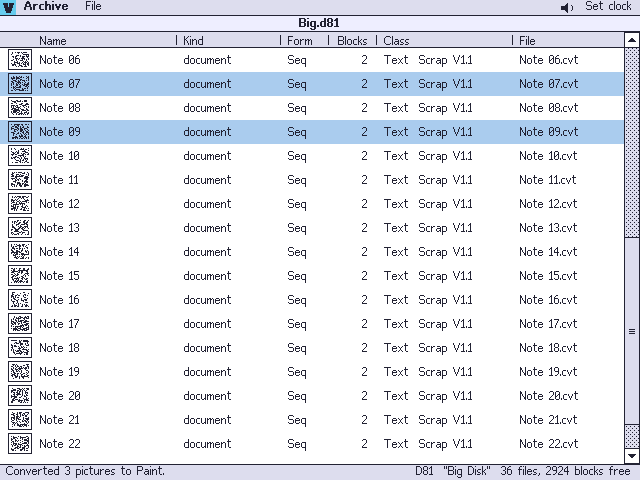
- Double-click a
.D64,.D71or.D81file. - Or double-click Archive in
/VERANDA/APPSand choose File > Open....
- Lists the disk's files in a window titled with the image's name: each file's icon, name, kind, form (VLIR or sequential), size in blocks, class and the name it gets on the card. Plain CBM files are listed too. The status bar shows the disk's name, its number of files and its free blocks.
-
Extract: copies the selected files into the folder where the disk
image is.
- A GEOS file becomes a
.cvtfile (its GEOS name kept inside). - A plain PRG, SEQ or USR file is copied as it is.
- A GEOS file becomes a
- To Paint: turns geoPaint documents, Photo Scraps and photo albums into Paint pictures.
Click a file to select it (click again to unselect); selected files are highlighted. File > Select all selects every file. The scroll bar at the right moves the list: its arrows a file at a time, its track a page.
| Menu | Items |
|---|---|
| Archive | About Archive, Quit (Ctrl+Q) |
| File | Open... (Ctrl+O), Select all (Ctrl+A), Extract (Ctrl+E), To Paint |
| Key | Action |
|---|---|
| Up, Down | the list a file up or down |
| PgUp, PgDn | the list's previous or next page |
| Ctrl+O, Ctrl+A, Ctrl+E, Ctrl+Q | Open..., Select all, Extract, Quit |
- Archive only reads disk images. It never writes to them.
- Veranda does not run C64 GEOS programs. Extracted documents can be opened by Veranda programs that know them (Paint pictures, text).
- On a PC,
tools/vdisk.pyin the source does the same.