Repository navigation
Troubleshooting
What the programs say, and what to check:
| Message | What to check |
|---|---|
| "There is no serial card" (Term), "no network card" | The card is seated in its slot. Its DIP switches put it in one of the ten places from $9F60 to $9FF0 (the factory's is $9FE0). In Term: Settings, P looks for it. |
| "The modem does not answer" | The ESP32 runs Zimodem. Turn the X16 off and on (Zimodem keeps its speed until it is powered off). Try About this X16 > Ask the modem. |
| "Could not connect (refused, or no such host)" | The host's name and port. The Wi-Fi: in Term type ATI2 to see the modem's IP address. For Gemini, Claude, Ask and Update from GitHub: your Zimodem must know ATCS (see Network setup). |
| "No answer in 15 seconds", a server that stops sending for 30 seconds | The network or the server is slow or down. Try again later. |
| "Is claude_bridge.py running on the PC?" | Start the bridge on the PC. Check the PC's address and port 8642, and the PC's firewall. |
- The helper on the PC never hears from the X16: the PC's address and port 8643 are right in Settings; the PC's firewall lets port 8643 in; the X16 and the PC are on the same home network.
- The browser does not come back: port 1455 must be free on the PC.
- "Set the clock" in the status bar: set the date, time and time zone (see Date, time and time zone).
-
"The sign-in has ended: sign in again from your PC": the sign-in
was unused for 30 days, or you signed out elsewhere. Run
chatgpt_signin.pyagain. -
"The plan did not accept the sign-in (401). Kept.": run the
--checkand look atASK.LOG: see Veranda Ask. - "Your ChatGPT plan can't be used in this app": only Plus and Pro plans work. Use an OpenAI API key.
- The menu bar says "Set clock": the clock reads 1 January 2000 (never set). Click it and set it. See Date, time and time zone.
- The clock forgets the time when the X16 is off: the X16's clock battery may be empty.
- The time is one hour off after a change to or from summer time: Veranda does not change it by itself. Change the clock and the time zone by hand.
- "Cannot start it:" with a reason. Often the reason is memory (RAM banks). Veranda runs on 512 KB, but programs put aside with Alt+Tab keep their memory. Right-click them in the dock and choose Quit, then try again. About this X16 shows which programs hold how many banks.
-
"No application opens this file.": no program in the folder,
/VERANDA/APPS,/VERANDAor the top folder takes that extension. Use File > View to look at it. - "No memory to put it aside." / "Quit it, losing its work?" after Alt+Tab: there is not enough memory to keep the program. Answer No, save your work, and quit other programs that are aside.
-
A program is missing: check
/VERANDA/APPS. Some programs (SID Player, Lighthouse Pinball, Harbour Walls) are not in every package. - On a 2 MB machine, programs have more room for documents.
If a program stops with an error, Veranda shows a box:
- "The program name stopped."
- why: "It ran into a BRK at $xxxx", "It called Panic at $xxxx" or "Its stack was full at $xxxx", and the RAM bank.
Click OK. The desktop comes back with Veranda's kernel restored from its copy in RAM. The program's unsaved work is lost.
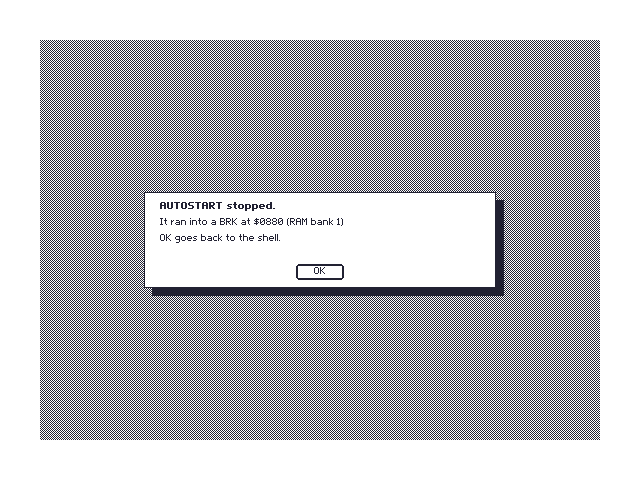
Photograph the box before you click OK: the name, the reason and the address help to find the bug.
| File | What is in it |
|---|---|
/VERANDA/.SYSTEM/ASK.LOG |
Veranda Ask's last renewal and last request (no tokens) |
/VERANDA/.SYSTEM/LAYOUT.LOG |
what Veranda Setup moved where |
/VERANDA/UPDATE.LST |
the build installed (its first lines) |
| About this X16 > Copy | the machine's facts on the clipboard |
In Veranda Update choose Undo last update. It
puts back the files the last update replaced, from
/VERANDA/.SYSTEM/OLD/<build>/, and removes the files it added. Only the
last update can be undone.
If Veranda does not start any more after an update: put the card in a
PC and copy the files from /VERANDA/.SYSTEM/OLD/<build>/ back to their
places (the file UNDO.LST in that folder lists where each one
belongs), or copy a whole package's VERANDA folder over the card's.
Please give:
- What you did, step by step, and what you expected.
- A photo of the screen when it goes wrong (the whole screen, sharp enough to read). For a crash: the crash box.
- About this X16: click Copy, paste into Veranda Edit or Note Pad, save, and send the text (or a photo of the About window). It has Veranda's build, the ROM, the memory and the card.
- For network problems: the program's message, and for Veranda Ask
ASK.LOG.
Report it on Veranda's public repository on GitHub.
Can Veranda run my C64 GEOS programs? No. Veranda uses GEOS's programming interface, so GEOS programs with source code can be ported, but it does not run C64 program files. Archive can copy documents out of C64 GEOS disk images.
Do I need 2 MB? No. Veranda runs on a stock 512 KB X16. 2 MB gives more room for documents and for programs put aside.
Where are my files? In /DOCUMENTS. Disk > Documents opens it.
The screen went dark. The screen blanker: it turns the video signal off, so the monitor may show "no signal" or go to sleep. Move the mouse or press a key. Preferences sets the delay.
How do I get back to BASIC? Options > BASIC (keep Veranda); come
back with SYS 35328. See BASIC and back.
Does Veranda print? To PDF files. See Files and folders.
Is it safe to type passwords? They are stored as plain text on the card, and the modem does not check certificates. See Network setup.