Repository navigation
VIDKIT Player
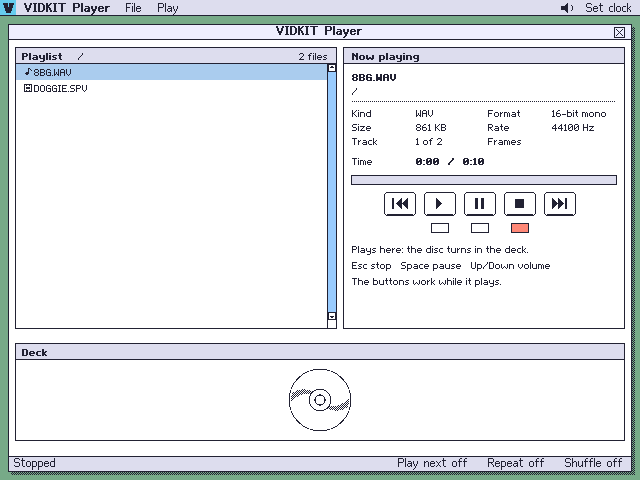
VIDKIT Player plays SPV videos full screen and WAV and ZCM audio in its window. It streams them from the SD card with VIDKIT, Anthony W. Henry's banked-RAM streaming library, which is packed inside the program. Its window follows MOD Player's. Version 1.0, by Anthony W. Henry, written in Prog8. MIT licence.
It needs the X16 ROM R48 or later. It is in /VERANDA/APPS as
VIDKIT Player.cvt.
- Double-click a
.SPV,.WAVor.ZCMfile: VIDKIT Player opens with that file's folder as the playlist. Choose the file there and press Return (or double-click it). - Or double-click VIDKIT Player in
/VERANDA/APPSand go to your files in its playlist.
-
The playlist: the folder's folders, then its SPV, WAV and ZCM
files,
..to go up. Double-click a file to play it, a folder to open it. The one playing is marked. - Now playing: the file chosen: its kind, format, size, rate, track (1 of 2 ...), frames, the time and its length, and its bookmark if it has one; a progress bar; the buttons previous, play, pause, stop, next, with their lights.
- The deck: an audio CD whose sheen turns while audio plays.
- The status bar: Stopped, Playing, Finished and so on on the left; Play next, Repeat and Shuffle on the right.
A video takes the whole screen: the window fades to black first, and fades back in when the video ends. Audio plays in the window; the buttons work with the mouse while it plays.
| Menu | Items |
|---|---|
| VIDKIT Player | About VIDKIT Player |
| File | Play all (the folder from its first file), Quit |
| Play | Play, Stop, Next, Previous, Repeat: off/on, Shuffle: off/on, Play next: off/on |
In the playlist:
| Key | Action |
|---|---|
| Up, Down | move the selection |
| PgUp, PgDn | move the selection 15 rows |
| Home, End | the first, the last entry |
| Return | open the folder, or play the file |
| Space | play the file chosen |
| Right | play the next file |
| Left | play the previous file |
| Backspace | up a folder |
| Alt+Q | quit |
While a file plays:
| Key | Action |
|---|---|
| Esc | stop |
| Space | pause, and go on |
| Up, Down | the volume |
| F5 | play the file again when it ends (Esc still stops it) |
The mouse: the playlist (double-click), the scroll bar, the buttons, the close box.
- Play next (off at first): when a file ends, the next one plays by itself. A video followed by another video runs straight into it, fading through black, without coming back to the window.
- Repeat: the same file plays again when it ends.
- Shuffle: Next picks a file at random (never the one that just played).
- Next and Previous wrap at the ends of the list.
- While a run of files plays (Play next, Repeat, Play all), the screen does not blank, even with no key pressed. The screen blanking you set in Preferences comes back when the run ends.
Stop a file part way, and VIDKIT Player leaves a bookmark beside it
in the same folder: NAME.MARK for NAME.SPV, NAME.WAV or
NAME.ZCM. It holds where the file stopped (the video's frame, the
audio's position). VIDKIT's own stand-alone players write the same
files, so each resumes the other's bookmarks.
- Choose a bookmarked file, and VIDKIT Player asks Resume where it stopped?: Yes goes on from the bookmark, No starts again from the beginning and deletes the bookmark, Cancel plays nothing.
- Play next, Repeat and Play all use the bookmark without asking.
- A file that plays to its end loses its bookmark.
- High-bandwidth SPV videos play from the SD card only, not from a folder on a PC (the emulator's host file system). VIDKIT Player says "High bandwidth video: SD card only".
- "VIDKIT cannot play it": VIDKIT could not open or play the file.
- "VIDKIT needs ROM R48 or later": update the X16's ROM.
- Up to 255 entries in the playlist. A file name of 62 characters or more is listed but cannot be played.
- While a file plays, VIDKIT has the machine: the menus and desk accessories wait until it stops (the buttons work for audio).
- It needs enough RAM banks for VIDKIT; without them it says "Not enough RAM banks."
VIDKIT Player and VIDKIT are by Anthony W. Henry, MIT licence. The player is built with Prog8 and Prog8 for Veranda (For developers). The parts of its window ported from MOD Player keep their notice (Marcin Spoczynski, MIT). See Licences.