Repository navigation
Veranda Chat
Veranda Chat is an IRC client. IRC (Internet Relay Chat) is chat in
channels (#name) and private conversations, on one server at a time.
It works through the Wi-Fi modem (see Network setup).
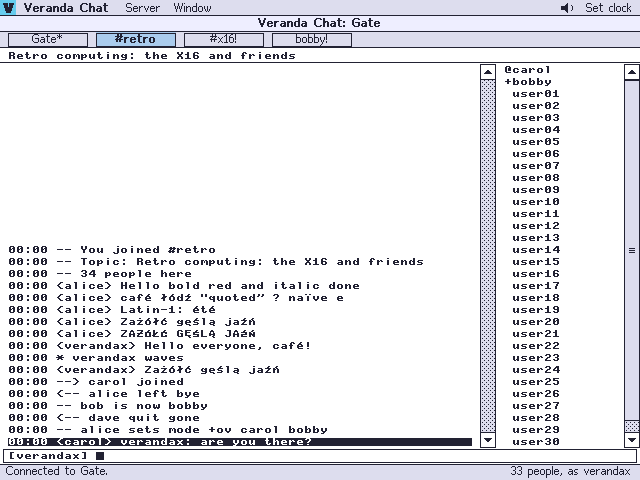
Server > Servers... (shown at the start) lists your servers. The
selected one's fields: name, host, port, nick, an alternative nick (used
when your nick is taken), real name, password (the server's: for a
bouncer, or a registered nick where the server takes it so) and the
channels to join, such as #retro #x16.
- Tab, Down and Up move between the fields. PgUp and PgDn choose a server.
- Connect (or Return, or a double-click) connects. It is the default button: its frame is thicker.
- New and Delete add and remove a server. Esc closes the page.
The first time, the list has Libera.Chat, SDF and EFnet.
-
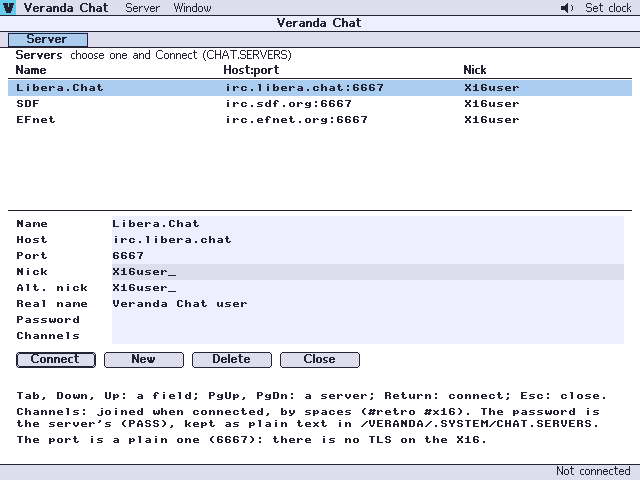
The tabs at the top: the server's window, then up to six channels
and private conversations. Click one, or press F1-F7, Ctrl+N
(next), Ctrl+P (previous).
*after a name: new lines.!: a line that names you, or a new private message. A name in brackets is a channel you are no longer in. - The topic under the tabs.
- The text, with the time of each line (Window > Times on/off). A line that names you is shown reversed, with a sound. Its scroll bar is at its right: an arrow scrolls a row, a click on the track a page.
-
The nick list at the right of a channel: operators (
@), voices (+), then the others. Click a nick to put it in the input line. It has its own scroll bar. Window > Nick list on/off. - The input line at the bottom, in a frame.
- The status bar: what happened at the left; the connection and the people in the channel at the right.
| Menu | Items |
|---|---|
| Veranda Chat | About Veranda Chat; Quit (Ctrl+Q) |
| Server | Servers...; Disconnect |
| Window | Next (Ctrl+N), Previous (Ctrl+P), Close (Ctrl+W); Nick list on/off, Times on/off; Clear |
The menus show their keys at the right.
| Key | Action |
|---|---|
| Return | send the line |
| Left, Right, Home, End, Backspace, Delete | edit the line |
| Up, Down | the last 8 lines you sent |
| Tab | complete a nick of the channel (again: the next one) |
| Ctrl+V | paste the clipboard's first line |
| PgUp, PgDn, wheel, the scroll bar | scroll back |
| End, Esc | back to the newest lines |
| F1-F7, Ctrl+N, Ctrl+P | change tab |
| Ctrl+W | close the tab |
| Ctrl+Q | quit (asks first when you are connected) |
| Command | Does |
|---|---|
/join #channel [key] |
join a channel |
/part [reason] |
leave the channel |
/msg nick text |
a private message |
/query nick [text] |
open a tab for a private conversation |
/me action |
an action (* nick action) |
/nick new |
change your nick |
/topic [text] |
show or set the topic |
/notice nick text |
a notice |
/raw line (or /quote) |
send a line to the server as it is |
/close |
leave a channel or close a conversation |
/clear |
clear the window |
/quit [reason] |
disconnect |
/help |
the commands |
Other commands are sent as they are (/whois nick, /away ...).
//text sends a line that starts with /.
IRC's bold and colours are taken out. UTF-8 is decoded: Latin-1 letters
(é, ü, ñ) are shown; other European letters as their base letter (ł as
l); other scripts as ?. What you type is sent as UTF-8.
/VERANDA/.SYSTEM/CHAT.SERVERS, one server per line:
name,host,port,nick,alternative nick,real name,password,channels
Up to 8 servers. The password is kept as plain text.
- Port 6667, no TLS: servers that need TLS or SASL cannot be used. No DCC.
- One server; the server's window and 6 channels or conversations.
- Each window keeps about 50 lines (4 KB). A channel lists 190 people at most; the list's last row says how many more there are ("and 2209 more"), and the status bar counts everyone.
- Pasting many lines fast may get you disconnected for flooding.
Alt+Tab keeps the connection: what arrives meanwhile comes in when you come back. If you are away long, the server may drop you.