Repository navigation
VeraBASIC
VeraBASIC is a BASIC for Veranda: a structured BASIC with Veranda's
windows, menus, dialog boxes, graphics, files with long names, sound and
the switcher. Programs are plain .bas text files.
VeraBASIC has its own full manual: the VeraBASIC manual (a tutorial, the editor, the language, the reference). This page only tells you how to start.
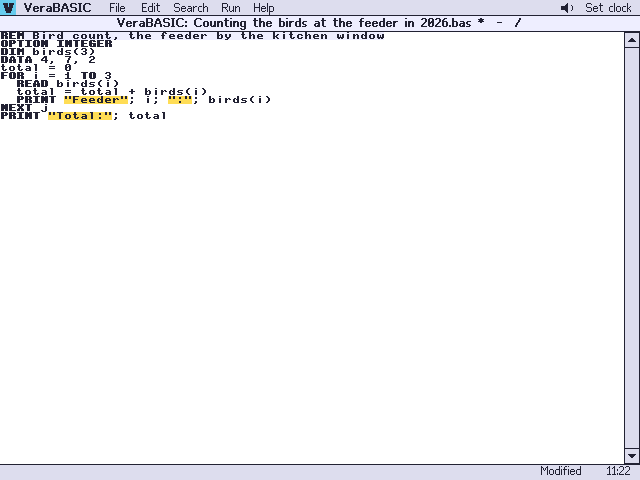
- VeraBASIC is the editor and the runtime in one: write a program, check it, run it. It colours the program, shows the syntax of the keyword at the cursor, and jumps to an error's line.
- VeraBASIC Run runs finished programs.
- Double-click a
.basfile: VeraBASIC opens it. - Or double-click VeraBASIC in
/VERANDA/APPS.
| Key | Action |
|---|---|
| Ctrl+K | Check the program |
| F8 | the next error |
| Ctrl+R | Run |
| Ctrl+C | Stop a running program |
| F1 | help on the keyword at the cursor (on other words: the contents) |
| Ctrl+N, Ctrl+O, Ctrl+S, Ctrl+Q | New, Open, Save, Quit |
All keys are in the manual's chapter The editor.
F1 opens VeraBASIC's help viewer. The help files are in
/VERANDA/HELP: the keywords, the errors, the tutorial, the editor and
the manual's chapters. Help > Contents > Manual in the editor opens
the manual. Reference card.pdf in the same folder is a two-page
reference card to print on a PC.
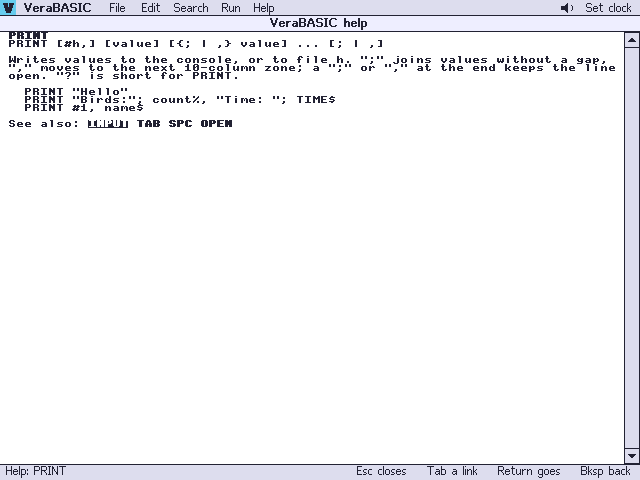
In the help viewer: Up, Down, PgUp, PgDn and its scroll bar scroll; Tab and Shift+Tab choose a link; Return (or a click) follows it; Backspace goes back; Esc closes.
-
/DOCUMENTS/VeraBASIC Exampleshas example programs (Notes, Dice, Address book, Tiles) and the tutorial's seven steps to Bird Watch. -
File > Make application... turns a program into an application of
its own, with its own icon. Bird Watch in
/VERANDA/APPSis one (it opensGarden.brdin/DOCUMENTS).
While saving, VeraBASIC writes ~VBASIC.TMP first. If a save is cut
short, Disk Tools can find this file.