Repository navigation
Term
Veranda Term is a terminal: for Telnet BBSes and other text services on the Internet, through the Wi-Fi modem (see Network setup). It shows ANSI colours, keeps a scrollback, captures text to a file and downloads files with XMODEM. It is also the place to type AT commands to the modem.
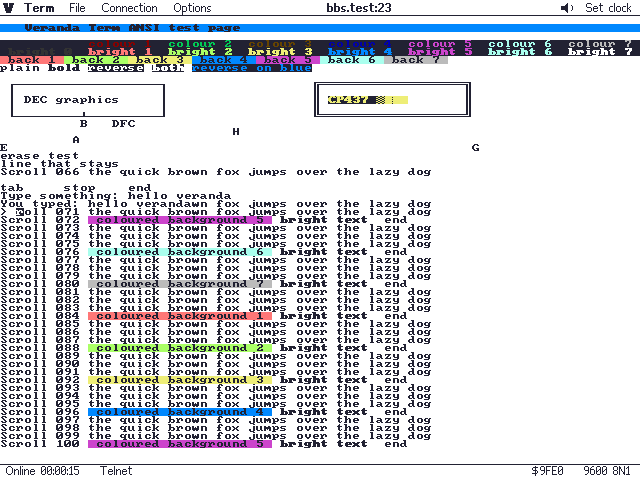
- Double-click Term in
/VERANDA/APPS. - Double-click a
.TELfile (a linename|host:port): Term connects to that host. - Dex's Connect starts Term with a card's host.
The BBS or host's name in the menu bar, 80 x 55 characters, and a status
bar at the bottom. On its left: Offline, Dialling or Online and the time
online (in a TCP session, the host and port first), then Telnet or Raw
TCP, Local echo, Capture, Sending a file, the XMODEM block, and
"Back n of m" in the scrollback. On its right: the card's address (or
Script) and the line, for example $9FE0 9600 8N1.
The 80 columns fill the screen, so the scrollback has no scroll bar: use PgUp and PgDn.
Connection > Connect... opens the Hosts page: up to 11 hosts,
each with a name, host:port and a mode, Telnet or raw TCP.
Click a host to choose it, and double-click it to connect. The buttons under the list do the same as the keys:
| Key | Button | Action |
|---|---|---|
| 1-9, A, B, or Up and Down | (click the host) | choose a host |
| Return | Connect | connect (or double-click the host) |
| C | Other host | connect to another host (host, port: 23 if empty, T or R) |
| N | New | add a host |
| X | Remove | remove the chosen host |
| Esc | Back | back |
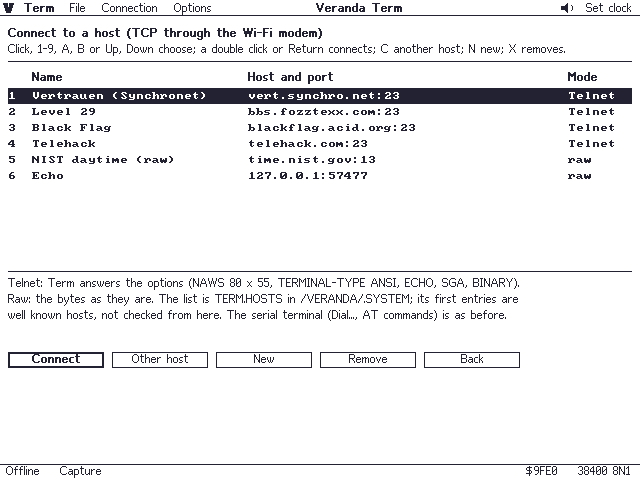
The first time the list has five well-known hosts: Vertrauen, Level 29,
Black Flag, Telehack, and NIST's time service. They were written from
memory and not checked from here. The list is kept in
/VERANDA/.SYSTEM/TERM.HOSTS.
Connection > Disconnect ends the session.
-
Connection > Dial... dials
host:port, or sends an AT command as it is. -
Connection > Address book: eight well-known Telnet BBSes (from
memory: check them) and eight of your own (N new, E edit, X delete).
Kept in
TERM.BOOK. Click an entry to choose it and double-click it to dial; the buttons Dial, New, Edit, Delete and Back under the list work on the chosen entry, as the keys do. -
Connection > Modem status sends the status commands (
ATI;ATI2at first). - When not connected, what you type goes to the modem: type
ATIto see its version,AT+CONFIGfor Zimodem's Wi-Fi setup.
The menus are in groups, and show their keys at the right.
| Menu | Items |
|---|---|
| Term | About Term; Desk accessory...; Quit (Alt+Q) |
| File | Capture on/off, Send text file... (raw); XMODEM download... (Alt+X) |
| Connection | Connect..., Dial... (Alt+D), Address book; Disconnect / hang up (Alt+H); Modem status, Clock from network |
| Options | Settings...; Clear screen, Copy screen (the window's text to the clipboard) |
Almost every key goes to the host: the arrows, Home, End, Insert, Delete and F1-F4 as VT100/xterm sequences; Ctrl + a letter as its control code; STOP as Ctrl+C.
| Key | Action |
|---|---|
| PgUp, PgDn | move through the scrollback (816 lines); any other key comes back |
| F7 | the session menu: D hang up, X download, C capture, Q quit |
| Alt+D | dial |
| Alt+H | hang up |
| Alt+X | XMODEM download |
| Alt+Q | quit |
Options > Settings is a page in the window, in three groups (the
serial port, the terminal, the modem and the clock): press a letter to
change a line, W to write the settings (TERM.CFG), Esc to go
back.
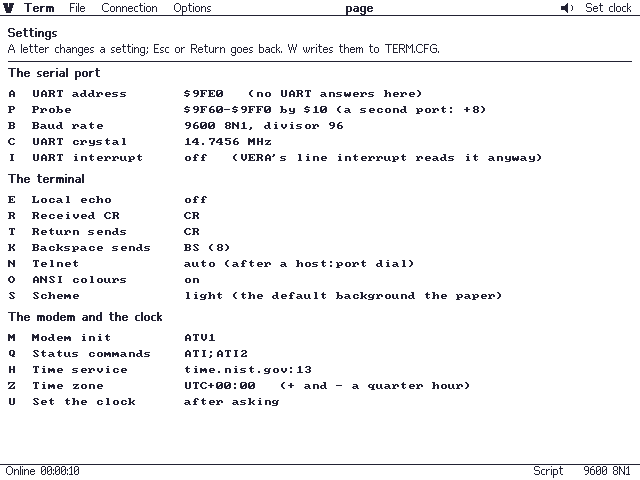
| Key | Setting | Default |
|---|---|---|
| A, P | the card's address; P looks for the card | $9FE0 |
| B | the baud rate (300 to 115200) | 9600 |
| C | the card's crystal | 14.7456 MHz (TexElec's card) |
| I | the card's own interrupt | off |
| E | local echo | off |
| R | a received CR as CR or CR LF | CR |
| T | Return sends CR, CR LF or LF | CR |
| K | Backspace sends BS or DEL | BS |
| N | Telnet: auto, always, never | auto |
| O, S | ANSI colours; the light or dark scheme | on, light |
| M | the modem's init string | ATV1 |
| Q | the status commands | ATI;ATI2 |
| H, Z, U | the time server; the time zone; set the clock without asking |
time.nist.gov:13, UTC, off |
Connection > Clock from network asks the time server (NIST's at first), adds Term's time zone (setting Z, in quarter hours) and, after you click Yes, sets the X16's clock. Set Term's time zone to yours first.
- Colours: Veranda's screen has one ink colour and one paper colour per character cell. Coloured text on a black background looks as on a PC; on a coloured background the text is black. Underline and blink are not shown.
- No PETSCII mode, no UTF-8, no XMODEM upload, no ZMODEM.
- With 512 KB, Term's scrollback (16 RAM banks) may be too big to put Term aside: then Alt+Tab asks to quit it.