Repository navigation
SID Player
SID Player plays SID tunes (C64 music, .SID files) on a real SID
chip, on the X16-SID card (the CommanderSID project's card). The
card's own player runs the tune; the X16 shows what the chip does.
Version 1.1, a port of CommanderSID's player. GPL-3.0-or-later.
You need the X16-SID card. Without it, SID Player says "No X16-SID
card found" and can only show folders. It looks for the card at IO5
($9FA0), then IO6 ($9FC0).
SID Player is not built into every package. If it is not in
/VERANDA/APPS, copy SID Player.cvt there.
- Double-click a
.SIDfile. - Or double-click SID Player and choose a tune in its playlist.
-
The playlist: folders first, then
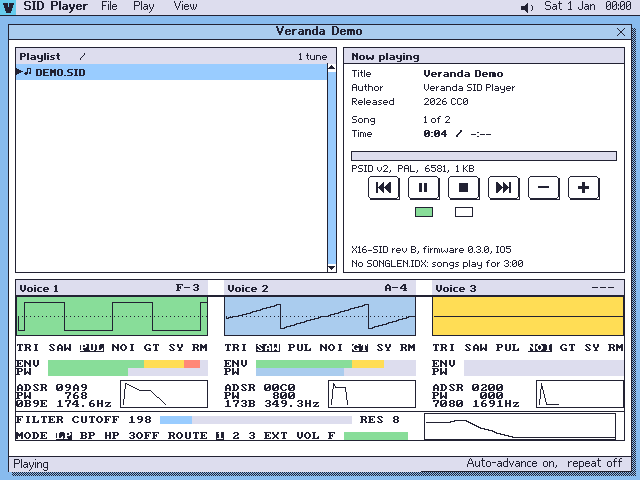
.SIDfiles. - Now playing: title, author, year, song x of y, time and length, a progress bar, PSID or RSID, PAL or NTSC, 6581 or 8580, the size.
- Buttons: previous tune, play/pause, stop, next tune, song -, song +.
- The voices: for each voice a scope, the note, the waveform, the envelope, and the filter.
- View > Tracker shows the notes as they start.
| Menu | Items |
|---|---|
| SID Player | About SID Player, the desk accessories |
| File | Open..., Find the card, Quit |
| Play | Play/Pause, Stop, Next tune, Previous tune, Next song, Previous song, Auto-advance: on/off, Repeat: off / folder / song |
| View | Playlist, Tracker |
| Key | Action |
|---|---|
| Space | play or pause |
| Right or N | the next tune |
| Left or P | the previous tune |
| Esc or S | stop |
| + or = | the next song in the tune |
| - | the previous song |
| 1 to 9 | play that song number |
| A | auto-advance on or off |
| R | repeat: off, folder, song |
| T | playlist or tracker |
| Alt+O | Open... |
| Alt+Q or Q | quit |
| Up, Down, PgUp, PgDn, Home, End | move the selection |
| Backspace | up a folder |
| Return | open the folder, or play the tune |
- Auto-advance (on at first) goes to the next song when the time is up, then to the next tune. Without song lengths, a song plays 3:00.
-
SONGLEN.IDXgives the real lengths (from HVSC's song length list). Put it in the tune's folder, the card's top folder or the player's folder. CommanderSID's tools make it. -
RSID tunes need
C64ROMS.BIN: your own C64 ROM images (exactly 20 KB), in the card's top folder or the player's folder. Veranda does not include them.
- A tune may be up to 64 KB. Up to 512 entries in the playlist.