Repository navigation
Dex
Dex is an address book. It is a desk accessory: it opens over any program.
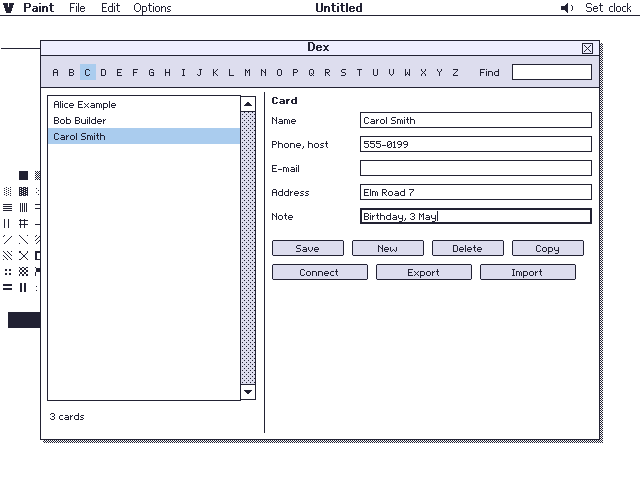
Each card has five fields: name, phone (a phone number, or a
BBS's host:port), e-mail, address and note. Cards are kept
in name order.
- Search: type in the Find field at the top right. Dex shows the cards whose name, phone or e-mail holds the text, as you type.
- The alphabet bar at the top: click a letter to jump to the first name that starts with it.
- Click a card in the list to show it. Edit its fields in place. The scroll bar beside the list moves it: the arrows a card at a time, a click above or below the thumb a page.
- Save keeps the card (a new one, or the one selected).
- New empties the fields for a new card.
- Delete removes the card (after a question).
- Copy puts the card on Veranda's clipboard as text, a line per field.
-
Export writes all cards to
DEX.CSV(a header line, then a line per card) in the current folder. Veranda Calc opens it. Import readsDEX.CSVand adds its cards. - Connect: on a card whose phone field is a host (it has a letter, a dot or a colon), Dex asks, then starts Term and connects to that host. The program under Dex is closed for this.
| Key | Action |
|---|---|
| Tab | move between the search field and the card's fields |
| Return | save the card |
| Up, Down | the previous, the next card in the list |
| Esc | close Dex |
In the file Dex Cards in /VERANDA/.SYSTEM.