Repository navigation
Calendar
The Calendar shows a month and the appointments of a day, and rings alarms. It is a desk accessory: it opens over any program.
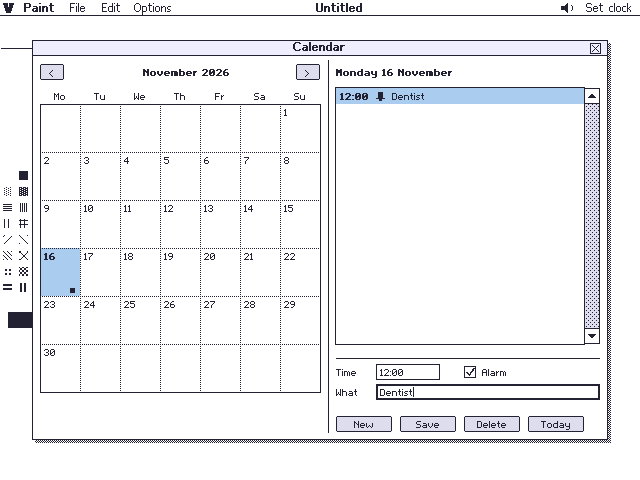
- The month: a grid, Monday first. Today is yellow (from the X16's clock). The chosen day is light blue. Days with appointments have a mark. < and > change the month; Today goes back to today.
- The day: its appointments in time order, and a form to add or change one: the time, the text, and the Alarm check box. The scroll bar beside the list moves it when a day has more appointments than it shows.
- New fills the form: the next minute if the day is today, else 09:00.
- Type the time and the text, tick Alarm if you want one, and click Save (or press Return).
- Click an appointment to change it, then Save.
- Delete removes the chosen appointment (after a question).
| Key | Action |
|---|---|
| Tab | between the time and the text |
| Return | save |
| Arrows | move the chosen day |
| PgUp, PgDn | the previous, the next month |
| Esc | close the Calendar |
An alarm rings over any program while Veranda runs: a sound and a box with the appointment's text. Click OK to close the box.
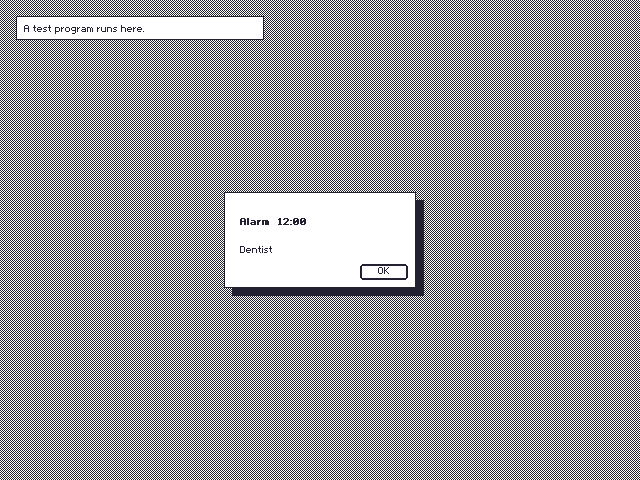
- The alarms work only while Veranda runs. An alarm whose time passes while the X16 is off or in BASIC does not ring later.
- Set the clock first: see Date, time and time zone.
In the file Appointments in /VERANDA/.SYSTEM: up to 120
appointments, in the years 2000 to 2099. Veranda keeps the next 8
alarms ready. The coming alarms are also written to Veranda Alarms there,
which Veranda reads when it starts.