Repository navigation
Import and Export
On a wide screen, choose Import/Export data on the map toolbar. On a phone, choose More → Reports and data transfer. Both open Import / Export Data in a task window with Close.
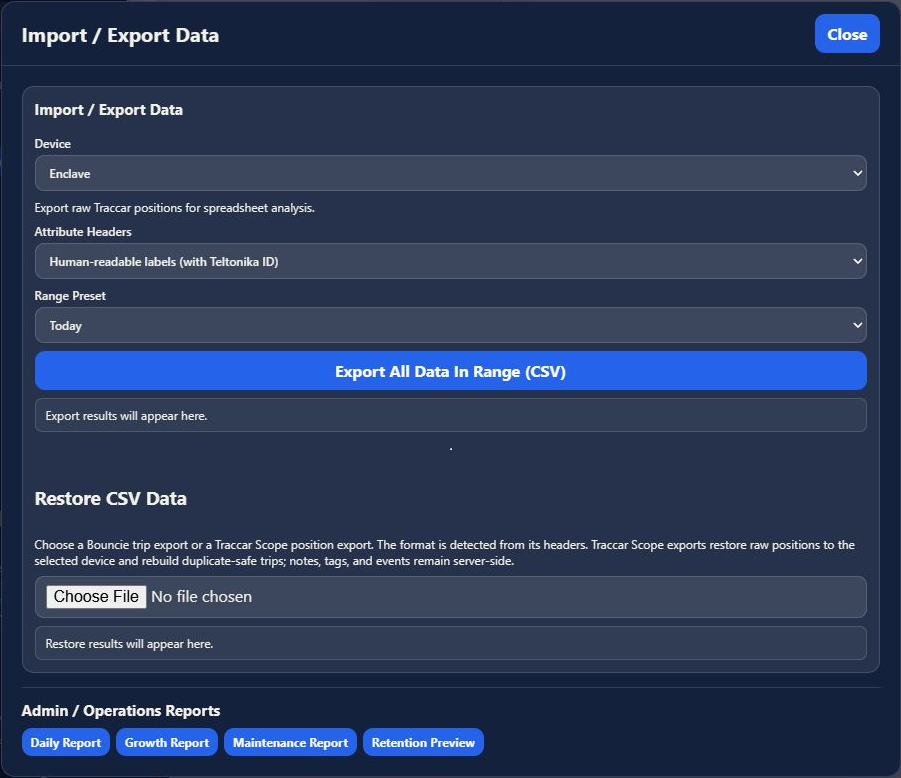
- Choose the source Device.
- Choose Attribute Headers: human-readable labels with Teltonika IDs, or Teltonika attribute IDs.
- Choose a Range Preset, such as Today, This Week, This Month, This Year, All Time, or Custom.
- For a custom range, enter the dates requested by the dialog.
- Choose Export All Data In Range (CSV) and review the status message.
This export is for raw Traccar positions and spreadsheet analysis. To export summarized trip results, use Reports. Graphs also have their own Export telemetry control.
Under Restore CSV Data, choose a Bouncie trip export or a Traccar Scope position export. The dialog states that format detection uses the headers. Traccar Scope position exports restore raw positions to the selected device and rebuild duplicate-safe trips; notes, tags, and events remain server-side.
Select the intended device and verify the file before choosing it. Restoring data writes to the application; it is a separate operation from downloading an export.
Open Settings → Bouncie REST Import for the provider's connection and historical import controls. Use the client registration and redirect URL for your installation. Review the requested date window and import status before starting another import. Large imports are paced and can take time.
The import/export dialog also offers Daily Report, Growth Report, Maintenance Report, and Retention Preview under Admin / Operations Reports for administrators. Regular users retain raw-position export and CSV restore without those operations buttons. These tools are separate from the full vehicle report catalog opened by Stats in the wide workspace.