Casting and Fishing Controls
Avid Angler's Casting module manages the fishing input loop, visible controls, helper settings, action pickers, action slots, and fishing gear behavior.
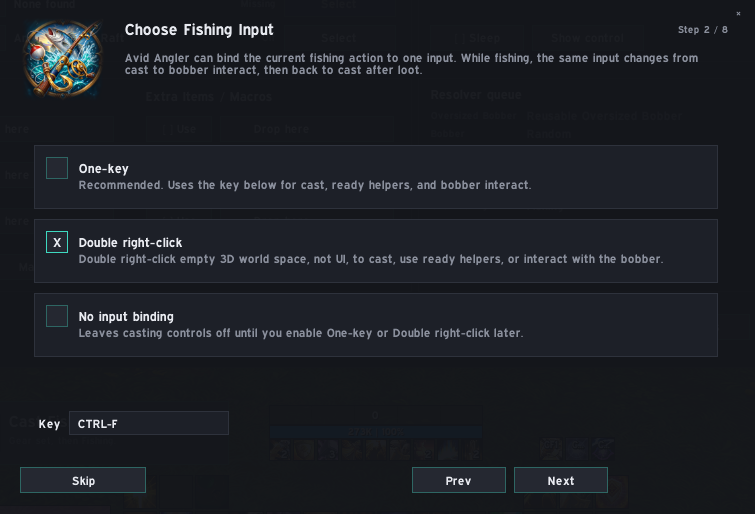
Avid Angler can drive the current fishing action from one of three input modes:
| Mode | What it does |
|---|---|
| one-key fishing | Uses one configured key for the active fishing action. The setup wizard defaults to CTRL-F. |
| double right-click | Uses a double right-click in empty 3D world space for the active fishing action. |
| No input binding | Leaves Avid Angler's fishing input disabled until you enable one-key fishing or double right-click later. |
When fishing is idle, the active action is normally Cast. While a cast is active, the same input changes to bobber interaction. After loot, Avid Angler resolves the next available fishing action again.
one-key fishing binds one key to the current fishing action, so the same key can be used through the normal cast-and-reel loop.
The key can be changed in Settings or with:
/aaone key CTRL-F
Examples accepted by the addon include CTRL-F, ALT-F, SHIFT-F, F, BUTTON4, and CTRL-BUTTON5.
double right-click watches for a genuine double right-click over the 3D world rather than over normal UI elements. It is intended for players who prefer mouse-driven fishing.
It does not replace normal right-hold camera movement. A held right-click used for mouselook is tracked separately and is not treated as a fishing double-click.
| Setting | What it does |
|---|---|
| Auto Loot | Temporarily enables Auto Loot for fishing and restores your previous WoW setting afterwards. |
| Manage Soft Interact | Temporarily adjusts WoW's Soft Interact helper to make bobber interaction more reliable. |
| Disable Soft Icon | Disables WoW's soft-target object icon for game objects, including bobbers. |
| Dismount With Key | Adds /dismount [mounted] before supported Avid Angler cast, toy, item, and action-slot macros. |
| Release When Swimming | While swimming, the binding is retained for supported water toys such as rafts or dinghies. If no water toy is ready, the fishing binding is released. |
| Audio Focus | While fishing, reduces music, ambience, and dialog relative to sound effects, then restores your previous audio settings when the cast ends. |
All of these helpers are optional and can be changed later from Settings.
Avid Angler pauses or restores fishing controls around combat, death, protected content, UI reloads, and logout-sensitive states. If the addon cannot safely update a binding or protected action, it waits rather than trying to force the action.
Casting and reeling always require player input.