Catch Tracking and History
Avid Angler keeps a history of your fishing catches and casts so you can review what you caught, where it came from, and how a fishing session is going.
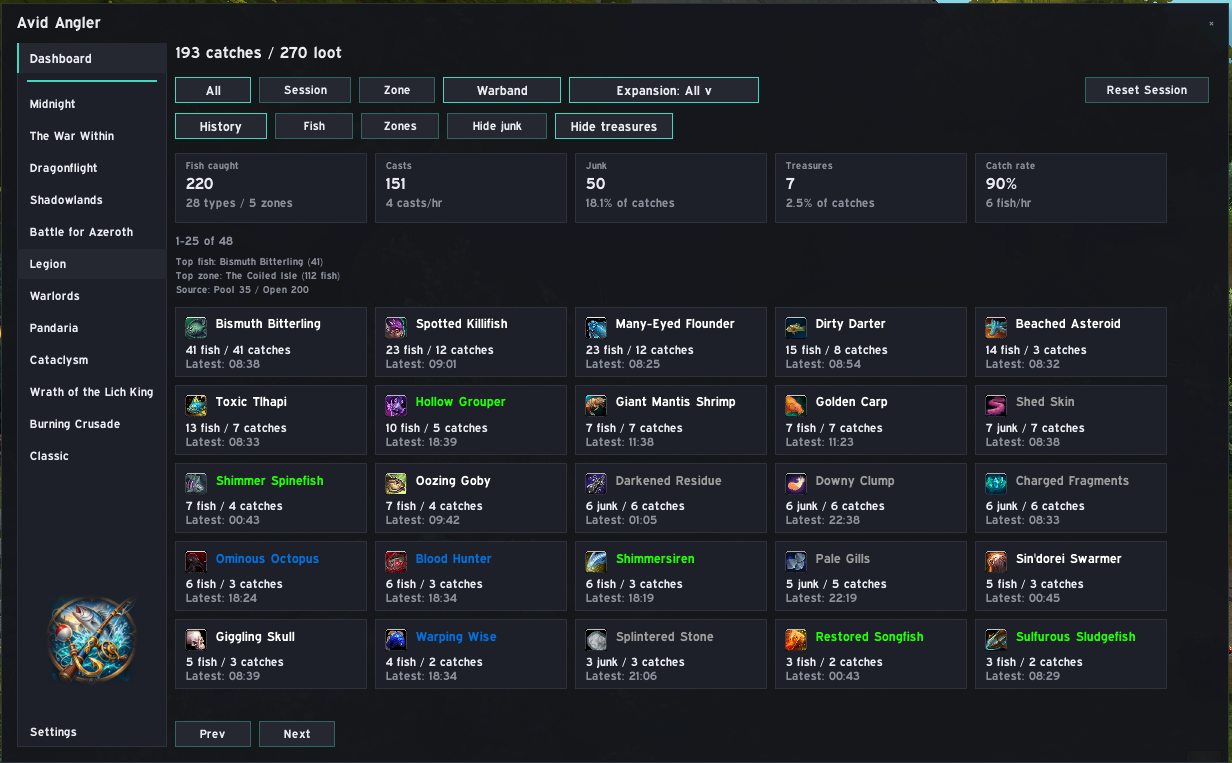
Catch records can include:
| Field | Meaning |
|---|---|
| Item | The item that was caught |
| Quantity | How many were looted |
| Time | When the catch was recorded |
| Zone | Where the catch happened, when available |
| Position | Player coordinates, when available |
| Source | Pool, open water, either, or unknown when Avid Angler can determine it |
Fishing casts are tracked as well, allowing the Dashboard and history views to calculate session totals, catch rates, and other summaries.
| View | What it shows |
|---|---|
| All | All recorded catches |
| Session | Catches since the current session started or was last reset |
| Zone | Catches from your current zone |
History is paged using Prev and Next. Depending on the selected view, Avid Angler can also show summaries such as total catches, loot count, number of item types and zones, fish per hour, top fish, top zone, source mix, and the catch window.
Use the Fish and Zones views to group your fishing history in different ways.
These are useful for seeing:
- which fish or items you catch most often;
- which zones you have fished in most;
- how many catches came from each source type;
- when each item was caught most recently.
Use Reset Session on the Dashboard or:
/aasession reset
Resetting the session starts a new session from that point onward. It does not delete your all-time catch history.
Source labels can include Pool, Open, Either, Unknown, or Not detected yet.
Some catches can remain unknown when World of Warcraft does not expose enough information for Avid Angler to determine the source reliably.