Settings
Settings is where you change Avid Angler behavior after setup.
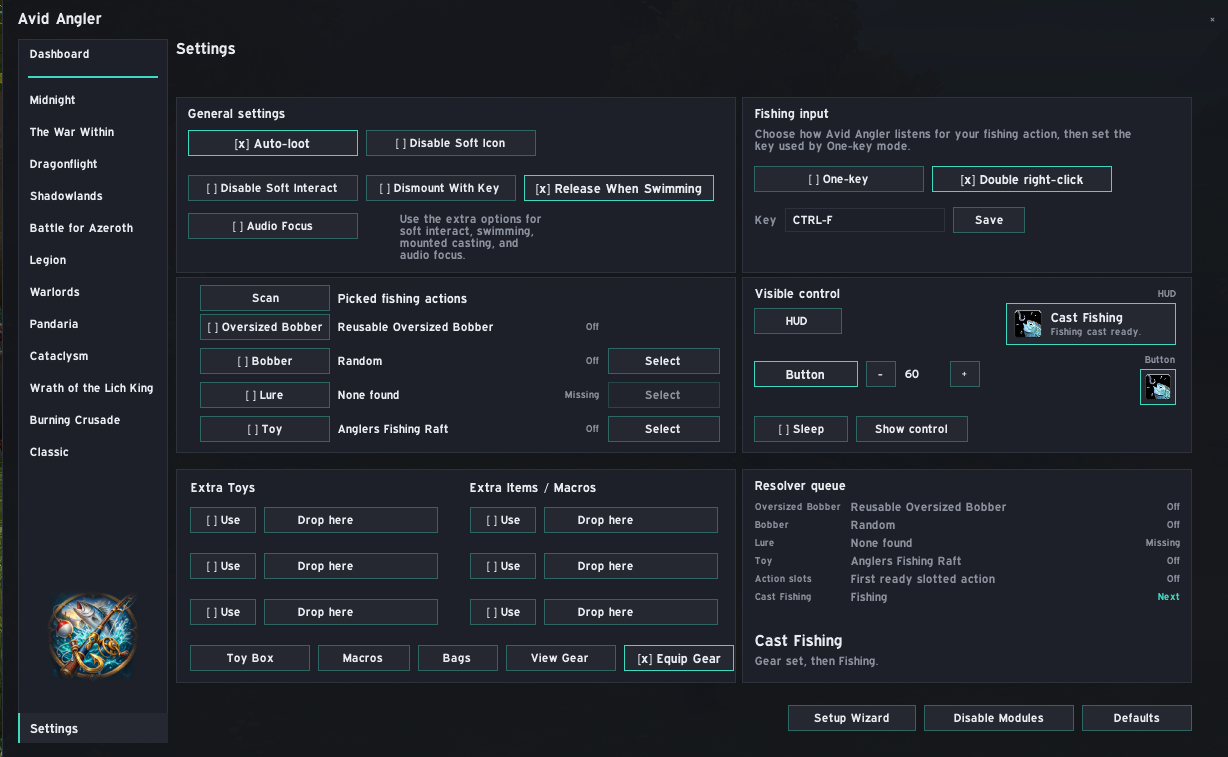
| Setting | What it does |
|---|---|
| Auto-loot | Temporarily turns on Auto Loot while Avid Angler handles fishing loot, then restores your previous WoW setting. |
| Disable Soft Icon | Turns off WoW's soft-target hook icon for game objects, including bobbers. |
| Disable Soft Interact | Stops Avid Angler from temporarily raising WoW's Soft Interact helper when Casting is enabled. |
| Dismount With Key | Adds /dismount [mounted] before Avid Angler cast, toy, item, and action-slot macros. |
| Release When Swimming | Releases the fishing binding while swimming unless a water toy action is ready. |
| Audio Focus | Temporarily changes audio levels around fishing. |
| Setting | What it does |
|---|---|
| one-key fishing | Uses one keybind for the active fishing action. |
| double right-click | Lets a double right-click in the world run the active fishing action. |
| Key | Sets the key used by one-key fishing. |
Audio Focus has percentage fields for:
- Master Volume
- Music Volume
- Effects Volume
- Ambience Volume
- Dialog Volume
Defaults restores the recommended mix: Master 100, Music 0, Effects 100, Ambience 0, Dialog 0.
| Setting | What it does |
|---|---|
| Scan | Scans bags, toys, and usable fishing items. |
| Oversized Bobber | Enables or disables oversized bobber upkeep. |
| Bobber | Enables, selects, or randomizes bobber upkeep. |
| Lure | Enables or selects a fishing lure. |
| Toy | Enables, selects, or randomizes a fishing toy. |
| Setting | What it does |
|---|---|
| HUD | Shows the recommended HUD control. |
| Button | Shows the smaller icon-only control. |
| Sleep | Temporarily pauses or resumes the visible fishing control. |
| Show control | Shows the fishing control again if hidden. |
| Control scale | Adjusts the size of the visible fishing control. |
| Slot type | What it does |
|---|---|
| Extra Toys | Toy slots selected from the Toy Box or by dropping a toy. |
| Extra Items / Macros | Usable bag item or macro slots. |
New slots stay off until Use is enabled.
| Setting | What it does |
|---|---|
| Save Gear | Creates the AvidAngler equipment set from your current gear. |
| View Gear | Appears after the AvidAngler set exists, opens the character screen and equips it for review. |
| Equip Gear | Equips the AvidAngler set before casting and restores the previous named set after fishing loot. |
Disable Modules opens module toggles for the major Avid Angler systems:
- Casting
- Tracking
- Scoring
Defaults returns all Casting settings to their defaults. This cannot be changed in combat.
Setup Wizard reopens the first-run setup wizard.