Dashboard
The Dashboard is the main overview of your Avid Angler catch data. It gives you a quick picture of what you have caught, where you caught it, and how the current fishing session compares with your saved history.
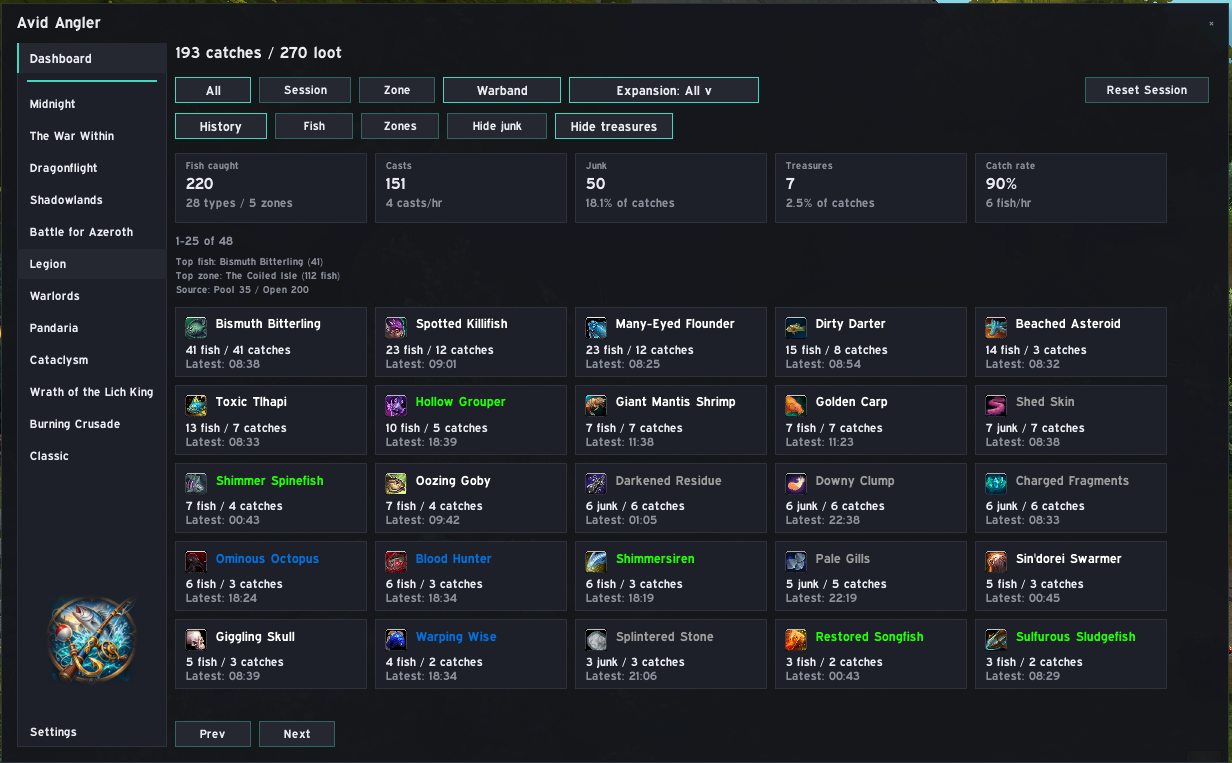
Use the buttons across the top of the Dashboard to change the data being summarized:
| Filter | What it shows |
|---|---|
| All | All saved catch data |
| Session | Catches and casts from the current fishing session |
| Zone | Catch data for your current zone |
| Warband | Combined tracking where Warband data is available |
| Expansion | Limits the Dashboard to the selected expansion |
The Dashboard can show at-a-glance totals including:
- Fish caught.
- Casts.
- Junk catches.
- Treasure catches.
- Catch rate and fish-per-hour information.
The exact values depend on the selected filters and the tracking data you have collected.
Below the summary, Avid Angler shows individual catch cards with useful information such as the item name, icon, number caught, catch count, and most recent catch time.
Item quality colouring is used where appropriate, making unusual or higher-quality catches easier to spot.
The Dashboard also provides three ways to explore the underlying data:
| View | Use it for |
|---|---|
| History | Browse individual recorded catches |
| Fish | Group your tracking data by fish or caught item |
| Zones | Review where your catches were recorded |
You can also hide junk or treasure catches when you want a cleaner view of normal fishing results.
Reset Session starts a new session for session-based statistics. It does not delete your all-time tracking history.
The left sidebar also links to fishing information for Midnight and earlier expansions. Those pages combine fishing-guide data with Avid Angler's tracking tools where relevant.
For more detail on individual records and filtering, see Catch Tracking and History.