Getting Started
This page takes you through the first few minutes with Avid Angler: the setup wizard, opening the addon, and getting into a normal fishing session.
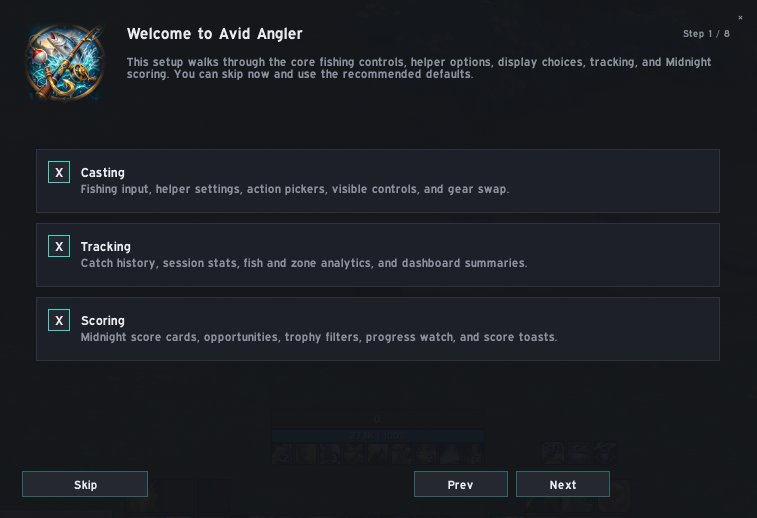
The setup wizard opens the first time Avid Angler loads on an account where setup has not yet been completed. It gives you a quick way to choose the main fishing behaviour without having to work through every Settings page first.
The wizard has eight steps:
| Step | What it covers |
|---|---|
| Welcome to Avid Angler | Enable or disable the Casting, Tracking, and Scoring modules |
| Choose Fishing Input | Choose one-key fishing, double right-click, or no input binding |
| Fishing Helpers | Configure Auto Loot, Soft Interact, and the soft-target icon helper |
| Comfort Options | Configure dismounting, swimming behaviour, and Audio Focus |
| Fishing Gear | Save your current fishing gear and choose whether Avid Angler should equip it |
| Visible Control | Choose the movable HUD or compact Button |
| Tracking and Scoring | Configure the Midnight score watch and trophy display |
| Ready to Fish | Finish setup and start fishing, or continue into Settings |
Selecting Skip applies Avid Angler's recommended defaults instead. The setup wizard can be reopened later from Settings if you want to run through it again.
You can open Avid Angler in any of these ways:
| Method | Action |
|---|---|
| Minimap button | Left-click the Avid Angler minimap icon |
| Addon Compartment | Click Avid Angler in the Addon Compartment |
| Chat command | Type /aa or /avidangler
|
Right-clicking the minimap button or Addon Compartment entry toggles the visible fishing control on or off, unless your character is in combat.
Once setup is complete, a normal session is straightforward:
- Open Avid Angler if you want to review your current settings or tracking information.
- Position the HUD or compact fishing button where you want it.
- Use one-key fishing, double right-click, or the visible control to perform the current fishing action.
- When the bobber is ready, use your configured input again to interact with it.
- Loot the catch normally.
- Avid Angler prepares the next available fishing action for your next input.
If you want to change your input mode, helper options, lures, bobbers, action slots, gear behaviour, or visible control, open Settings at any time.
Avid Angler does not fish unattended. Casting and interacting with the bobber still require player input; the addon prepares the appropriate fishing action for that input.
| Goal | Page |
|---|---|
| Learn the fishing input options | Casting and Fishing Controls |
| Choose between the HUD and compact button | HUD and Fishing Button |
| Use lures, bobbers, toys, or macros | Lures, Bobbers and Precast |
| Save and restore fishing gear | Fishing Gear |
| Review catch history | Catch Tracking and History |
| Work on Midnight Anglin' Score | Midnight Anglin' Score |