Repository navigation
Installation
Local Transcriber is free and needs no account. Download it from the Download section of transcript.sierock.com or straight from GitHub Releases.
| Platform | Requirement |
|---|---|
| macOS | macOS 12 Monterey or later, Apple Silicon or Intel |
| Windows | Windows 10 or 11 (x64 or ARM64), with the WebView2 runtime (already installed on Windows 10/11) |
| Linux | x86_64 or ARM64 with webkit2gtk-4.1 (Ubuntu 22.04+, Debian, Fedora, openSUSE…) |
Disk space: the app itself is small (about 10–80 MB depending on the package). The default speech model downloads once on first use and is about 550 MB.

Open the website and scroll to Download (or click Download for at the top). The site detects your operating system and processor and marks the best file Recommended. You can switch platforms with the macOS / Windows / Linux tabs.
| Platform | File | Best for |
|---|---|---|
| macOS | LocalTranscriber_<ver>_macos_arm64.dmg |
Apple Silicon (M1/M2/M3/M4) |
| macOS | LocalTranscriber_<ver>_macos_x64.dmg |
Intel Macs |
| Windows | LocalTranscriber_<ver>_windows_x64-setup.exe |
Most PCs |
| Windows | LocalTranscriber_<ver>_windows_arm64-setup.exe |
ARM laptops (Snapdragon) |
| Windows | LocalTranscriber_<ver>_windows_x64.msi |
Managed / Intune / silent installs |
| Linux |
…_linux_amd64.deb / …_linux_arm64.deb
|
Debian, Ubuntu, Mint |
| Linux |
…_linux_amd64.AppImage / …_linux_arm64.AppImage
|
Any distro; updates itself |
| Linux |
…_linux_amd64.rpm / …_linux_arm64.rpm
|
Fedora, RHEL, openSUSE |
If the site can't reach GitHub, the buttons send you to the GitHub Releases page instead. Download from there.
-
Open the
.dmgand drag Local Transcriber into Applications. -
Launch it. When macOS asks for the microphone, click Allow.
-
If macOS blocks the first launch (early builds are not notarized yet), go to System Settings → Privacy & Security → Open Anyway, or right-click the app and choose Open. From a terminal:
xattr -dr com.apple.quarantine "/Applications/Local Transcribe.app"

-
Run the
-setup.exe. It installs in seconds. -
If SmartScreen appears, choose More info → Run anyway (builds are not code-signed yet).
-
For IT deployments, use the MSI silently:
msiexec /i "LocalTranscriber_<ver>_windows_x64.msi" /qn
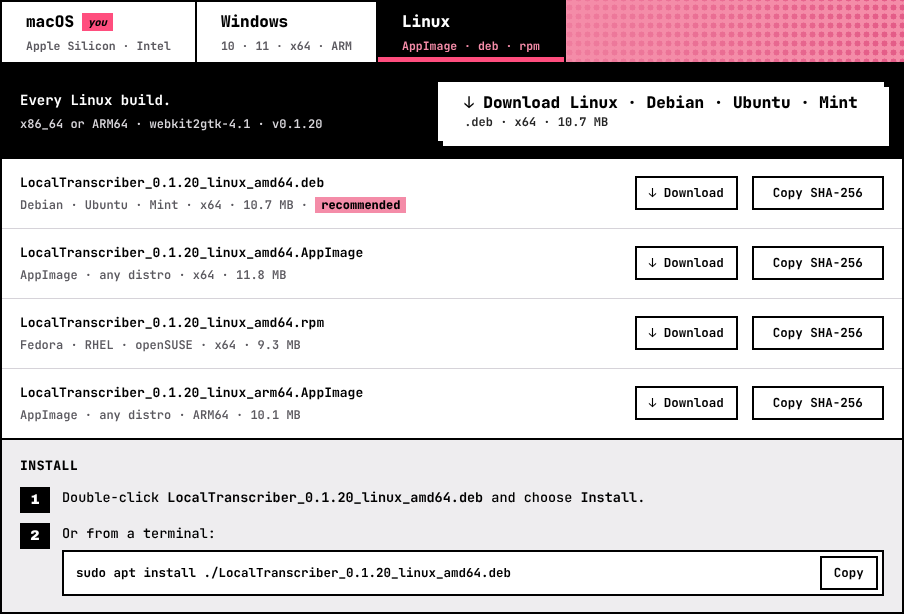
# Debian / Ubuntu / Mint
sudo apt install ./LocalTranscriber_<ver>_linux_amd64.deb

# Fedora / RHEL / openSUSE
sudo dnf install ./LocalTranscriber_<ver>_linux_amd64.rpm

# AppImage: no install needed
chmod +x LocalTranscriber_<ver>_linux_amd64.AppImage && ./LocalTranscriber_<ver>_linux_amd64.AppImage
Only the AppImage can update itself in the app. .deb and .rpm installs get a download link when a new version is out (see Updates).
Each file in the download list shows the start of its SHA-256 checksum, with a copy button. Each release also includes SHA256SUMS.txt. Compare it with:
| OS | Command |
|---|---|
| macOS | shasum -a 256 <file> |
| Windows | certutil -hashfile <file> SHA256 |
| Linux | sha256sum <file> |
Every version and every file is listed under All binaries & versions on the website. You can filter it by platform. See Website Tour#all-binaries--versions.
You need Node 20+, Rust and the Tauri prerequisites for your OS.
git clone https://github.com/GrzeskoByte/local-transcript
cd local-transcript
npm install --ignore-scripts
npm run tauri:build
# installers → src-tauri/target/release/bundle/
Next: Getting Started