Global Hotkeys
Global hotkeys let you trigger TypeWhisper from any application without bringing the app to the foreground. This page covers the available hotkeys, the Shortcuts settings panel, and how global hotkey detection works on Wayland.
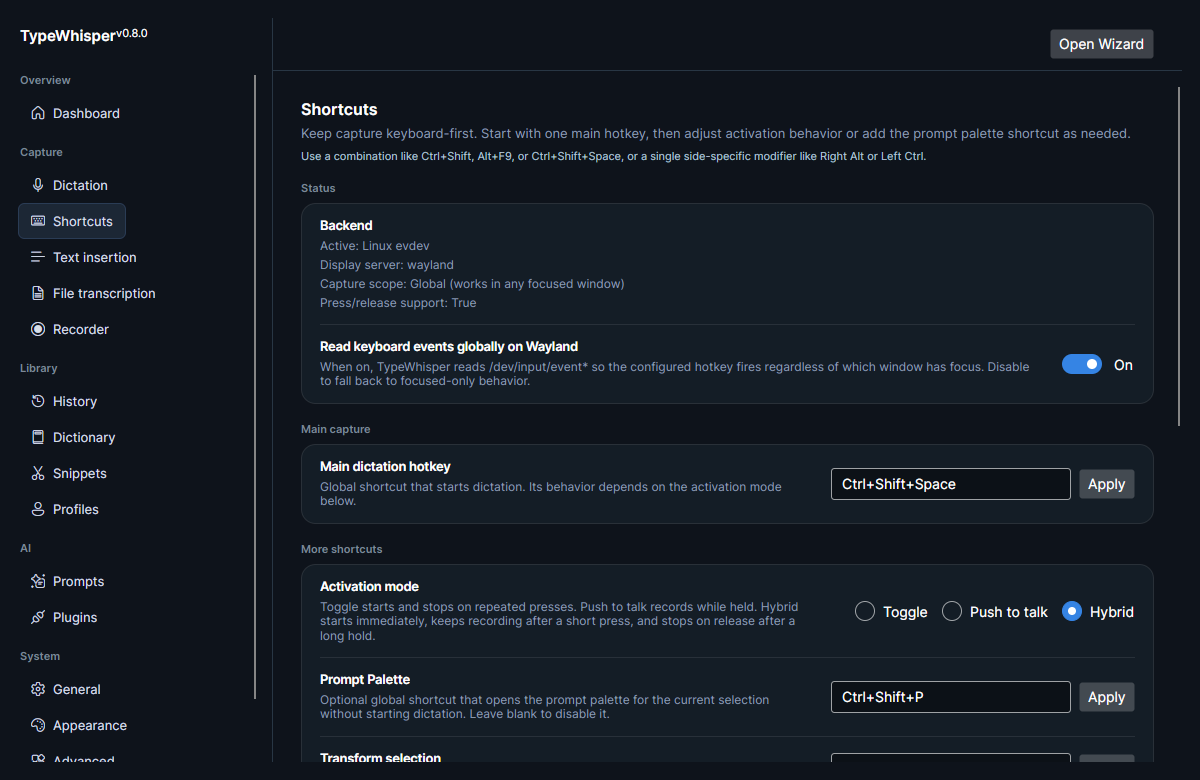
| Hotkey | What it does |
|---|---|
| Main dictation hotkey | The one global hotkey that starts/stops dictation (behavior depends on your activation mode). |
| Prompt palette hotkey | Optional hotkey that opens the prompt palette. |
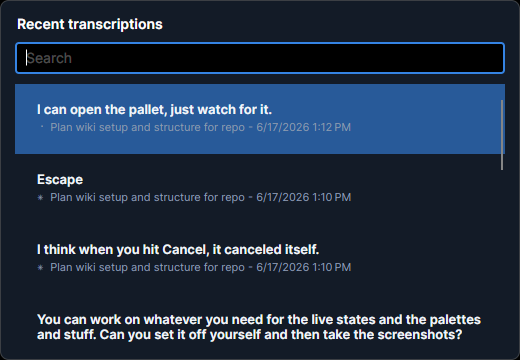
| Recent-transcriptions palette | Opens the palette of recent transcriptions. |
| Copy-last-transcription | Copies your most recent transcription. |
| Transform-selection | Voice-edits the text currently selected in another application. |
See Dictation for how the main hotkey behaves in Toggle, Push to talk, and Hybrid activation modes.
The top of the Shortcuts panel reports what the active hotkey backend can actually do, so you know whether your hotkey fires globally before you rely on it:
| Field | What it shows |
|---|---|
| Active | The active backend's display name. |
| Display server | Your session type (wayland, x11, …). |
| Capture scope | Global (works in any focused window) or Focused only (TypeWhisper window). |
| Press/release support | Whether the backend can deliver key-release events (needed by Push to talk and Hybrid). |
On Wayland, when TypeWhisper can't yet read keyboard event nodes, a banner explains that the evdev backend needs read access to /dev/input/event* and offers an Enable keyboard access action. Approving its single admin prompt installs a keyboard-scoped uaccess udev rule at /etc/udev/rules.d/61-typewhisper-input.rules that grants your currently active session read access to keyboard devices immediately — no logout, no reboot. The rule is narrower and more secure than joining the input group: it is scoped to keyboards (not mice/touchpads) and to your session.
On init systems without systemd-logind (Devuan, Alpine without elogind) uaccess has no effect, so the rule's GROUP="input" fallback applies and setup adds you to the input group instead — that grant only takes effect after you log out and back in, and TypeWhisper tells you when a re-login is needed. See Wayland notes.
The input-group fallback is used only when no seat manager is present. If systemd-logind or elogind is running and the keyboard-access check still fails afterwards, setup reports an actionable error rather than granting the much broader input group — that group would give read access to every input device, permanently, which is not something to fall back into by accident.
Setup also refuses to touch a file it does not own. If /etc/udev/rules.d/61-typewhisper-input.rules already exists as a symlink, as a non-regular file, or as a regular file without TypeWhisper's ownership marker on its first line, the privileged script aborts and explains why instead of overwriting it. Removal re-checks that marker before deleting, so a foreign file that merely mentions TypeWhisper somewhere in its body is left alone.
If the active backend can only deliver key presses (no releases) while your activation mode is Push to talk or Hybrid — both of which need release events — a warning appears suggesting you switch to Toggle or enable a backend that supports press+release.
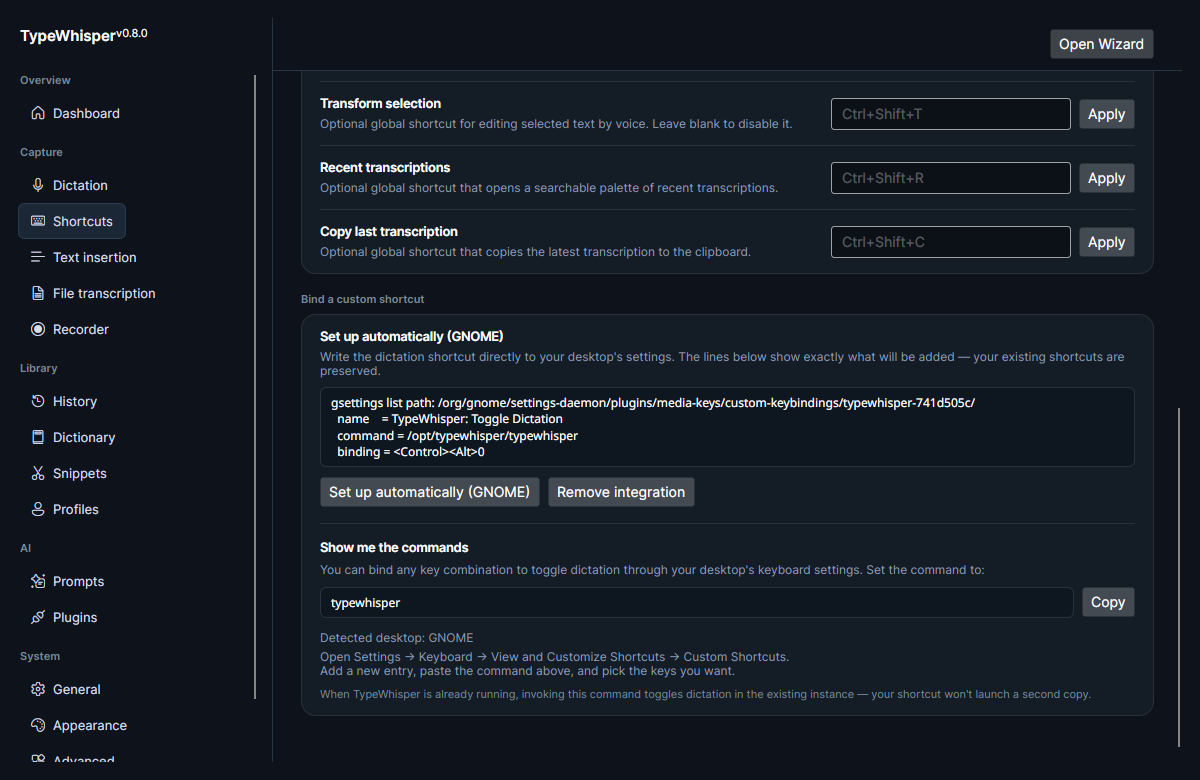
The Shortcuts settings panel includes per-desktop shortcut writers with a one-click auto-setup flow. This registers your configured TypeWhisper hotkey with the active desktop environment so you do not have to hand-edit config files. A preview shows exactly which lines will be added — your existing shortcuts are preserved — and a Remove integration button undoes the binding. Auto-setup is offered only when a writer matches your detected desktop.
For desktops without auto-setup (or if you prefer), bind any key combination to the copyable command:
typewhisper
When TypeWhisper is already running, invoking this command toggles dictation in the existing instance rather than launching a second copy. The panel shows per-desktop instructions for GNOME, KDE, Hyprland, Sway, XFCE, Cinnamon, and MATE (falling back to generic guidance otherwise).
On Hyprland and Sway, which support separate press/release binds, the panel additionally offers a true push-to-talk pair (copyable individually or together):
# Hyprland
bind  = CTRL SHIFT, SPACE, exec, typewhisper record start
bindr = CTRL SHIFT, SPACE, exec, typewhisper record stop

# Sway
bindsym --no-repeat $mod+space exec typewhisper record start
bindsym --release   $mod+space exec typewhisper record stop
On Wayland, TypeWhisper detects global hotkeys through an evdev backend that reads /dev/input/event* directly. Because it reads input devices directly, the configured shortcut fires regardless of which window has focus.
- Enabled by default.
-
Requires read access to keyboard event nodes, granted by the keyboard-scoped
uaccessudev rule the first-run setup installs (applied to the active session immediately — no logout — withGROUP="input"as the fallback on init systems without logind). - Fallback chain: if the evdev path is unavailable, it falls back to the XDG portal, then to focused-only SharpHook.
- Can be turned off from Settings → Shortcuts to keep focused-only behavior.
Because the evdev backend reads keyboard devices directly, it is explicitly stood down while your session is locked or inactive. TypeWhisper tracks your login session through logind and, on lock:
- Closes the keyboard file descriptors immediately. Revoking a device's udev ACL does not affect a descriptor that is already open, so they are closed rather than relied on being revoked. They are re-opened when you unlock.
- Rejects starting a dictation, including via the HTTP API and the CLI.
- Aborts a recording that is already running, and suppresses text insertion and spoken commands — on every backend, not just evdev, so this holds on X11/SharpHook sessions too.
On hosts without logind, there is no lock signal to act on and the previous always-active behavior applies.
The Read keyboard events globally on Wayland toggle is shown in the Shortcuts panel screenshot at the top of this page.
For more on Wayland-specific behavior and setup, see Wayland notes.
- Dictation — activation modes for the main dictation hotkey.
-
Wayland notes — evdev backend, the keyboard
uaccessrule, and portal fallbacks. - Desktop integration — autostart and tray behavior.
- Prompts — actions surfaced through the prompt palette.
| Date | Change |
|---|---|
| 2026-06-17 | Initial version. |
| 2026-06-17 | Added Shortcuts panel and auto-setup screenshots. |
| 2026-06-17 | Added recent-transcriptions palette screenshot. |
| 2026-06-17 | Documented the Status block (backend/display server/scope/press-release), the input-group banner and command, the capability-mismatch warning, the manual custom-shortcut flow (incl. XFCE/Cinnamon/MATE and Hyprland/Sway push-to-talk binds), and the auto-setup preview and Remove-integration action. |
| 2026-06-23 | v0.10.0: replaced the input-group banner with the Enable keyboard access flow — a keyboard-scoped uaccess udev rule that applies to the active session immediately (no logout), with input-group fallback only on non-logind systems. |
| 2026-07-27 | v0.13.0: documented lock/inactive-session behavior (readers closed, dictation rejected, recording aborted), that the input-group fallback now requires proven seat-manager absence, and that setup refuses to overwrite a udev rule it does not own. |