HTTP API
TypeWhisper includes a local HTTP API for integrations and desktop automation. You enable and configure it on the General settings page, then drive it directly over HTTP or through the CLI.
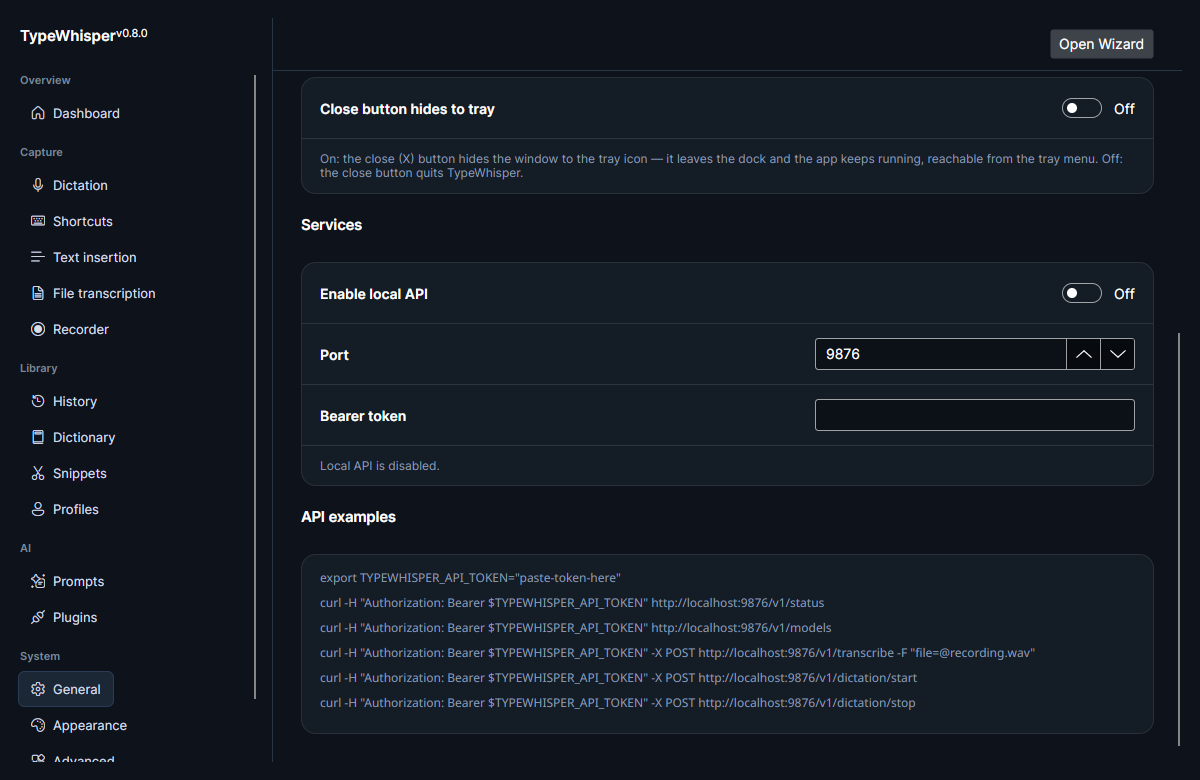
Configure the API on the General page:
| Setting | What it does |
|---|---|
| Enable local API | Turns the local HTTP API on or off. |
| Port | The port the API listens on. Defaults to 9876. |
| Bearer token | An optional token. When configured, requests must present it. |
When enabled, TypeWhisper listens on http://localhost:<port>/. The API binds to localhost only, so it is not reachable from other machines.
While the API is running, TypeWhisper writes the active port and bearer token to ~/.config/typewhisper/api-discovery.json (mode 0600). Local clients — including the CLI — can auto-discover the port and token from this file, so they usually need no port or token passed explicitly. The file is created at API start and deleted at stop.
| Endpoint | Method | Description |
|---|---|---|
/v1/status |
GET | App status, active model, and acceleration (see below) |
/v1/models |
GET | List available models |
/v1/transcribe |
POST | Transcribe uploaded audio (see options below) |
/v1/transcribe/local-file |
POST | Transcribe a file already on disk by absolute path (see below) |
/v1/history |
GET | Search history |
/v1/history |
DELETE | Delete history entries |
/v1/profiles |
GET | List profiles |
/v1/profiles/toggle |
PUT | Toggle a profile on or off |
/v1/dictionary/terms |
GET | List dictionary terms |
/v1/dictionary/terms |
PUT | Add or update dictionary terms |
/v1/dictionary/terms |
DELETE | Delete dictionary terms |
/v1/dictionary/corrections |
GET | List find→replace corrections (see below) |
/v1/dictionary/corrections |
PUT | Add or update a correction |
/v1/dictionary/corrections |
DELETE | Delete a correction |
/v1/dictation/start |
POST | Start recording; returns a sessionId
|
/v1/dictation/stop |
POST | Stop recording |
/v1/dictation/status |
GET | Check dictation state |
/v1/dictation/transcription |
GET | Poll the result of a dictation session (see below) |
GET /v1/status returns the app and engine state:
| Field | Description |
|---|---|
status |
ready when an engine is loaded, otherwise no_model. |
engine |
Active engine provider id. |
model |
Active model id (engine-local). |
activeModel |
Fully qualified plugin model id. |
apiVersion |
API version string (1.0). |
supportsStreaming |
Whether the active engine streams. |
supportsTranslation |
Whether the active engine can translate. |
acceleration |
Acceleration object, or null when the engine reports no status (see below). |
The acceleration object reports the local-model backend (see GPU & CUDA):
| Field | Description |
|---|---|
preference |
Configured preference (auto / cpu / cuda). |
activeBackend |
The backend actually loaded: nvidia-cuda or cpu. |
displayText |
Human-readable status (e.g. Using NVIDIA CUDA). |
detail |
Extra detail, when present. |
requiresRestart |
true when the preference differs from the loaded backend and an app restart is needed to switch. |
POST /v1/transcribe transcribes uploaded audio. It accepts these optional form/query fields:
| Field | Values | Description |
|---|---|---|
filename |
string | Name for the uploaded audio. |
language |
code | Force a transcription language. |
language_hint |
code (repeatable) | One or more hints to bias language detection. |
task |
transcribe or translate
|
Transcribe in the source language, or translate. |
target_language |
code | Target language when translating. |
model |
id | Override the model used. |
engine |
id | Override the transcription engine used. |
prompt |
string | Prompt/context passed to the engine. |
response_format |
json or verbose_json
|
Response shape (see below). |
Append ?await_download=1 to wait while the active engine restores or downloads its model before transcribing.
The standard json response includes text, language, duration, noSpeechProbability, engine, and model.
When response_format=verbose_json, the response additionally includes per-segment timing (start, end, text), so callers can build SRT/VTT output themselves if they need it.
POST /v1/transcribe/local-file transcribes a file that is already on disk by its absolute path — there is no upload. The request body is JSON:
| Field | Description |
|---|---|
path |
Absolute path to the audio file (required). |
language |
Force a transcription language. |
languageHints |
Array of language hints to bias detection. |
task |
transcribe or translate. |
targetLanguage |
Target language when translating. |
responseFormat |
json or verbose_json. |
prompt |
Prompt/context passed to the engine. |
engine |
Override the transcription engine. |
model |
Override the model. |
awaitDownload |
Wait while the engine restores or downloads its model. |
The path must exist and be a supported audio format. The response shape matches /v1/transcribe.
POST /v1/dictation/start begins a recording and returns { "started": true, "sessionId": N }. After stopping the recording (POST /v1/dictation/stop), poll the result with:
GET /v1/dictation/transcription?sessionId=N
The response carries a state:
-
in_progress— the session is still recording or transcribing. -
not_found— no such session (or it expired). - Otherwise the stored result, with
text,rawText,language,durationSeconds,engine, andmodel.
A typical flow is: start → record → stop → poll transcription until state is no longer in_progress.
Separate from /v1/dictionary/terms, the corrections endpoints manage find→replace rules:
| Method | Body | Description |
|---|---|---|
GET /v1/dictionary/corrections |
— | List corrections (original, replacement, caseSensitive). |
PUT /v1/dictionary/corrections |
{ "original", "replacement", "caseSensitive" } |
Add or update a correction (original and replacement required). |
DELETE /v1/dictionary/corrections |
{ "original" } |
Delete the correction with that original. |
- Uploaded audio conversion uses the same
ffmpeg-based importer as the File transcription page. - The API binds to
localhostonly.
- General settings — enable the API, set the port, and configure the bearer token.
-
CLI — the
typewhisperclient that talks to this API.
| Date | Change |
|---|---|
| 2026-06-17 | Initial version. |
| 2026-06-17 | Added local API screenshot. |
| 2026-06-17 | Documented local-file transcribe, dictation result polling, dictionary corrections, full status fields, and discovery file. |