Repository navigation
Widgets and Designs
| Category | Widgets |
|---|---|
| At a glance | Now: one tile with the one thing that matters right now: a fault, a turn within 1 km, low fuel, the parking timer ending, a break, rain or a weather warning, an appointment within 2 hours, servicing due; else a calm line with the time, weather and range. While driving it changes card only when something more pressing comes up; parked, it pages through what is active. A tap does the useful thing (that tile's dashboard, the cheapest fuel nearby, guidance to the appointment, said first with a few seconds to cancel) |
| Driving | Speed, compass, trip computer (This drive and Since fill-up side by side: distance, time, average speed, fuel and its cost), drive history (this week's distance, drives and cost, then your latest drives), g-force, eco driving, break reminder, gear (R / 1–6 / N, estimated from revs and speed), speed limit (OpenStreetMap; can say "Over the limit, 80" once per limit, off until you turn it on), GPS (satellites, accuracy, altitude), performance timer (0–50, 0–100 km/h, 400 m, best times kept) |
| Navigation | Built-in map, Google Maps / Waze directions, Maps window, Google Maps inside, parking spot, parking timer (30 min / 1 h / 2 h, the phone reminds you), fuel to destination, fuel prices (France), home and work (drive time, one tap guides), commute (average and best times), speed cameras (next fixed camera from OpenStreetMap; spoken warnings off by default, as they are illegal in some countries, France included) |
| Vehicle | Telemetry, fault codes, all OBD data, fuel & range, fuel log (refuels, real consumption, cost of 100 km), doors, car status, tyres, engine temperatures (20-minute graph), CAN monitor, particle filter, engine warm-up, battery, my car, servicing, LPG tank (see Car Care and Servicing) |
| Info & comms | Clock, weather (with hourly rain), weather alerts (official warnings here and at your destination; orange and red spoken), agenda, quick dial / phone favourites, share my arrival (texts a favourite your ETA through the phone), notifications, audio, voice notes |
| Media & apps | Music player (any app, plus the unit's BT music and radio), radio presets (your stored FM stations from every FM band; a tap tunes directly, switching back from AM first; names the radio announces are remembered and shown first), app launch bar, dashboard bar |
| System | Head unit monitor: CPU, RAM, temperature, busiest apps with Stop (CPU and apps need root) |
| Switches | Wi-Fi and Bluetooth on / off, Wi-Fi networks and Bluetooth devices (your connected phone on top; join or connect with a tap where the unit allows it), screen light (day and night levels that follow the headlights), quick switches (mute, day / night look, do not disturb, Wi-Fi, Bluetooth), second screen light |
Plus real Android widgets, app shortcuts and app icons.
Made for driving:
- Tiles never call, text or re-route on one tap: a 3 s Cancel step comes first, in the standard tiles and the designed ones alike.
- Entry tiles (fuel log, Wi-Fi, Bluetooth, voice notes) wait until parked; every widget has a sensible minimum size.
- The add sheet marks what needs an adapter, the phone or internet, and what is already on a dashboard.
- Small buttons answer a finger slightly off target: every control reacts to a 76 dp area, the size car makers use, without anything moving on screen.
Status of Now, drive history and the per-tank trip computer: emulator-tested, new on 2026-10-10.
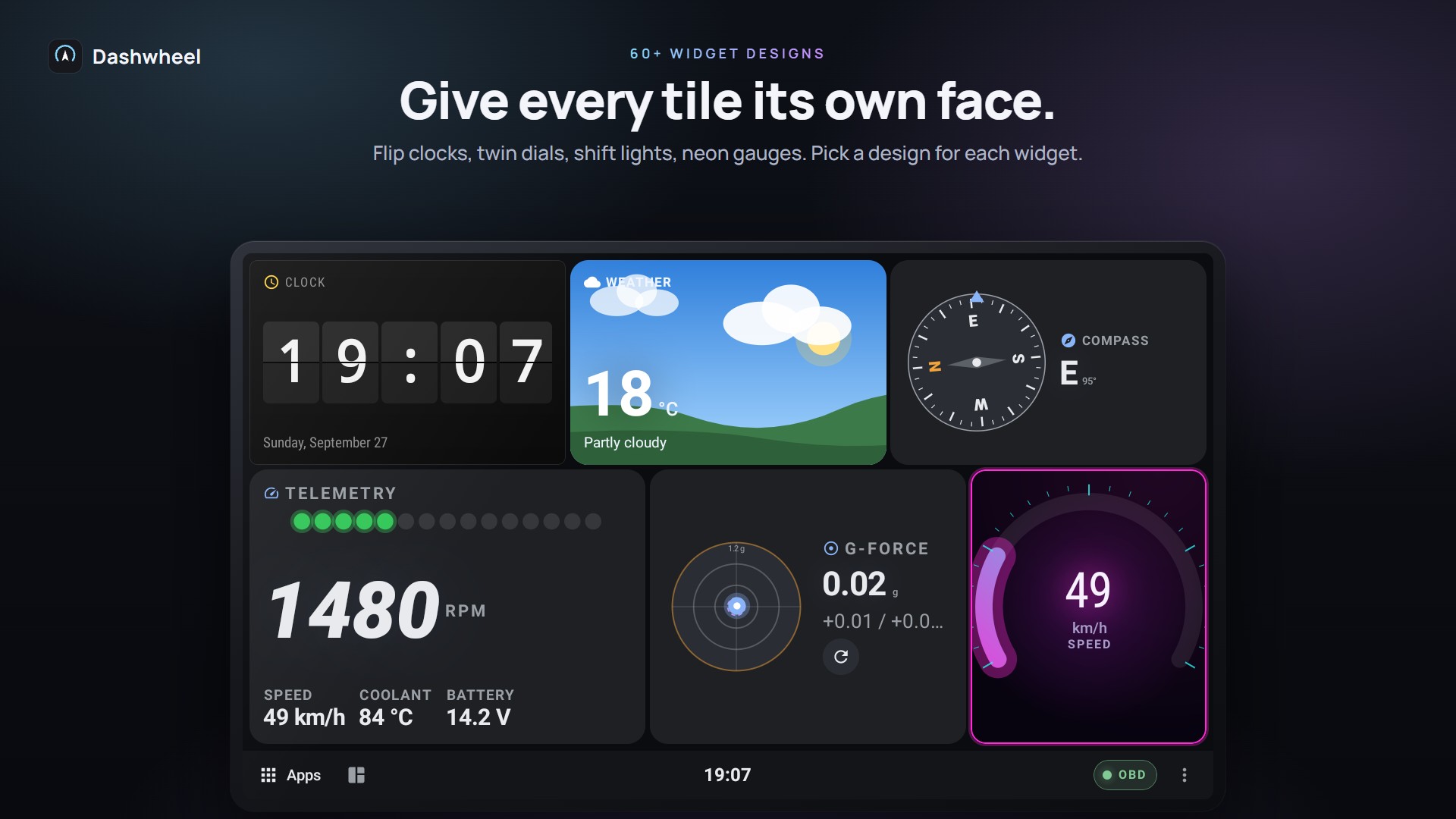
Each tile can wear its own design, picked from the design shelf in the tile panel with live previews: flip clock, twin dials, shift lights, LCD, neon, fuel tank, car top view, radar, road sign, gauge bank, printout, traffic light, gear gate, odometer, warning lamp…
The Cabins family (navy & gold, sage, crimson carbon, graphite) adds Lane view, Trend (a live area chart), Pulse, Contour, and the Tyre map / Car outline signatures, which can show your own car.
Designs never make up a reading: with no data they show -- instead of a needle at zero or a flat line, and designs keep the tile's buttons (Scan, Erase, Connect...). Decorative designs are listed as Parked looks for driving widgets. Designs follow the theme's palette and day / night mode. See Themes and Skins.
Getting started
Dashboard
Car
Road
Phone and screens
More
