Repository navigation
Graph nodes
Each node does one thing. The header’s color is who does the work, a port’s color is what goes through it; only ports of the same type can be linked («scene» and «video» share one color, blue, but can’t be linked).
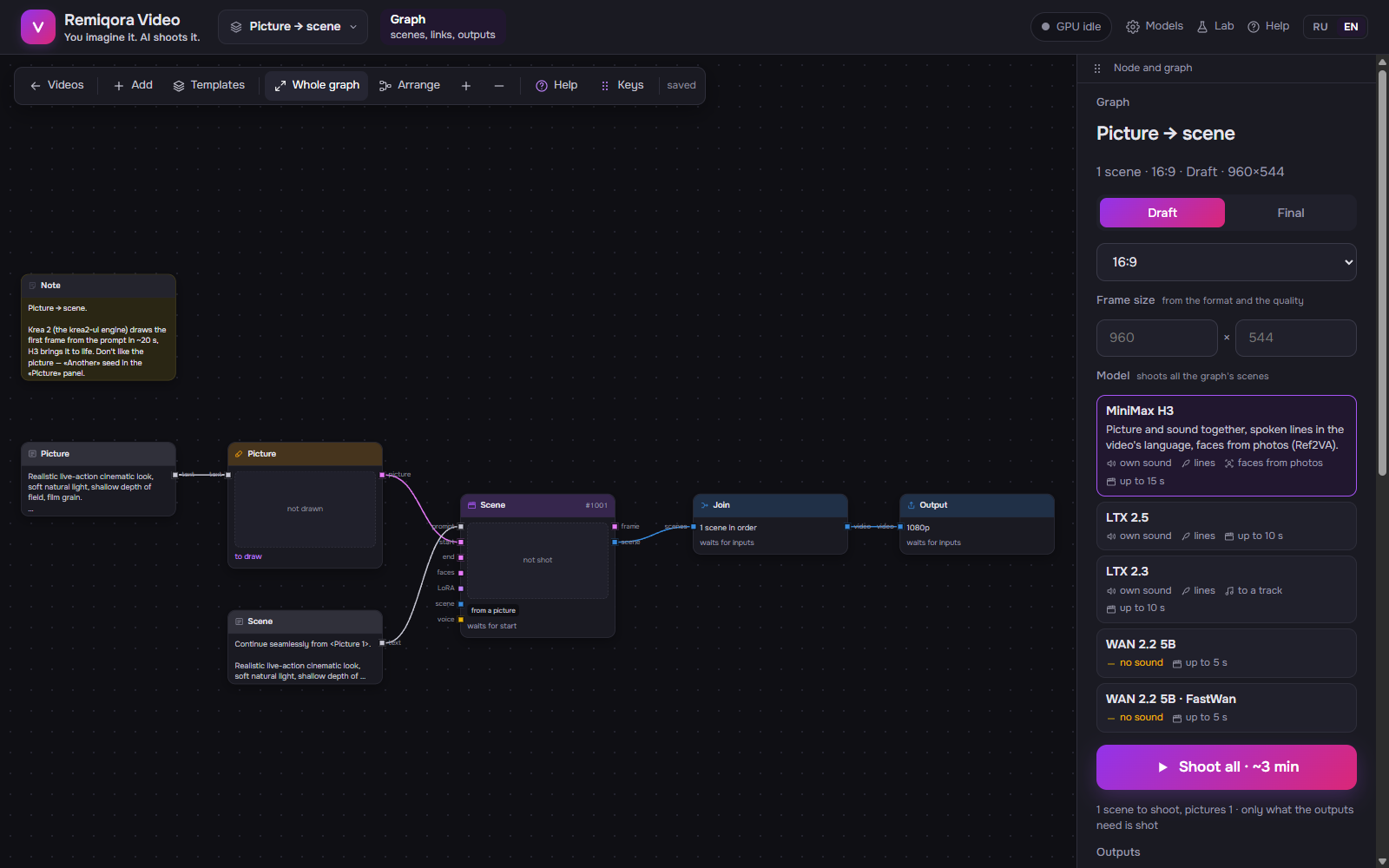 Picture → scene: Krea 2 draws the frame, the scene brings it to life
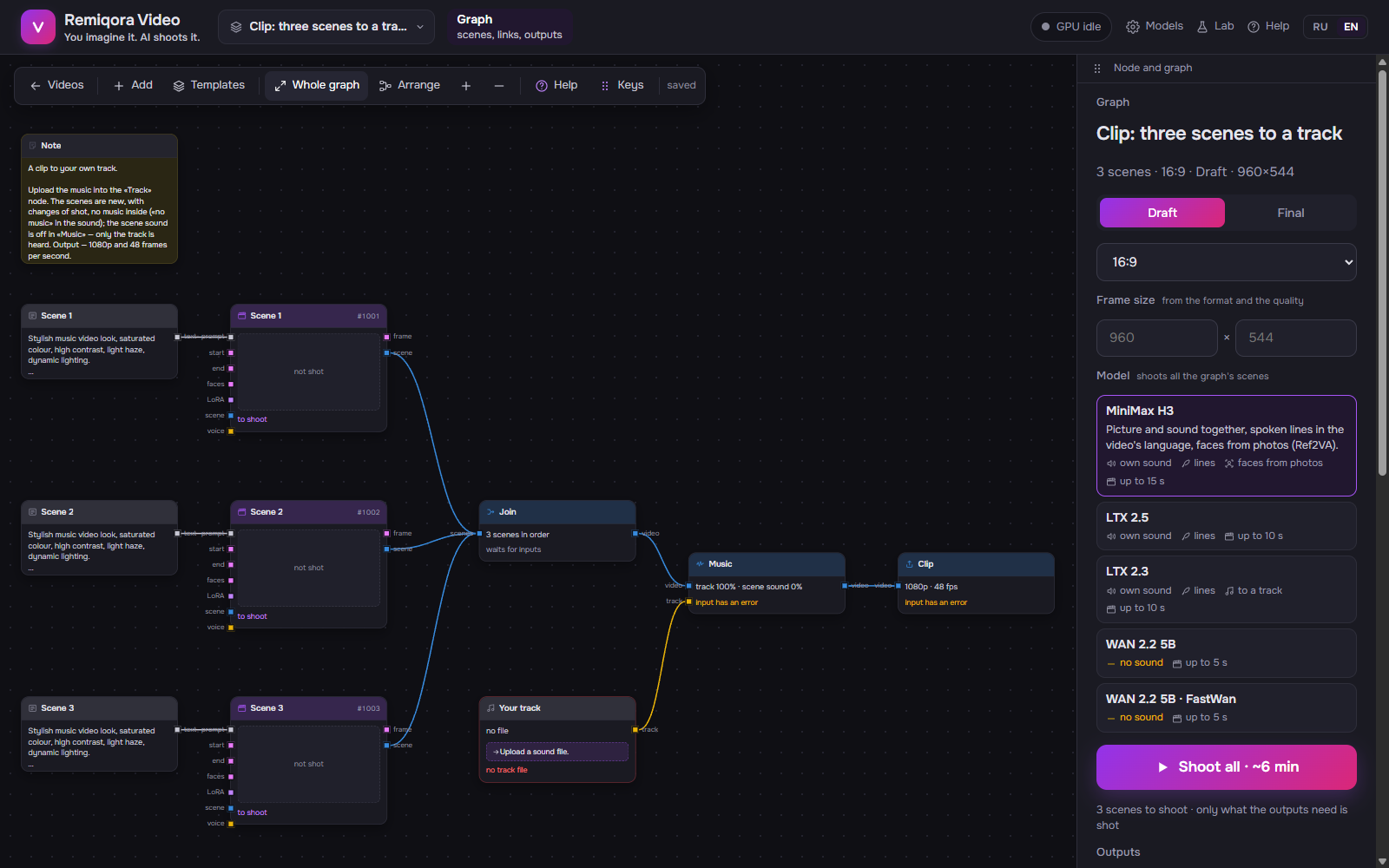 A clip to your own track: scenes, a join, the track and music before the output
model shoots · Writer (LLM) · join, ffmpeg and RTX · Krea 2 draws · clip rebuild · your data
text · look · picture · scene, video · sound · LoRA
Outputs
-
text— a couple of sentences in your language, into the Writer’s «idea» input
What the video is about, in your language (set on «Models» → «Writer»). «Turn into a prompt» is for when you want to shoot the idea right away, without the Writer: it translates the idea into an English prompt for the graph’s model, a «Prompt» node appears next to it, and the idea’s links to scenes and pictures move to that node.
Outputs
-
look— the hero’s description, into the Writer’s «heroes» input -
picture— the hero’s photo, into a Scene’s «faces» input (Ref2VA)
Photo, gender, age, look and outfit in English. «Describe from photo» fills them in by button. You can describe the hero in your language and press «Translate to English»: the Writer splits the description into look and outfit.
Inputs
-
idea— what the video is about, from an «Idea» node -
heroes— who is in the frame, from «Hero» nodes, several if you like
Writes a storyboard from the idea and the heroes («Write»). «Expand into scenes» places prompts and scenes, a join and an output to the right; after «Rewrite», the same nodes get new texts and keep their seeds.
Outputs
-
text— an English prompt, into the «prompt» input of a Scene, a Picture or «Video → video»
What is in the frame and what the heroes say, for the graph’s model (H3, LTX or WAN), as text or by fields, as in the Lab. The line «Continue seamlessly from <Picture 1>.» is added by itself if the scene starts from a frame. «Lines»: what the heroes say, in the video’s language; they go into the timeline and the sound.
Outputs
-
picture— into a Scene’s «start»: the first frame (cropped to the frame); into «faces»: a face for Ref2VA
Your picture from disk.
Inputs
-
text— what to draw, from a «Prompt» or an «Idea»
Outputs
-
picture— the drawn frame, into a Scene’s «start»
Krea 2 draws a picture from the prompt at the video’s frame size, on the same worker as the video, in about 3.5 s (the first one after video takes about 10 s). You can add a Krea LoRA with a strength.
Inputs
-
prompt— what is in the frame and what is said, from a «Prompt» node -
start— the first frame: a «Photo», a «Picture» or the «Frame» of the previous scene -
end— the frame the scene arrives at, LTX only -
faces— the hero’s photo: Ref2VA keeps the face, H3 only -
LoRA— LoRA sets from a «LoRA» node; a LoRA from a sample also changes the model that shoots -
scene— the sample clip for IC-LoRA and Ref2VA LoRA: its length and frame are used -
voice— the voice sample for ID-LoRA, from a «Track» or a «Scene sound»
Outputs
-
frame— the last frame, into the «start» of the next scene -
scene— the shot clip, into a Join, a Montage, a Frame, a Scene sound or «Video → video»
Shot by the graph’s model: H3 3–15 s, LTX up to 10 s, WAN 5 s without sound (5 by default). Without a «start» it is shot from the prompt alone, with a «start» from the picture, with an «end» it arrives at the picture. From a sample: a LoRA that reads a sample goes into the «LoRA» input (in the «LoRA» node, the «From a sample» group), and the scene is shot by that LoRA’s model: IC-LoRA (Alpha-Gen, 3DREAL, CrossView, upscale) and H3’s Ref2VA LoRA remake the clip from the «scene» input, LTX 2.3’s ID-LoRA shoots a talking hero, the face from «start», the voice from a piece of a «Track» in the «voice» input (from which second and how long is in the scene panel, 5 s is best), the prompt in [VISUAL] / [SPEECH] / [SOUNDS] or plain text with lines. WeSpeaker measures how close the voice is to the sample: «sounds like it» from 0.6, «doesn’t» below 0.4, «partly» in between; a sample with music lowers the score. The shot clip is checked as in the storyboard: «In the clip: …» in the panel and a badge on the node. Takes, continuations and montage work as for any scene.
Inputs
-
scene— the clip to remake, from a Scene or another «Video → video» -
prompt— if the LoRA asks for a prompt, from a «Prompt» node -
picture— the character to swap in (Character-Swap), from a «Photo» -
LoRA— LoRA with strengths, from a «LoRA» node
Outputs
-
scene— the remade clip, into a Join, a Montage, a Frame or the next «Video → video»
The clip again, through a LoRA that reads the clip itself: IC-LoRA for LTX 2.5 (Alpha-Gen removes the background, Restore, Deblur…), IC-LoRA for LTX 2.3 (3DREAL turns a 3D render photorealistic, CrossView gives another camera position, upscalers make the clip bigger) or a Ref2VA LoRA for H3 (Character-Swap replaces the hero with the character from the picture). The LoRA is chosen in the node; how to run it comes from its profile: whether it needs a prompt and what word the prompt starts with, one or two stages, how many frames at a time, how many times bigger the result is than the clip. Alpha-Gen gives a mask and a clip with a transparent background; in the node panel it downloads for editing (MOV ProRes 4444: DaVinci, Premiere) and for the web (WebM: browsers, OBS). A regular player doesn’t show transparency and plays the whole clip. A clip longer than the LoRA takes at once goes in pieces. Your own profile for a LoRA is a <name>.v2v.json file next to it. Such LoRA don’t go into scenes: there they give a flat picture.
Inputs
-
scene— the clip, from a Scene or «Video → video»
Outputs
-
picture— a frame of the clip, into another Scene’s «start»
A frame from a scene: the last one or at any moment within its length. A continuation doesn’t have to start from the end.
Inputs
-
scene— the shot scene whose sound to take
Outputs
-
track— the scene’s voice, into the «voice» of the next Scene (ID-LoRA) or the «track» of Music
The sound of a shot scene, by default only the voice (Demucs separates it from music and noise, ~1 min on the GPU). So the hero speaks in the same voice throughout the video.
Outputs
-
LoRA— a set with strengths, into the «LoRA» input of a Scene or «Video → video»
A set of LoRA with strengths. The LoRA belong to the graph’s model (H3, LTX or WAN), from its folder. A scene can have several sets, different scenes different ones.
Inputs
-
scenes— clips in order, from Scenes and «Video → video», as many as you like
Outputs
-
video— the joined video, into Music or an Output
Scenes in order (the order is in the panel on the right). A continuation from its own last frame is joined without repeating the frame. Sound is cut in whole frames together with the picture and isn’t shifted, as in the montage; at a cut, 0.03 s of smoothing prevents clicks. «Make a montage» turns it into the same node with a montage editor.
Inputs
-
scenes— clips for the montage, from Scenes and «Video → video», as many as you like
Outputs
-
video— the edited video, into Music or an Output
A join with an editor, the same one the storyboard has: trimming, splitting (S), copies, speed, transitions, scene takes, sounds from files, undo. «Open montage» in the node panel; the montage is stored in the node, each branch has its own. «Video → video» clips come each as a separate clip, without takes. The track comes from a «Music» node after it.
Outputs
-
track— an audio file, into Music’s «track» or a Scene’s «voice» (a voice sample, 5–10 s of clean speech is best)
Your audio file: mp3, wav, m4a, flac or ogg, or «Record voice» from the microphone.
Inputs
-
video— from a Join or a Montage -
track— from a «Track» or a «Scene sound»
Outputs
-
video— the video with music, into an Output
The track over the video: track and scene sound volume, from which second of the track, fade-in and fade-out.
Inputs
-
video— from a Join, a Montage or Music
The finished file: as shot, 1080p or 4K via RTX, HDR10, 48 frames per second. There can be several outputs, each its own version.
Text on the canvas; it does nothing.
A titled frame behind nodes. Drag it by its header and the nodes inside move with it.