Repository navigation
gsheet_add_seg_details
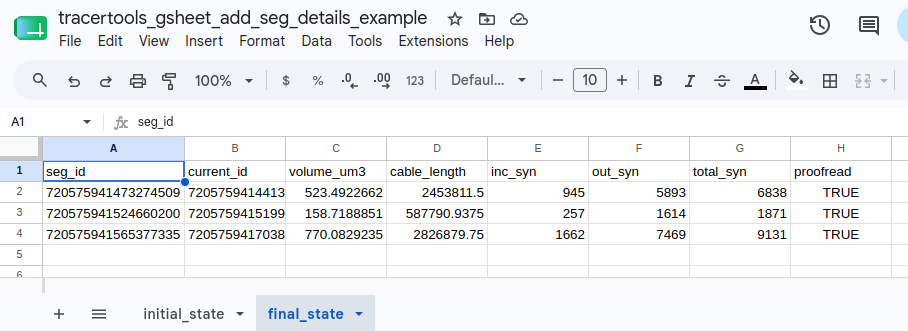
This function gets neuron details for a list of segment IDs in a Google sheet column and adds them to the sheet using the gspread package. This requires a tab in the sheet with a single column of segment IDs with a header. By default, it adds columns for 3d volume, cable length, synapse counts, and proofreading status, but each of these can be toggled off independently as desired.
Note
Google-sheet-related functions require a security token to be set up prior to use. Read the Google Sheets Setup for a guide on how to do this.
Arguments:
-
datastack(string, mandatory)- the name of the CAVE datastack the segment IDs belong to
-
sheet_key(string, mandatory)- the unique key for identifying the google sheet
- can be found in the url of the sheet between
/d/and/edit?
-
tab_name(string, mandatory)- the name of the tab you want to update within the google sheet
- "tab" is an informal term, officially these are called "worksheets" within Google's documentation
-
volume(boolean, optional, default=True)- whether or not to include 3D volume data in cubic micrometers
-
cable_length(boolean, optional, default=True)- whether or not to include skeleton cable length data
-
synapse_counts(boolean, optional, default=True)- whether or not to include synapse count data
-
proofreading(boolean, optional, default=True)- whether or not to include proofreading status
-
oauth(boolean, optional, default=False)- by default this function assumes you want to use a google service account for authentication
- setting this to
Trueattempts to use an OAuth token instead
Returns:
- fills the chosen tab with the requested data (including a copy of the original segment ID column)
Returns "ERROR" string if a particular lookup process encounters a problem to avoid crashing the whole run. In some cases, like connection or server-side issues, waiting a bit and rerunning can fix this. In others, like cases where a segment is too large for the requested lookup (e.g. the CT1 neurons in Drosophila) or the initial ID is bad, rerunning won't work.
The following example uses this Google sheet.
First, we start with a Google sheet containing a headered column of segment IDs.
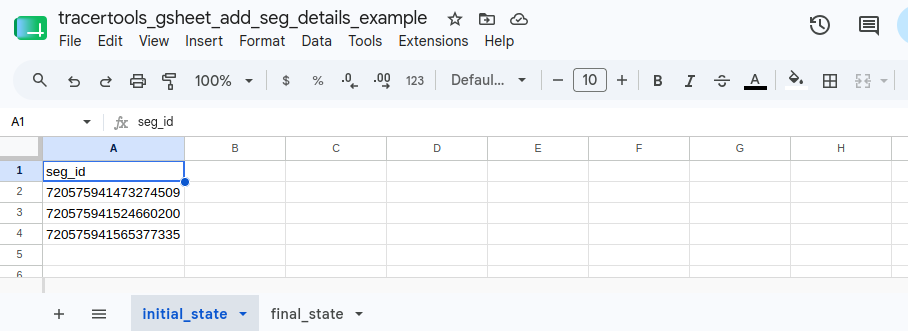
Then you can run the following code to populate it with the requested data.
INPUT:
import tracertools as tt

tt.gsheet_add_seg_details(
    datastack = "brain_and_nerve_cord",
    sheet_key = "1Mq93HT7iEv-E1-4NCN9_bcMIGzbTVC9A0S5ZqYr4VAg",
    tab_name = "final_state",
)
You should now have a filled in sheet:
Note
This function writes one row at a time to allow for continuous monitoring for issues when running very large lists. The amount of time required for each segment's lookup processes varies with segment size, synapse number, and connection speed to the host servers. In particular getting the cable length requires skeletonizing the segments, which can take a minute or two per segment depending on size and whether that skeleton has already been cached recently. Time estimates for each segment will print out as they're fed into the skeletonization service. On average, a good starting point is to budget 20-30 seconds for each segment to run. An option for batch submission is planned for the future.