Repository navigation
gsheet_get_col_as_list
This function gets the data of a Google sheet column as a Python list using the gspread package. Each cell in the column will become an item in the list.
Note
Google-sheet-related functions require a security token to be set up prior to use. Read the Google Sheets Setup for a guide on how to do this.
Arguments:
-
sheet_key(string, mandatory)- the unique key for identifying the google sheet
- can be found in the url of the sheet between
/d/and/edit?
-
tab_name(string, mandatory)- the name of the tab you want to update within the google sheet
- "tab" is an informal term, officially these are called "worksheets" within Google's documentation
-
col_num(integer, optional, default=1)- the number of the column you want to convert
- column numbers start at 1 for column A, which is the default
-
ignore_header(boolean, optional, default=False)- if set to
True, will skip the first row of the column
- if set to
-
oauth(boolean, optional, default=False)- by default this function assumes you want to use a google service account for authentication
- setting this to
Trueattempts to use an OAuth token instead
Returns:
-
col(list)- a list of the values in the column
The following examples uses this Google sheet.
First, we start with a Google sheet populated with segment info.
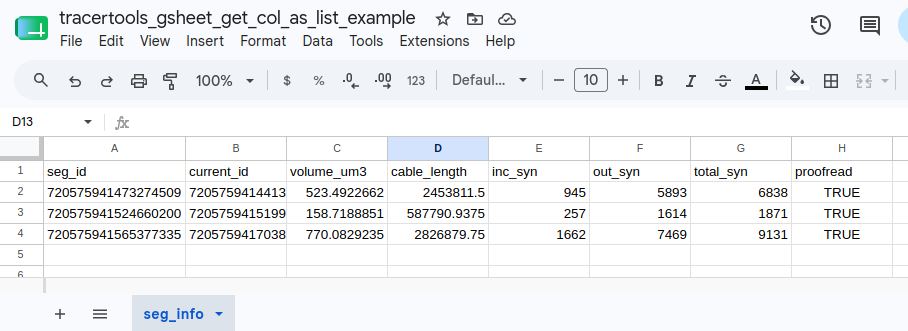
The following code will grab the data in the first column and return it as a Python list.
INPUT:
import tracertools as tt

col_data = tt.gsheet_get_col_as_list(
    sheet_key = "1Qvm6AVyd2zI7BRTHrvJOM_-QvI3vR3qW9pW3_WucGsc",
    tab_name = "seg_info",
)

print(col_data)
OUTPUT:
[
    'seg_id',
    '720575941473274509',
    '720575941524660200',
    '720575941565377335'
]
The following code will grab the data in the fourth column and return it as a Python list without the header from the first row.
INPUT:
import tracertools as tt

col_data = tt.gsheet_get_col_as_list(
    sheet_key = "1Qvm6AVyd2zI7BRTHrvJOM_-QvI3vR3qW9pW3_WucGsc",
    tab_name = "seg_info",
    col_num = 4,
    ignore_header = True,
)

print(col_data)
OUTPUT:
[
    '2453811.5',
    '587790.9375',
    '2826879.75'
]