Repository navigation
Cloud backup
Your high scores, saves and settings in a cloud of your own: Google Drive, Dropbox, WebDAV (Nextcloud, ownCloud), SFTP (a PC or a NAS) or MEGA. Every cabinet you sign in uses the same folder, so a record made on one shows up on the others.
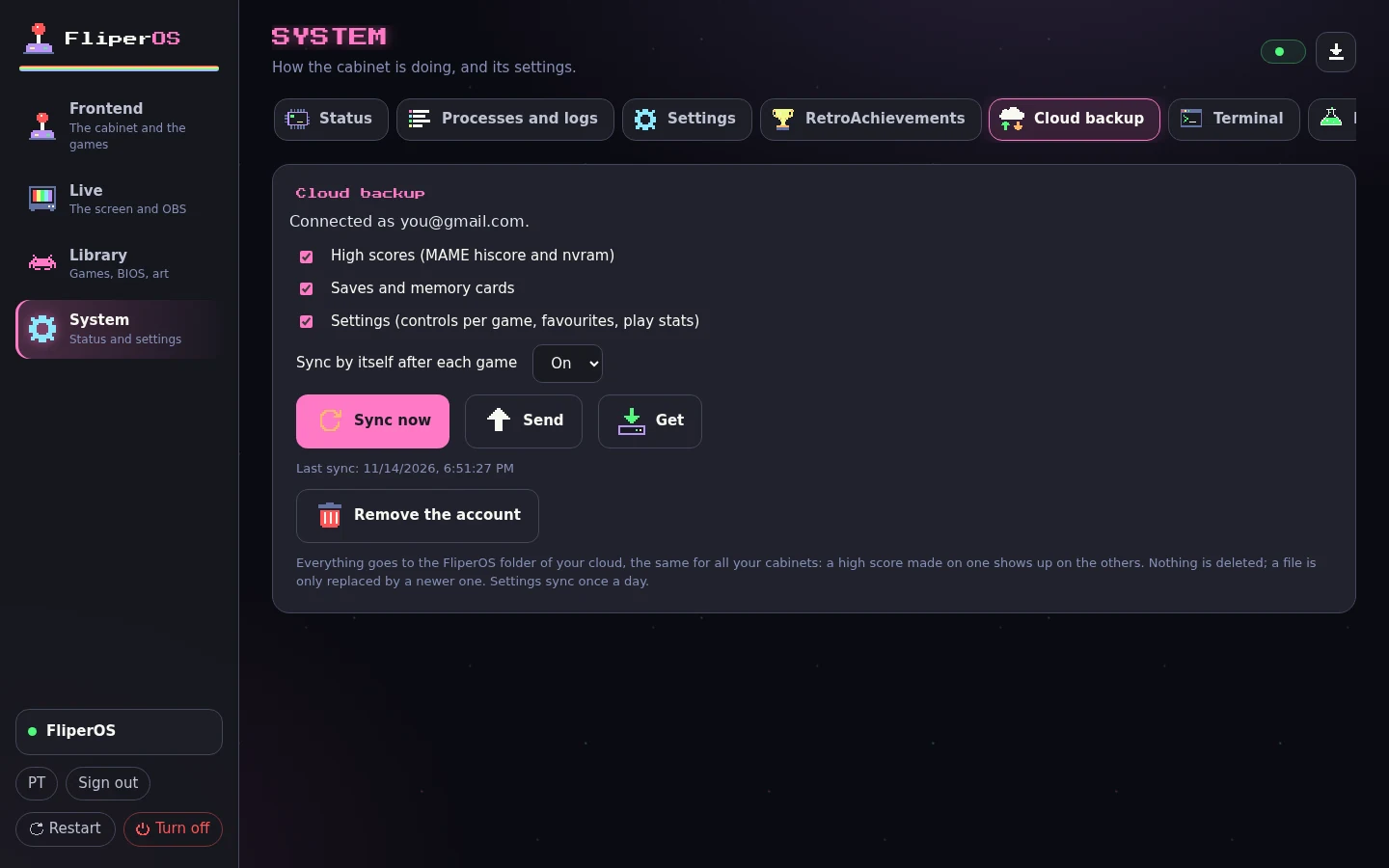
It is in Setup > Cloud backup on the cabinet, and in System > Cloud backup in the web panel.
- Open Cloud backup. The first time it installs rclone, a small download.
- Choose where the files go.
- Sign in (below). The first sync starts by itself, with a progress bar (the percentage of files sent, from rclone's own count) on the Setup screen, on the tube and in the graphical menu, and on the web panel's Cloud page.
| Cloud | How you sign in |
|---|---|
| Google Drive | Sign in with Google, like a smart TV: the screen shows a QR code and a code. Open the address on a phone or a computer, type the code and approve. The cabinet waits and finishes by itself |
| Dropbox | At Dropbox's site, so only from the web panel, on a phone or a computer |
| WebDAV | The folder's address (https://...), user and password |
| SFTP | The computer's or NAS's name or IP, the SSH port (22), user and password |
| MEGA | User and password |
Google only sees the FliperOS folder: the cabinet asks for access to the files it creates itself, nothing else in your Drive.
Passwords are saved hidden, only on this cabinet.
| Item | What it does |
|---|---|
| Sync now | Both ways: each side keeps the newest file |
| Send | Only from this cabinet to the cloud |
| Get | Only from the cloud to this cabinet |
| By itself | Syncs the high scores and saves after each game, and the settings once a day |
| What to sync | High scores, saves and settings, each one on or off |
| Remove the account | Forgets the account on this cabinet; the files stay in the cloud |
The top of the screen shows the account and the last sync.
Nothing is ever deleted, on either side: a file is only replaced by a newer one. Going back to a cabinet, only what is newer than what it has comes in.
| Group | What it carries |
|---|---|
| High scores | MAME's hiscore files (~/.mame/hiscore, and HBMAME's ~/.hbmame/hiscore on a cabinet that has it) and the arcade memory (~/nvram) |
| Saves | Saves and memory cards (~/save) |
| Settings | What you set and what you leave behind: played games, time played, favourites, the emulators' and frontends' settings, button maps, the on-screen menu's profiles |
The monitor and video settings never come back from the cloud, since another cabinet may have another tube. Art, videos, cores, themes and caches don't go: they are downloaded or made again.
In the cloud everything is in a FliperOS/ folder, with hiscores/, saves/ and config/ inside.
- Google Drive is not in the list: the cabinet couldn't get FliperOS's Google sign-in. Check the internet and open the screen again, or use the web panel.
-
The sync failed: the log is
cloudin the web panel's System > Processes and logs, or/opt/fliperos/logs/cloud.log.
-
config/fliperos-cloudruns as thefliperosuser, with the rclone remotefliperosin~/.config/rclone/rclone.conf; its state is~/.config/fliperos/cloud.conf. Commands:status,remote KIND(fields on standard input, never on a command line),forget,auto on|off,what LIST,sync [push|pull|both],watch PID,google start|status|cancel. - Each side gets
rclone copy --update, neversync, so nothing is deleted. -
By itself:
fliperos-kms-runandfliperos-x11-runstartfliperos-cloud watch PID, which syncs when the game closes, at most every 2 minutes; the settings once a day. -
Sign in with Google is Google's "OAuth 2.0 for TV and Limited-Input Devices", with FliperOS's own client (type "TVs and Limited Input devices", scope
drive.file) in/etc/fliperos/google-oauth.conf. The waiting runs as a detached process, so the Setup and the panel only read its state; a code that expires is renewed by itself, and with nobody looking for 10 minutes it gives up. Remove the account revokes the token at Google. - Dropbox signs in with
rclone authorizeon the cabinet: the panel takes the site's address from it and hands the code back. WebDAV, SFTP and MEGA passwords reach rclone on standard input and are saved obscured (rclone obscure -). - The Setup screen is
screen_cloudinscreens/setup-menu.sh, on top oflib/cloud.sh.
See also: Web panel, ROMs, BIOS and artwork.