Repository navigation
Web panel Live
The Live area of the web panel shows the cabinet's screen live in the browser, with sound, and gives three pages for OBS: the live screen, the game's marquee and the controller.
What is on the tube, live: the game, the frontend, the menu, the desktop and the text console.
| Control | What it does |
|---|---|
| 15, 30 or 60 fps | Frames per second |
| Quality | Light (weak Wi-Fi), Normal, High or Maximum (network cable) |
| Sound | The stream starts muted when the browser asks for it; this turns the sound on |
| Full screen | The picture alone |
The card shows the size, the frame rate and the delay in the browser's buffer. A new quality counts once nobody is watching the old one: refresh the OBS source too.
The page shows the cabinet's network, and recommends a network cable when the cabinet is on Wi-Fi: a USB Wi-Fi adapter loses packets, and each loss freezes the picture for a moment.
The first boot installs and turns on the live screen. If it couldn't download (no internet), install it with Install on the Streaming card, or in Setup > Games > Extras > Live screen. Then it is a service in Setup > System > Services (Live screen).
The Streaming card has the service state, the encoder (the graphics card, or software), the sound, and Turn off.
The live screen carries the cabinet's sound, on by default. A game opened after the sound was turned on goes to the stream with sound; one already open keeps playing only on the cabinet until it is reopened. It is in System > Setup > Network > Live screen.
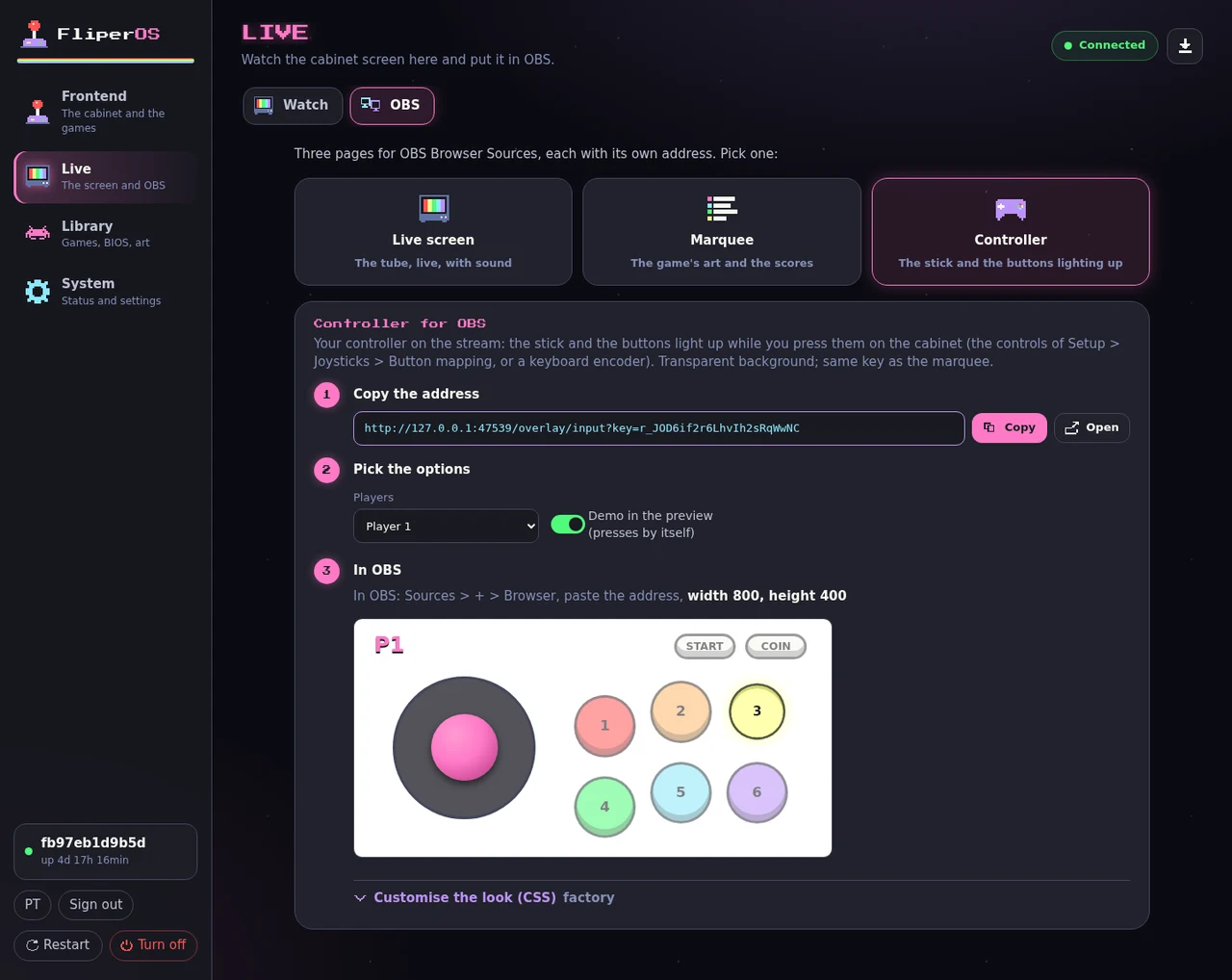
Three pages for an OBS Browser Source, each with its own address. In OBS: Sources > + > Browser, paste the address, set the width and height the card gives.
The screen in 4:3, as on the tube (or stretched to the whole source), with the sound: tick Control audio via OBS. It reconnects by itself.
Delay for OBS: while the stream plays on the page, a balloon under the OBS steps says how many milliseconds to delay your camera (its source: Filters > + > Render Delay) and your microphone (Edit > Advanced Audio Properties > Sync Offset), so they line up with the game. On the cabinet over Wi-Fi it is about 300 ms.
The marquee of the game on screen, as a page with a transparent background. It needs no Pixelcade or ZeDMD.
- It shows the game's art, the same as the ZeDMD uses (
~/media/dmd,marqueeorlogo), or the name without art. - The opening text (the high scores, or "Now Playing") scrolls once, achievements pop up, and the versus score shows each side's name and wins (Scoreboard games).
- When the frontend is idle, it plays the ZeDMD's logo animation.
- In OBS: width 1280, height 320.
&led=1draws it as LED dots,&text=0leaves the texts out.
Turn it on with Turn on the marquee page on the card, or Marquee overlay for OBS in Settings.
The player's stick and buttons lighting up on the stream, restyled in the panel with a live CSS editor. It has its own page: Controller on the stream.
The OBS pages can't sign in, so their address carries a key. New address makes another key, and the old address stops working, for all three pages. The key only opens these pages: the marquee, the current game's picture, the live screen and the controller.
-
go2rtc (
fliperos-stream.service, MIT, a pinned version checked by sha256) opens ffmpeg only while someone watches. ffmpeg reads the screen from DRM (kmsgrab) and encodes H.264. -
Reading the screen: on AMD cards (radeon and amdgpu) the driver doesn't let the screen's buffer be mapped into memory, so the frame goes through VA-API's video processing, which copies and scales it on the card. Cards that allow the mapping read it directly (
hwdownload). ffmpeg runs withlibfliperos-dropmaster.so(config/fliperos-dropmaster.c): opening/dev/dri/cardNwhen nobody owns the screen made ffmpeg the DRM master, and X and the graphical Setup could no longer open the video. - Encoding: on the graphics card (VA-API) when it has an encoder; otherwise in software with x264 (no B-frames, a keyframe every second). The R7 240 has no encoder (its Oland chip has no VCE); the cabinet's i7 870 keeps 60 fps with x264.
-
Mode changes: kmsgrab stops when the framebuffer changes size, which happens every time a game opens or closes on a 15 kHz screen. So the capture is two processes: the grabber (
fliperos-stream grab) runs kmsgrab in a loop, reopening it at the new size, and always outputs raw 640x480 RGB; the encoder reads that pipe and never stops. A mode change costs about a second of frozen picture, with the sound still in sync. -
Size: never larger than 640x480. The frame is scaled with nearest-neighbour to 640x480 (4:3) before it is encoded: 640x240 doubles each line, 480i stays, RetroArch's 2560x240 drops to a quarter across. The panel and the OBS page draw each frame on a canvas that the browser enlarges without smoothing (
image-rendering: pixelated), since browsers always smooth a<video>. -
Bitrate: at Normal, 1.5 Mbit/s at 15 fps, 2 at 30 and 3 at 60, with half a second of buffer; Light is 0.6 times that, High twice (x264 preset
superfast), Maximum 3.5 times (veryfast). The choice isstream_quality=infliperos.conf. -
Network: WebRTC goes over TCP only (
listen: ":8555/tcp"): over UDP the cabinet's USB Wi-Fi lost packets, and go2rtc can't ask ffmpeg for a new keyframe, so each loss froze the picture until the next one. The browser sends its offer to the panel (/api/stream/offer), so the panel login applies; go2rtc's own API only listens on127.0.0.1. The video then goes straight to the browser on the local network, on port 8555, with no outside server. -
Sound:
snd-alooploads as the cardFliperOSLoop;asound.confgets a route that feeds the real card and the loopback with the same format, and ffmpeg records the loopback in Opus. Turning it on tests thedefaultdevice first, and the copy only goes intoasound.confwith the loopback really there, so the game sound never breaks. - Delay for OBS is measured from the browser's last second of WebRTC stats (buffer and decode time, half the round trip) plus the cabinet side (about two frames of capture and encoding; for the sound, the loopback period and the Opus frame).
-
Marquee:
fliperos-pixelcade, which gets every event (kms-run, x11-run, GroovyMAME, the Attract-Mode Plus plugin, the ES-DE scripts), writes the current marquee to$XDG_RUNTIME_DIR/fliperos-marquee; the page asks for it every second, and the art comes fromfliperos-dmd art. -
The key is created on first use in
/etc/fliperos/overlay.key(root only). The pages are/overlay/live?key=…&fps=…(&fit=fillstretches it,&muted=1drops the sound),/overlay/marquee?key=…and/overlay/input?key=….
See also: Web panel, Controller on the stream, Frontends.