Repository navigation
Updates and versions
FliperOS gets new features and fixes without a new ISO: numbered updates, applied in order over the network. You can also go back to an earlier update if one broke something.
- The cabinet looks for one by itself, in the background, after the first screen opens. The boot doesn't wait for the network to do it.
- At the next boot, a known update shows first what it changes (the changelog of each part, with scrolling), then the files of this machine it replaces, and asks.
- Apply now installs it there, with a progress bar. If it needs a restart, it asks.
- Not now leaves it for later: it installs when you power the cabinet off (not on a reboot).
Without a network at boot, nothing is asked: the update goes in at the next power off.
Other moments it is checked or applied:
- First boot: the updates published after the ISO go in as soon as there is internet (Installed system).
- Connecting to Wi-Fi in Setup > Network Setup checks right away.
- A game at boot: the question comes after the game, on the way to the menu.
The screen before the question has Read what changes (the changelog again) and View the files (every file it replaces, when they don't fit).
An update never touches your personal files: fliperos.conf, button maps, ROMs, saves, frontend lists.
Before asking, it lists the files changed on this machine that it would replace. Each one is copied first to /var/lib/fliperos/update/backup/<N>-<date>/, and sudo fliperos-update restore N puts them back.
After it is applied, the Setup choices (video, latency, buttons) are applied again, so the cabinet stays set up as it was.
If one part fails, nothing after it goes in, and it is offered again at the next boot. The log is /var/log/fliperos-update.log.
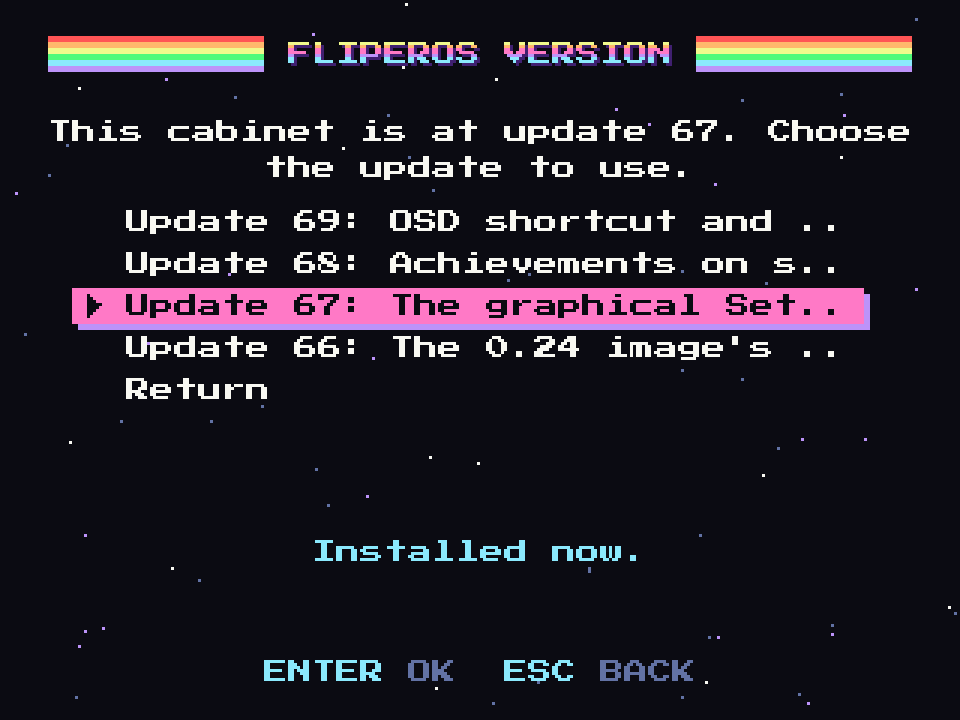
Setup > System > FliperOS version, and System > Setup > System > FliperOS version in the web panel, list the updates from the one the cabinet's image came with up to the newest.
| You pick | What happens |
|---|---|
| An earlier update | It undoes the ones after it. The files it replaces are copied first, as above |
| A newer update | It installs the ones up to it |
| Follow the updates | Back to the newest, and to following new ones |
On an earlier update the cabinet stays there: the boot no longer asks, and nothing is installed at power off, until a newer update than the ones it had seen comes out.
Use it to go back when an update broke something on your cabinet, and tell the Telegram group what broke.
After a new version or a new update, the FliperOS menu opens once on What's new in FliperOS, with scrolling (up and down a line, left and right a page):
- the updates installed since the last time, each with its changelog;
- the CHANGELOG sections of the versions since then.
Setup > System > What's new shows it again, with every update and every version. A new install starts with its own version marked as seen, and the installation media doesn't show it.
Setup > System > System Update is Ubuntu's own update: apt-get update and upgrade, with apt's real progress. It is separate from the FliperOS updates and needs the internet.
Before it, and before installing an Extra, FliperOS fixes the error "Conflicting values set for option Signed-By": when the same repository is in two apt sources with different keys (WineHQ added by hand next to the Setup's Wine Staging), the FliperOS one stays and the other is turned off.
A cabinet installed from an image older than the update system, or stuck on an update, gets going with:
curl -fsSL https://raw.githubusercontent.com/juniorterin/fliperOS/main/updates/bootstrap.sh | sudo bash- Updates are numbered and always applied in order: update N only goes on a machine at N−1 (
/etc/fliperos/patch-level), and a list with a gap is refused. - Each one is a repository commit listed in
updates/indexwith the sha256 of its files, downloaded over HTTPS from GitHub and checked before anything is written, plus an optionalupdates/NNNN.shfor what isn't a file copy, and its changelog inupdates/notes/NNNN.md. Updates also carry the FliperOS packages of the newest ISO (updates/packages.list). - The background check is
fliperos-update-check.service(fliperos-update check --save, waiting up to 2 minutes for the network). Power off applies it infliperos-update-shutdown.service, which stops before the network, so it can still download; it has 20 minutes. - Before asking, the update is rehearsed in an overlay over
/, and each file it would write is compared with what FliperOS itself installed:/var/lib/fliperos/update/manifesthas the sha256 of each file, recorded by the ISO and by each update. - The version chooser is
fliperos-update versionsandgoto N|latest. An earlier choice leaves/etc/fliperos/update-hold;goto latest, or a newer update, ends it. - What's new reads
/usr/local/share/fliperos/update-notesand/usr/local/share/fliperos/CHANGELOG.md; what was already seen iswhatsnew_versionandwhatsnew_levelinfliperos.conf. - The apt fix is
fliperos-update apt-heal: the duplicate.listline becomes a comment, a.sourcesblock getsEnabled: no. - How an update is made and published: Build and tests.
See also: System Setup, Installed system.