Repository navigation
GroovyMAME
GroovyMAME is MAME with Switchres inside: every arcade game opens in its own original video mode, on the tube. It is the arcade emulator of FliperOS, as on GroovyArcade. Its games go in ~/roms/mame.
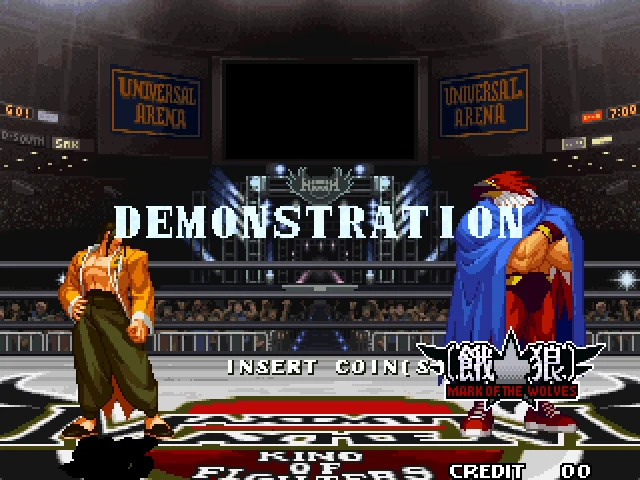
GroovyMAME runs in KMS, without Xorg, like GroovyArcade. Switchres makes each game's exact mode and SDL switches to it. On the cabinet: Street Fighter II at 384x224@59.64 (99.9% speed), The King of Fighters '98 at 320x224@59.19.
Interlaced games (more than 240 lines) follow Setup > Video Setup > Interlaced hacks: interlaced with the flicker filter by default, or 640x240 (Interlaced, colour and scanlines).
- Leaving a game: coin + Start held for a second, or Esc on a keyboard.
- MAME's menu: coin + button 1 held for a second, or Tab (Frontend controls).
- The power button closes the game at once, and MAME saves the high scores, NVRAM and settings, as with Esc.
-
High scores are saved by the
hiscoreplugin in~/.mame/hiscore, and shown on a Pixelcade or ZeDMD (LED displays). - Multi-screen games (Darius, The Ninja Warriors, Punch-Out!!) open each screen on its own monitor (Multiple monitors).
- Party play: every GroovyMAME game for two or more players can be played across 2 to 4 cabinets (Linked cabinets).
When a game stops at "System media audit failed", files are missing: BIOS and device ROMs come in zips separate from the game.
- The reason is in
/opt/fliperos/logs/groovymame.log(or the web panel's System > Processes and logs). -
groovymame -verifyroms GAMElists the missing files. - A missing BIOS is brought by Download BIOS. By hand, everything goes in
~/roms/mame(BIOS can also go in~/bios/mame), from the same MAME version, 0.289.
The FliperOS package is GroovyMAME gm0289sr222f (MAME 0.289 with Switchres 2.22f), built with FliperOS's party patch. FliperOS updates bring new packages.
Setup > Games > Emulators & Games > GroovyMAME > Build the newest compiles the newest GroovyMAME right on the cabinet, with the same patches. It takes many hours, often a whole night, with 20 GB free; each MAME version changes the romset. Back to the FliperOS package returns to the tested one (Games Setup).
HBMAME is MAME with the hacks and homebrews of arcade games (Robbbert's build). FliperOS has it with the same Switchres as GroovyMAME: the hbgroovymame command opens each game in its own mode on the tube. Its games go in ~/roms/hbmame, apart from GroovyMAME's ~/roms/mame, so nothing mixes: it has its own ~/.hbmame, ~/nvram/hbmame, ~/save/hbmame, ~/bios/hbmame and art in ~/media/<type>/hbmame.
-
It installs itself. HBMAME does not come in the image. The
hbmamefolder exists from the installation; when the first game is in it and you open it in the frontend, a bar installs HBMAME (a package already built, so it takes the time of a download) and the game opens. By hand: Setup > Games > Emulators & Games > HBMAME. -
It is a system of its own in every frontend (HBMAME, next to MAME), with the game names from HBMAME's own list, which knows the hacks. Right after the install the Setup reads that list (the
-listxmlof HBMAME, kept in a cache) and remakes the game list, so the clones that come inside a merged zip (ssf2t.zipwith its hacks) show up under their parent at once. Before HBMAME is installed only the zip itself is listed, since only HBMAME knows what is inside it. -
It follows the Setup: the monitor, the picture format, the latency and the Button mapping apply to both, since
hbmame.iniis made from themame.inithe Setup writes. -
BIOS and device sets (
neogeo.zip,qsound.zip…) can stay in~/bios/hbmameor in~/bios/mame. -
Everything GroovyMAME has: the audio synchronised with the video, party play (a game of the
hbmamefolder for two or more players goes across 2 to 4 cabinets, with HBMAME installed on each), multi-screen games on several monitors (thenumscreensof each one comes from HBMAME's own list, in/etc/fliperos/hbmame/screens), the high scores in~/.hbmame/hiscoreon the Pixelcade, the web panel and the cloud backup. The Pixelcade shows the scores only of the games its decoder (hi2txt) knows. - Updates: a cabinet that has it gets the new version with the system updates, like the other packages. The version is HBMAME 0.289.6, on MAME 0.289.
The groovymame command opens in an Xorg of its own instead of KMS:
- when multi-screen games are on with more than one monitor (in KMS only the main monitor stays on);
- with
groovymame_video=x11in/etc/fliperos/fliperos.conf; - on an installation without the package's SDL.
There Switchres switches each game's mode through XRandR. Frontend lines saved as fliperos-x11-run groovymame follow the same choice.
-
The package:
fliperos-groovymamecompiles GroovyMAME from the release's tag (commit953db38) with FliperOS's lockstep patch. The build takes hours, so it happens once, when the package is made; the image and the updates install the same.deb. The binary goes to/usr/local/libexec/groovymame, without the Qt debugger and the tools. Like GroovyArcade's package, it puts the tag's source files in/usr/local/share/groovymame:plugins(hiscore),uismall.bdf,bgfx,artwork,language,ctrlr,keymapsandhash. A build of the newest uses one compiler process per 1.5 GB of free memory; if a patch no longer fits the new code, the package stays. -
The command:
groovymameisconfig/fliperos-groovymame. It opens throughfliperos-kms-runand passes-inipath /etc/fliperos/mame(the release's default is relative to the folder it is opened from):/etc/fliperos/mame/mame.ini, which the Setup writes, is the one that applies. Commands without a screen (-listxml,-verifyroms,-version…) run directly. -
KMS mode switching needs the SDL2 of the
fliperos-sdl2-kmspackage (/usr/local/lib/fliperos/sdl2-kms, loaded only by GroovyMAME): Ubuntu's SDL2 with GroovyArcade's two KMS patches (packaging/patches/sdl2), so SDL re-reads the connector's modes on every query and puts the original mode back when the window closes. Switchres attaches each mode to the connector (ATTACHMODE, kernel patch 06).SDL_KMSDRM_REQUIRE_DRM_MASTER=0must not be set: with it, SDL undoes Switchres's switch on its next frame. -
hbgroovymame: the same file,
config/fliperos-groovymame, installed twice: the name it is called by decides (/usr/local/bin/hbgroovymame). The packagefliperos-hbgroovymame(PKG_OPTIONAL: compiled and published, not in the ISO) brings only the binary (/usr/local/libexec/hbgroovymame), HBMAME's own files (/usr/local/share/hbgroovymame: plugins, bgfx, hash, ctrlr…) andpaths.ini. The source is HBMAME's tagtag2896, plus the files GroovyMAME adds (Switchres, emusync, lz4) and its diff over MAME 0.289, ported to HBMAME's code (packaging/patches/hbgroovymame: 0001 the Switchres and emusync port, 0002 the newer asio and the headers HBMAME no longer includes, 0003 the audio synchronisation:sound.cpp, the OSD sound module and SDL that measure the sound card's real rate, and the sound update once per frame). The party's lockstep patch is the very file of GroovyMAME's package (packaging/patches/groovymame), applied to HBMAME too. Each game opens withhb_ini:/etc/fliperos/hbmame/hbmame.iniis the systemmame.iniwith the folders ofpaths.inion top (rebuilt when either is newer), and-inipathlists that folder first and/etc/fliperos/mameafter it, soui.iniand the Midway files are read from there (ui.iniis copied once, with the art folders pointing athbmame). -
A new HBMAME version: change
HBMAME_TAGandHBMAME_COMMITin the recipe and apply the patches in order (git applyof0001,0002,0003, then GroovyMAME's lockstep patch). HBMAME merges MAME's development head, so a patch that stops fitting has to be ported by hand, the way these were:0001is GroovyMAME's diff over MAME 0.289 for the Linux files,0002is what HBMAME's code asks differently, and0003repeats GroovyMAME's sound changes in HBMAME'ssound.cpp. After a change, raisePKG_REVISION. The check that worked: build, open a game with a zero-filled ROM set made from-listxml(MAME runs it with a checksum warning) under Xvfb withSDL_AUDIODRIVER=dummy, and run two instances with afliperos-lockstep.inion one machine. -
Per-driver settings: GroovyMAME reads
/etc/fliperos/mame/source/<driver>.iniaftermame.ini, only for the games of that driver. FliperOS ships none: the Midway 2D games (Mortal Kombat 1 to 3, NBA Jam, Smash TV, NARC) open in their own mode, 400x254 at 54.7 Hz, and an update removes the file that update 65 had installed for them (asourcefile you wrote is kept). -
Sound: it preloads
libfliperos-sdl-audio.so(config/fliperos-sdl-audio.c), which reports ALSA'sdefaultas SDL's default device. SDL 2.30 lists only thehw:devices, and MAME 0.289 saves the chosen one in each game's cfg (sound_map), so it took the card's raw device: no sharing with other programs, not the card picked in the Setup, no sound on the live screen. The oldsound_mapentries are removed once (.fliperos-sound-default). -
mame.iniis made like GroovyArcade's: GroovyMAME's own-createconfig, withconfig/mame.inion top (config/fliperos-mame-ini):plugin hiscore,skip_gameinfo 1,video opengl,switchres_ini 1,sound sdl,aspect 4:3,modesetting 1, and the Setup's latency (lowlatency,autoframedelay,framedelay). The UI font stays MAME's own, because GroovyArcade'suismall.bdfwas too small on the cabinet. -
aspect 4:3: withaspect auto, booting at 640x240 gave 8:3, and Switchres doubled the width of every game. The Setup goes back toautoonly for an LCD. -
ui.inigetsinfos_text_size 1.00,font_rows 20(MAME only accepts 20 to 40) and the Dracula colours. -
Folders:
~/.mame(cfg, hiscore),~/nvram/mame,~/save/mame. An update only adds the keysmame.iniandui.inidon't have yet. -
In X:
fliperos-x11-clientstarts openbox, which fits the full-screen window on each XRandR mode switch. Opened without a game (its UI),groovymamepasses-noautosync -waitvsync: the game chosen in the UI runs in the same process, and GroovyMAME's emusync in X used a DRM descriptor the UI had closed. -
Geometry:
switchres_ini 1makes GroovyMAME read/etc/switchres.ini, where Setup > Video Setup > Geometry saves acrt_range0(Video Setup).
See also: Emulators, KMS and X11, ROM Cleaner.