settings
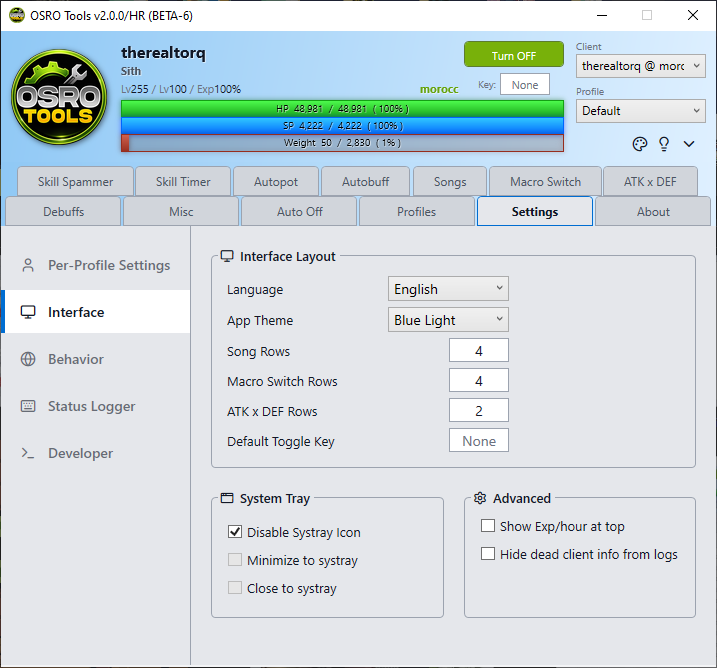
The Settings tab contains global configuration options for OSRO Tools. Use the sidebar menu to navigate between categories.
These options are tied to your currently active profile.
- Pause In Town: Automatically pauses all macros and autopot functions when your character enters a town map.
- Sounds On: Toggles notification sounds for the profile.
- Language: Change the display language.
- App Theme: Switch between Light and Dark mode.
- Rows Configuration: Adjust the number of visible rows in the Songs, Macro Switch, and ATK x DEF tabs.
- Default Toggle Key: Sets the default hotkey that will be automatically assigned to start and stop OSRO Tools whenever you create a brand new profile. (To change the hotkey for your current profile, edit the key box directly on the main top panel).
- Disable Systray: Hides the system tray icon entirely.
- Minimize to Systray: Hides the window in the system tray when minimized.
- Close to Systray: Hides the window in the system tray when closed. You must right-click the tray icon to fully exit.
- Pause When Chatting: Pauses all macros when your game chat box is active. This stops you from accidentally typing macro keys into chat.
- Pause When Dead: Halts all activity if your character dies.
- Show Exp Per Hour: Adds a live experience tracker below your character name on the main panel.
- Keep Dead Client Info: Prevents the UI from clearing character data if the game client disconnects.
- If you want to check your active buffs for troubleshooting, open the Status Logger tab to see raw status data.