skill spammer
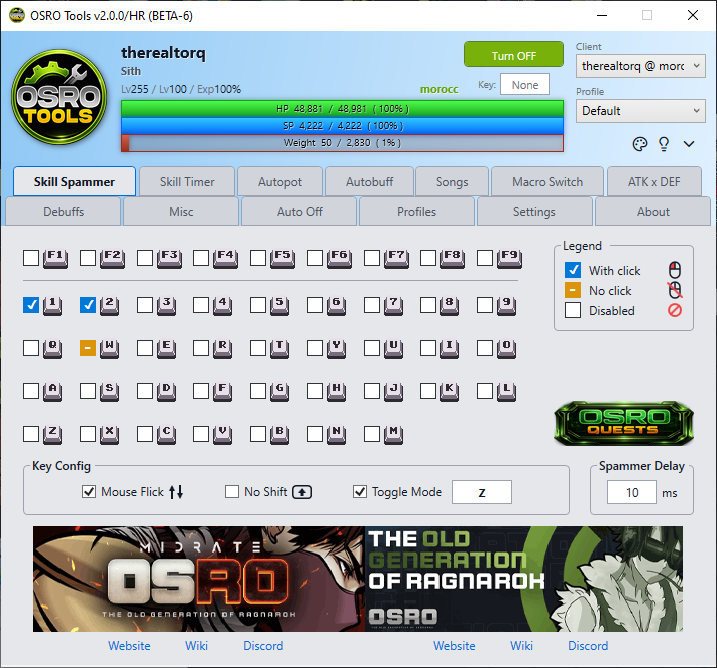
The Skill Spammer tab allows you to rapidly use skills while holding or toggling a hotkey.
The main area is a grid of checkboxes that match your keyboard layout. Each checkbox has three states that change when you click it.
- Disabled (Empty box): The key will not be spammed.
- With Click (White checkmark in a blue box): OSRO Tools will press the key and also send a mouse click at your cursor's location. This is for targeted ground skills.
- No Click (White dash in an orange box): OSRO Tools will press the key but will not send a mouse click. This is for instant self-buffs.
- Open the Skill Spammer tab in OSRO Tools.
- Find the key you want to spam on the grid.
- Click the checkbox until it shows the correct state for your skill (With Click or No Click).
- In the bottom panel, enter your desired Spammer Delay (ms). Lower values will try to spam faster, but the actual speed is limited by your server's ping and built-in skill delays.
- In the game, press and hold the key to start spamming.
- Check Mouse Flick to snap your cursor during clicks. This can help bypass certain skill animations.
- Check No Shift to simulate the Shift key being held down (this is the equivalent to Ragnarok Online's
/nscommand). - Use Toggle Mode if you prefer to press the key once to start spamming, and press it again to stop.