skill timer
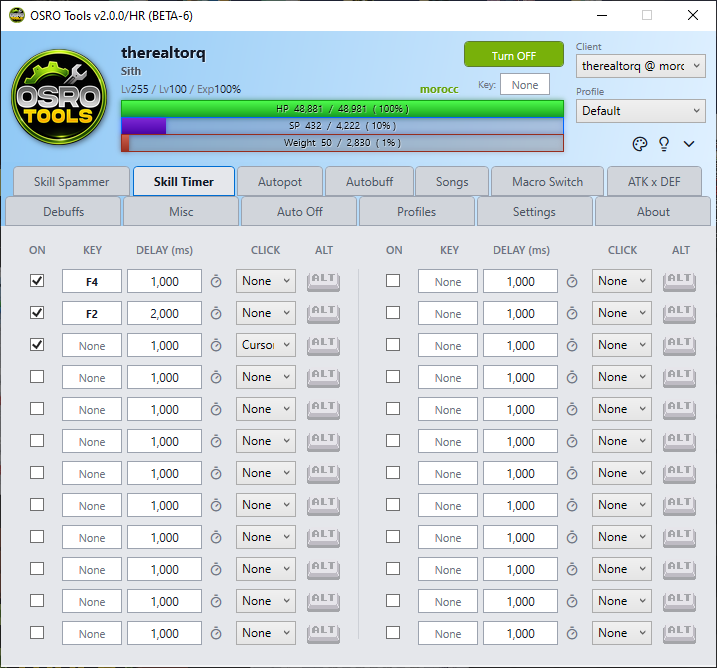
The Skill Timer tab allows you to automatically use specific skills or items at regular intervals. This is ideal for maintaining long buffs.
You have 24 separate slots to use. For each slot, you can set the hotkey and the time delay between presses.
- Open the Skill Timer tab in OSRO Tools.
- Click the box under Key and press the hotkey for your skill.
- Check the Alt box if the skill requires holding the Alt key in the game.
- Enter the Delay (ms). This is the time in milliseconds to wait before pressing the key again. Alternatively, click the clock icon next to the delay box to open a dialog where you can easily set the timer using minutes and seconds.
- Select a click mode from the dropdown list.
- Click None: Presses the key only.
- Click Cursor: Presses the key, then clicks wherever your mouse cursor is located.
- Click Center: Presses the key, then clicks in the exact center of the game window.
- Check the box on the far left to enable the timer.
Note: If a buff lasts 60 seconds, clicking the clock icon and setting the time to 59 seconds is the easiest way to ensure it stays active without gaps.
- The timer will only run if your global OSRO Tools toggle is currently active.