Repository navigation
Installing Mods
A mod reaches Bunny Loader as a package: a single file with the mod's code, pictures and description inside. There are two ways to install one, and after that a mod can be turned on and off, reordered, updated and removed without touching your saves. This page covers all of it.
Important
A mod runs code inside the game, with the same access the game has. Only install packages from people you trust, and prefer the ones from the catalog or from known authors.
The Explore tab lists the mods Bunny Loader can download for you. Tap one to open its page, read what it does, and tap Download mod. When it finishes, the button turns into the mod's switch, already on if Enable on install is on in Settings, and the mod loads the next time you press Play.
When someone sends you a mod, it is a file ending in .bl (sometimes .zip
or .bmod). Save it on your phone, open the Packages tab and tap Import
package at the top:
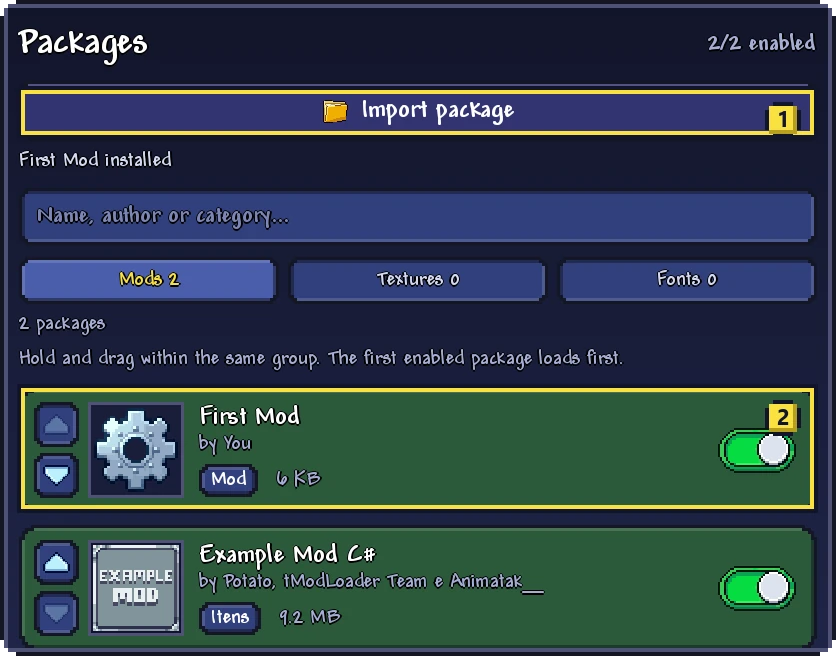
Bunny Loader reminds you that a mod runs code inside the game. Tap Choose file, find the package in the file picker, and tap it. A moment later Bunny Loader says the mod was installed, and it shows up in the list at (2).
Texture packs and font packs are installed the same way, and resource packs made for Terraria on PC can be imported too: they show up in the Textures group. See Texture and font packs.
Each package in the list has a switch. A mod that is off stays installed but does not load, and its items, blocks and NPCs stay safely in your saves until you turn it back on: Saves and backups explains how. The change takes effect the next time the game opens; if the game is already open, close it, or use the Restart button in the Mod Menu.
The filter buttons above the list show all packages, only the ones that are on, or only the ones that are off, and the search box finds a package by name, author or category.
Mods load from the top of the list down: the first enabled package loads first. Most of the time the order does not matter, and Bunny Loader already puts a mod after the mods it depends on. It matters when two mods change the same thing, and in multiplayer, where every player needs the same mods in the same order (Bunny Loader takes care of that when you join a server; see Multiplayer).
To change the order, hold a package and drag it up or down within its group, or use the arrows on its left side. Clear the search box first: the list can only be reordered when it shows everything.
A new version of a mod is installed like the first one, from the catalog or by importing the new file. Bunny Loader recognizes it as the same mod and asks before replacing the one you have, showing both versions. It also warns you when the file is older than what you have installed, or when it is the same version, in which case updating simply reinstalls it.
Your saves are not touched by an update. The new version takes effect the next time the game opens.
Open the mod's page, from Packages or Explore, and tap Remove. The mod is deleted from your phone. Like a mod that is turned off, its content stays in your saves, so installing it again later brings everything back.
Installed packages are kept in Bunny Loader's own folder, in
Android/data/com.bunnyloader/bunny_packs/ (with .beta after
com.bunnyloader for Bunny Loader Beta), one folder per mod. You never need to
go there to play; it is useful to know when you back up your phone.
