Repository navigation
Sharing Your Mod
Once your mod works, sharing it takes one file: its package, a .bl (or
.zip) file that anyone can import into Bunny Loader. This page shows how to
make that file, how to give your mod a page that makes people want to try it,
and what to think about before you send it out and every time you update it.
Note
This page continues from Your first mod. The pictures show First Mod after the additions described below.
A package is a zip file with manifest.json at its top level and the rest of
the mod around it. The .bl extension only tells people it is a Bunny Loader
package: Import package accepts .bl, .bmod and .zip alike.
On the phone, Bunny Loader makes the package for you. Open the Packages
tab, tap your mod to open its page, and tap Export .bl, at (5) in the
first picture below. Android asks where to save it, suggesting the
Downloads folder and a name made from the mod's ID, such as
firstmod.bl. The same button sits next to each project in the launcher's
Mod Sources screen (Settings → Developer → Mod Sources), which exports
a project without installing it first.
An exported package carries the code as you wrote it and also the compiled
code in bin/, with the stamp described in Mod
structure, so players who
import it never wait for it to compile. On a PC, the .zip you made in Setup
on PC is already a package: it has
FirstMod.dll, so it loads right away too. Rename it to .bl if you like.
Every mod has a page in Bunny Loader, the one players see when they tap it. Everything on it comes from files in your mod's folder, and none of them is required, but a mod with a picture and a description looks finished, and that is what makes people install it.

The wide picture at (1) is banner.png, a cover about three and a half
times wider than it is tall (.gif animates; .webp and .jpg work too). A
moment of your mod in the game makes a good one. The square at (2) is
icon.png, which also shows on the mod's card in the Packages list; an
icon.gif animates in the launcher. Pixel art stays sharp at any size.
The tag at (3) is the category from the manifest, and the box at (4)
shows the version, the updated date, the size of the package and the
license. Further down the page come the links and the tabs:
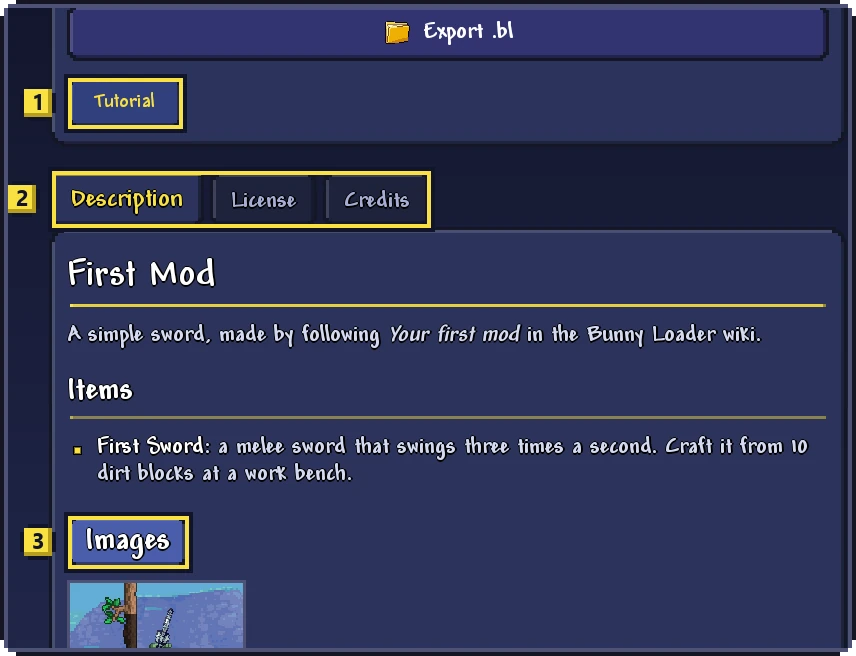
Each entry of the manifest's links becomes a button like the one at
(1), which opens its address: your Discord server, the source code, a
video. The tabs at (2) show your files. Description is
description.md, written in Markdown, so # makes a heading, **bold**
makes bold text and a line starting with - is a list item. License shows
license.md, a Changelog tab appears when you add a changelog.md, and
Credits lists the authors. The gallery at (3) shows every image in a
thumbnails folder; a tap opens it full size.
All together, First Mod's folder gained these files:
FirstMod/
  manifest.json      with the new fields below
  icon.png           the square picture
  banner.png         the wide cover
  description.md     the Description tab
  thumbnails/1.png   the gallery
And its manifest gained a summary, a category, a license, a link and the date of this version:
{
  "uid": "f4b5236a-df99-4750-809b-a74a78be4f3f",
  "id": "firstmod",
  "name": "First Mod",
  "version": "1.0.0",
  "author": "You",
  "type": "mod",
  "category": "Weapons",
  "summary": "A sword made by following the Bunny Loader wiki.",
  "license": "MIT",
  "links": [{ "title": "Tutorial", "url": "https://github.com/JonataOliveiraa/Bunny-Loader/wiki/Your-First-Mod" }],
  "updated": "2026-11-14",
  "blVersion": 3
}
The summary is the one line under the name on the mod's card. A few
categories get a color and an icon of their own; any other text, like
Weapons here, shows as a plain tag. Authors can be plain names or come with
a photo from an authors/ folder, a role and a link, and the page's colors
and background can be changed with theme; Mod
structure lists every field.
To publish a new version, raise the version in the manifest, update
updated, and write what changed in changelog.md, newest version first, so
players see it in the Changelog tab. Keep the same uid: that is how Bunny
Loader knows the new package is the same mod. When a player imports it, Bunny
Loader asks before replacing the version they have, and their saves are not
touched. Changing the uid would make the new version a different mod,
installed next to the old one.
The same care applies to your content. Players' worlds and characters store your items, tiles and NPCs by their class names, so after you rename a class, the copies players already have no longer match anything and show up as unknown items. Add new classes freely, but think twice before renaming old ones.
A license tells others what they may do with your mod: play it, share it,
change it, reuse its code or its art. Bunny Loader's own license does not
cover your mod; you choose. Put the license's short name in the manifest's
license field, which shows on the page, and its full text in license.md.
If your mod uses code or art from somebody else, such as tModLoader's Example
Mod, keep their license notice too.
A package is just a file, so any way of sending files works: a message, a cloud folder, a repository on GitHub. The Bunny Loader Discord is where players look for mods. Remember that a mod runs code inside the game, and Bunny Loader says so to every player who imports one, so be clear about what yours does and only ever put in it what you say.
Multiplayer takes care of itself: when a player joins a game hosted with your mod, Bunny Loader offers them the host's mods to download.
Before you share, play with the exported package once, the way a player would:
import the .bl you are about to send, check that the mod turns on without
errors, that its items have their names and pictures, and that its page looks
the way you want.
