Repository navigation
Multiplayer
You can play with mods together with your friends, as long as everyone uses Bunny Loader. The host chooses the mods, and Bunny Loader makes sure everyone who joins has the same ones, downloading and switching mods for you when it can. This page explains how to host, how to join and what Bunny Loader checks in between.
A modded world only works when every player runs the same mods in the same order, since the game identifies items, NPCs and projectiles by numbers that depend on that order. For the same reason, Bunny Loader only joins servers that also run Bunny Loader: if you try to join a game hosted with plain Terraria, it refuses with Bunny Loader only joins Bunny Loader servers.
On the title screen, tap Multiplayer, choose your character, open the Host tab and tap Host next to the world you want to share. The game shows its usual options (how many players, invite only, crossplay, password), and below them, Bunny Loader's own:
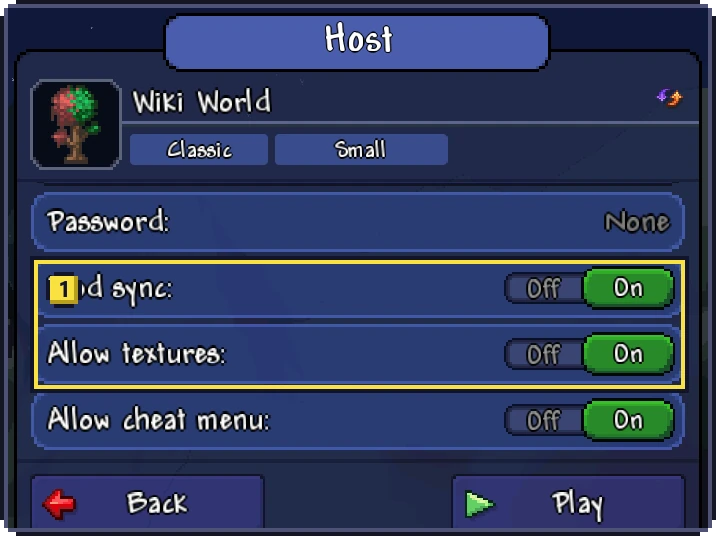
Mod sync decides what happens when someone joins with different mods. On, Bunny Loader offers them your mods and switches their game to match; off, it refuses them and lists the differences. Allow textures lets players who join use their own texture packs; when it is off, anyone with a texture pack turned on is refused and told to turn it off. Allow cheat menu decides whether the people who join may use the Mod Menu: when it is off, their menu is turned off while they are on your server. All three start on, and they apply while the game is open. Tap Play to start the server.
Your friends find the game the usual Terraria way: on the same local network it shows up in their Join tab, and from elsewhere they add your address with Add.
Join as you would in Terraria: Multiplayer, your character, the Join tab and the server. If your mods are exactly the host's, same mods, same versions and same order, you go straight in.
If they are not and the host has Mod sync on, Bunny Loader opens the Server mods screen. It lists what has to change: mods to download, mods to turn on and mods to turn off. Tap Sync: Bunny Loader downloads what is missing, restarts the game with the server's mods in the server's order, and reconnects on its own. Your own mod list is not lost: it comes back to normal the next time you open the game.
When a mod the server uses is not available for download, the screen says so; ask the host for the package, install it, and join again. Without Mod sync, the server refuses you with the list of mods that are missing on your side and the ones it does not use.
Mod settings that affect everyone belong to the host: on someone else's server you only see your own, client side options. Each player keeps their own character, with their mods' items saved as usual; the world, with everything the mods placed in it, is saved by the host.
