Repository navigation
Orders Tutorial
Home › All Categories › tkControls › Orders Tutorial
Build a customer-and-orders program whose windows are bound to records from an SQLite database, then print from it with reports drawn in tkEdit's Report Designer. You draw the windows and the reports; tkEdit generates the code that moves the data, and you write only what talks to the database.
The finished program is in the toolchain's examples/tkControls/tkOrders. Open its tiko.toml in
tkEdit and look around first, or compare with it at any step. This tutorial explains how it was made.
It assumes you have met the Form Designer; the Contacts Tutorial
covers menus, toolbars, the Resource Center and themes, which this one skips.
What you'll learn, step by step:
| Feature | Step |
|---|---|
| Records and SQL in one module of their own | 2 |
| A form bound to a record: DataType, Bind, LoadFrom, SaveTo, Required | 3 |
| A ComboBox's items from a function; DisplayField and ValueField | 4 |
| A DataGrid bound to the form's array, and one bound to a field of the record | 4 |
| A Navigator that follows a list; saving when the user moves on | 5 |
| A live grid that edits the record's own array; a method as a column | 6 |
| A DataGrid that is an SQLite query | 7 |
| How a report gets its data: array, SQLite, DataGrid | 8 |
| An invoice: an array source with a child source, a calculated field, a form with a ReportViewer | 9 |
| Sales by customer: an SQL source, parameters, groups, totals, a conditional style | 10 |
| The order list: printing a DataGrid as the user left it | 11 |
| Testing reports by their text | 12 |
- What you'll build
- The data: records and SQL
- A form bound to a record
- Lists: a ComboBox and two DataGrids
- Stepping through records: the Navigator
- The order dialog: a live grid
- A grid that is a query
- Reports: where the data comes from
- The invoice: an array and its child
- Sales by customer: an SQL query with parameters
- The order list: a DataGrid as the data
- Testing it
- Run it
- Troubleshooting
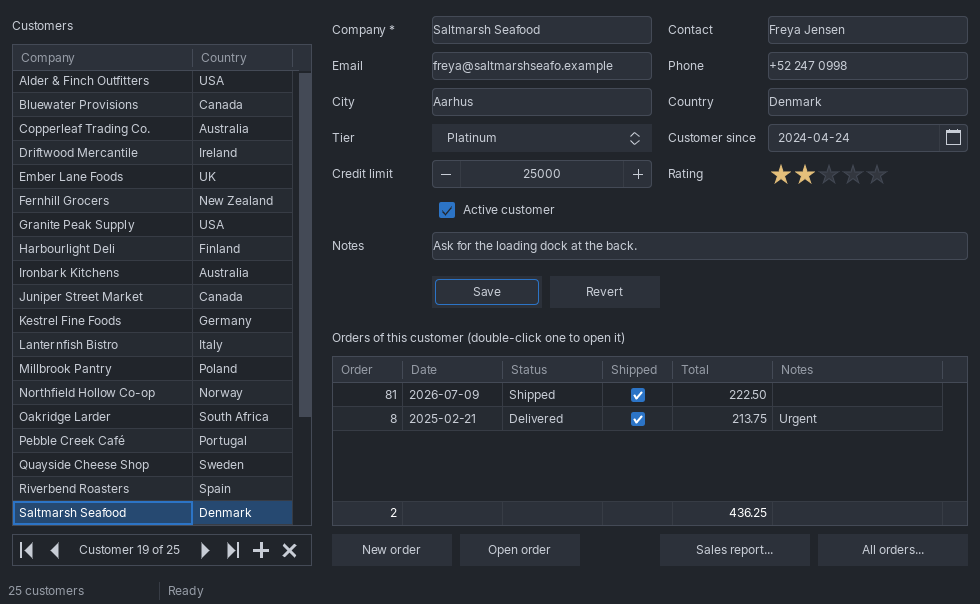
Five windows and three reports:
| Window | What it is |
|---|---|
| frmCustomers | The main window above. One customer at a time, bound to the boxes on the right; the list and the navigator step through them; the grid below lists the customer's orders. |
| frmOrder | One order: its header and a grid of its lines, edited in place. Invoice... prints it. |
| frmOrders | Every order in one grid read straight from SQLite, with a filter row. Print list... prints it. |
| frmInvoice | A report viewer showing the invoice. |
| frmReport | A report viewer for any report: the sales report and the order list use it. |
| Report | Its data |
|---|---|
| rptInvoice | one Order record and its Lines array, from the order dialog |
| rptSales | an SQL query over the database, with a date range the user can change |
| rptOrderList | the rows of frmOrders' grid, filtered and sorted as the user left it |
The project's folders, one per module:
tkOrders/
tiko.toml the project: the orders program and its self-test
main.tiko starts the program
orderdb/ the records and every SQL statement (+ seed.tiko, the sample data)
appTheme/ askbox/ the theme; a message box in the form's fonts
frmCustomers/ frmOrder/ frmOrders/ frmInvoice/ frmReport/
frmX.tkform the design (tkEdit owns it)
frmX.design.tiko generated from it: don't edit, do commit
frmX.tiko your half of the form
rptInvoice/ rptSales/ rptOrderList/
rptX.tkreport the report (tkEdit owns it)
rptX.design.tiko generated from it: don't edit, do commit
Everything the forms bind to is a plain tiko type in one module, orderdb. The forms never see SQL
for a record: they call procedures here. Keeping the records in a module of their own is what lets
the designer find them. A form names the module (DataModule ../orderdb) and the type
(DataType orderdb.Customer), and tkEdit reads the type's fields from it.
#module "orderdb"
#import "std/containers" public
#import "std/chrono" public
#import "vendor/sqlite3" public
using containers
public type OrderLine
Id as int64
ProductId as int64
Product as ustring
Qty as int32
UnitPrice as float64
declare function Total( ) as float64 ' Qty * UnitPrice: a method can be a grid column
end type
public type Order
Id as int64 ' 0 until saved
CustomerId as int64
Customer as ustring ' the customer's company, shown
OrderDate as chrono.LocalDate
Status as ustring
Shipped as boolean
Notes as ustring
Amount as float64 ' the stored total
Lines as Array( of OrderLine ) ' only filled by LoadOrder
declare function Total( ) as float64
end type
public type Customer
Id as int64 ' 0 until saved
Company as ustring
Contact as ustring
Email as ustring
Phone as ustring
City as ustring
Country as ustring
Tier as ustring
Active as boolean = true
CreditLimit as float64
Since as chrono.LocalDate
Rating as float64
Notes as ustring
Orders as Array( of Order ) ' a summary of each order, no lines
declare function SameAs( byref o as Customer ) as boolean
declare sub TrimFields( )
end type
' A ComboBox's choice where the text shown is also the value stored.
public type Choice
Name as ustring
end type
public function Tiers( ) as Array( of Choice ) ' Standard, Silver, Gold, PlatinumBelow the types are the procedures the forms call, each returning "" or SQLite's reason:
| Procedure | What it does |
|---|---|
OpenData( path ), CloseData( )
|
open (or make, and fill with the sample data) the database |
Connection( ) |
the open sqlite3 ptr: the reports and the query grid use it |
LoadCustomers( list ) |
every customer, each with a summary of its orders |
SaveCustomer( c ), DeleteCustomer( id )
|
insert or update one; delete one with its orders |
LoadOrder( id, o ), SaveOrder( o )
|
one order with its lines; write it and its lines back |
LoadProducts( list ), NewOrder( c )
|
the products; a blank order for a customer |
ORDERS_QUERY |
the SQL that frmOrders' grid shows |
Money( d ) |
1234.5 as "1234.50"
|
The full module is examples/tkControls/tkOrders/orderdb/orderdb.tiko; the
Contacts Tutorial explains the vendor/sqlite3 calls in
detail. One habit matters for binding: a date column is read into a chrono.LocalDate, and a column
with no date becomes LocalDate.Invalid( ), which a bound date picker shows as empty.
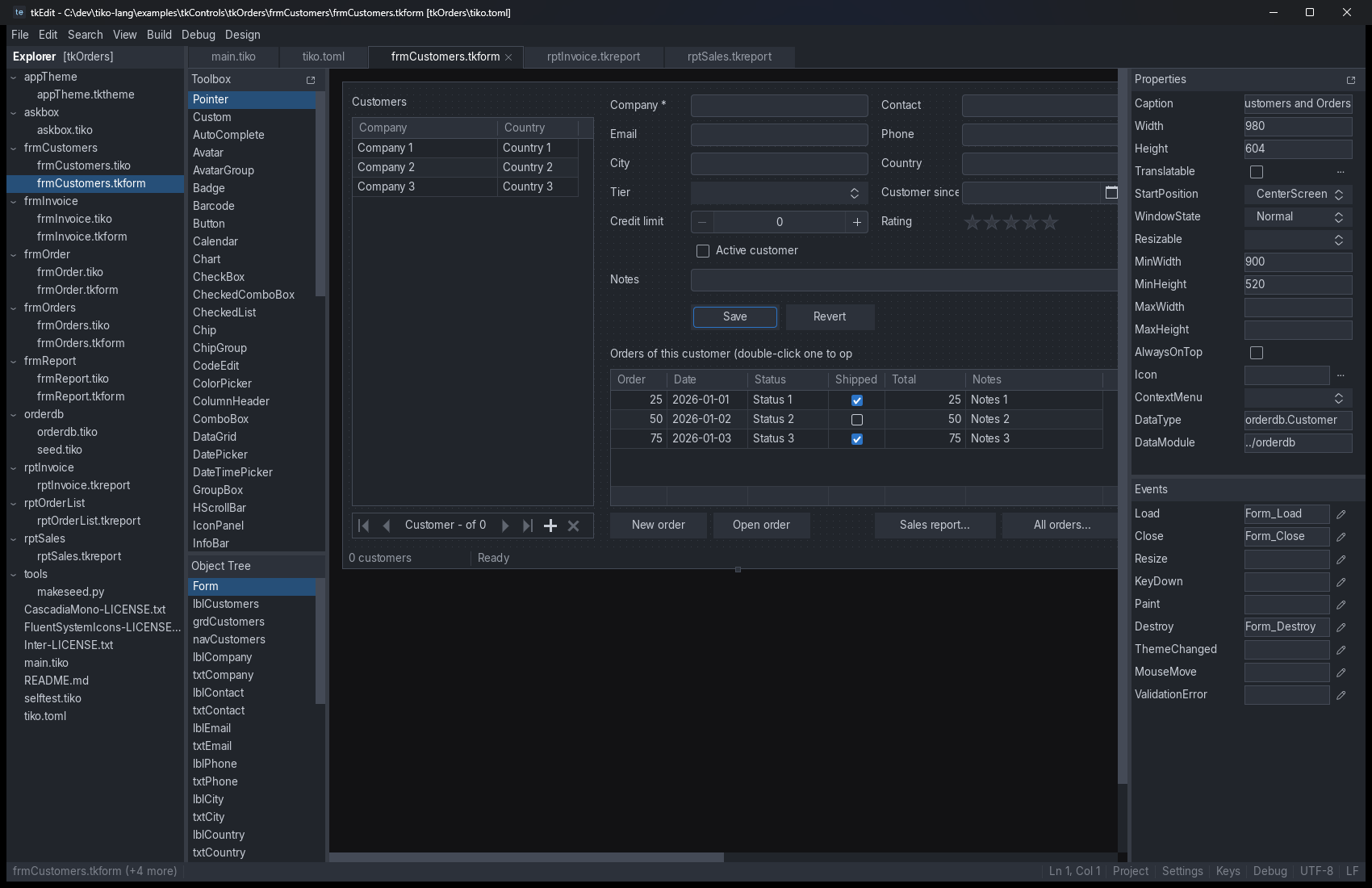
Make the form (Design > New Form..., frmCustomers) and draw its labels and boxes. Then click the
empty form and set the two properties that make it a data form:
| Property | Value | Why |
|---|---|---|
| DataType | orderdb.Customer |
the record the form shows |
| DataModule | ../orderdb |
where that type is; the form's generated half imports it |
Now select each box and set its Bind to a field of the record. Type the name, or press ...
beside it for the fields of orderdb.Customer. Company must not be left empty, so its Required is
ticked:
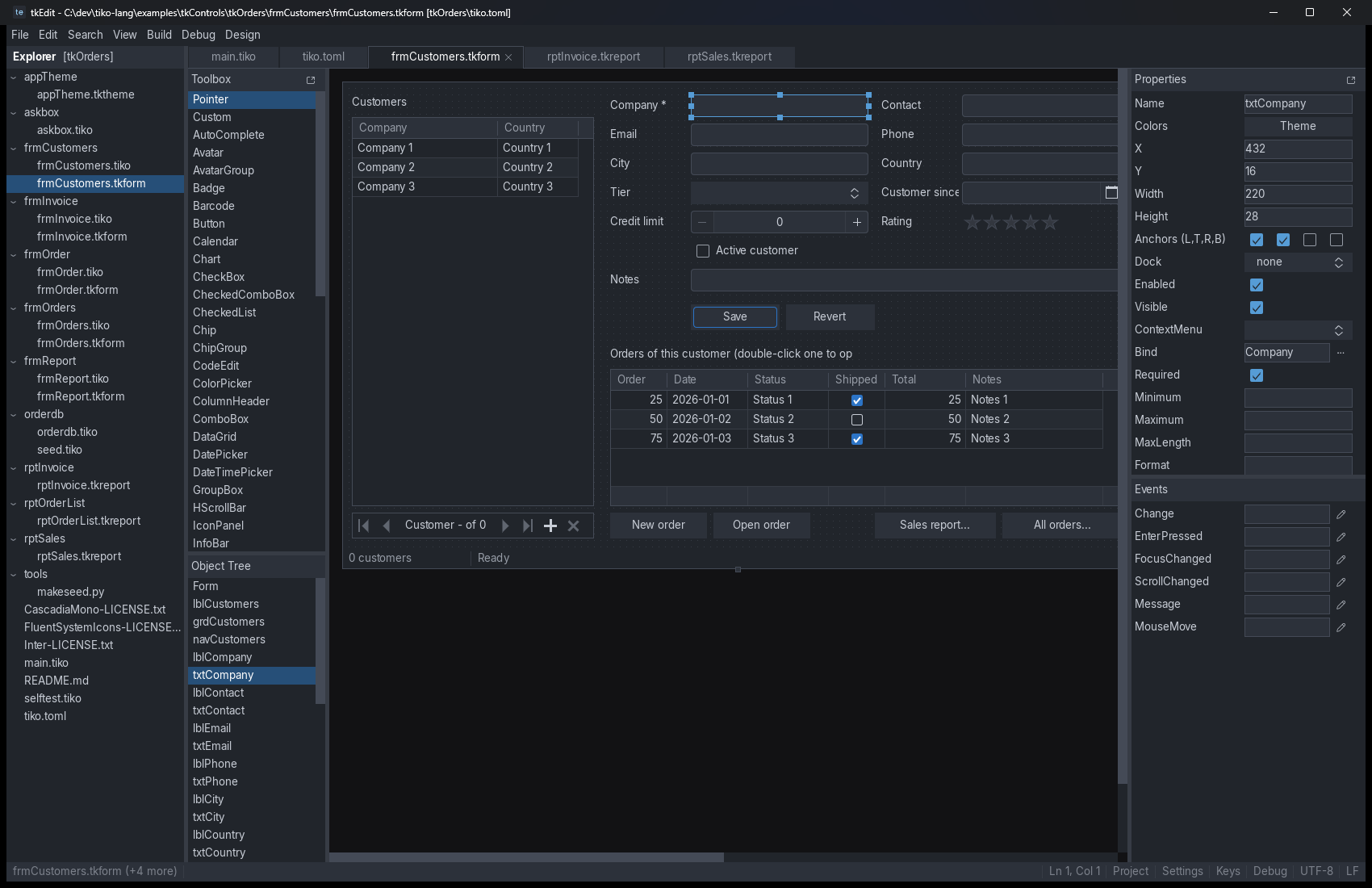
| Control | Kind | Bind | Rules and props |
|---|---|---|---|
txtCompany |
TextBox | Company |
Required |
txtContact, txtEmail, txtPhone, txtCity, txtCountry, txtNotes
|
TextBox | the field of the same name | |
cboTier |
ComboBox | Tier |
Required; its items in step 4 |
dtpSince |
DatePicker |
Since (a chrono.LocalDate) |
AllowEmpty |
nudCredit |
NumericUpDown |
CreditLimit (a float64) |
Range 0,100000, Increment 500 |
rtgRating |
Rating | Rating |
|
chkActive |
CheckBox | Active |
Save the form. Its generated half, frmCustomers.design.tiko, now has LoadFrom, SaveTo and
IsDirty, one line per bound control. LoadFrom( c ) puts a record on screen:
function Form.LoadFrom( byref r as orderdb.Customer ) as boolean
tkTextBox_SetText( txtCompany.Handle, tkBind_Text( r.Company ) )
...
tkDatePicker_SetDateValue( dtpSince.Handle, tkBind_Date( r.Since ) )
tkNumericUpDown_SetValue( nudCredit.Handle, tkBind_Float( r.CreditLimit ) )
tkCheckBox_SetChecked( chkActive.Handle, tkBind_Bool( r.Active ) )SaveTo( c ) checks every bound control first and writes nothing unless all pass. An empty Company is
refused with a message box, and the box gets a red border until it is typed in. IsDirty( c ) says
whether any box shows something other than what c holds. The conversions come from the field's
type, so the generator never needs to know it: tkBind_Float reads an int32 or a float64 alike,
and a wrong field name is the compiler's error in the generated file. The table of what each control
moves is in the Form Designer.
The Tier combo. Its choices come from a function, orderdb.Tiers( ), which returns an
Array( of Choice ). Set the combo's list properties:
| Property | Value |
|---|---|
| ItemsSource |
orderdb.Tiers( ): a call, or any array the form can reach |
| ItemType | orderdb.Choice |
| DisplayField |
Name: the text each item shows |
| ValueField |
Name: what Bind moves |
With a ValueField, the combo binds the chosen item's value instead of its index: LoadFrom selects
the item whose Name is the customer's Tier, and SaveTo writes the chosen Name back. The
generated cboTier_Fill( ) fills the items; call it once, before the first LoadFrom.
The list of customers. A DataGrid, grdCustomers, with ItemsSource Customers and
ItemType orderdb.Customer. Customers is a member you add to the form in your half
(Customers as Array( of orderdb.Customer )). Its columns, in Edit items, each name a Field:
Company, Country. ReadOnly, SelectionUnit Row.
The customer's orders. A second DataGrid, grdOrders, bound to a field of the record rather
than to a list of the form: ItemsField Orders, ItemType orderdb.Order. LoadFrom fills
it with the customer's orders, so it changes with every customer. Its columns: Id (a footer
count), OrderDate, Status, Shipped (a check column), Amount (a footer sum), Notes.
A DataGrid column has no number format of its own, so amounts are shown with two decimals by two events, CellFormatting and SummaryFormatting:
sub Form.grdOrders_CellFormatting( byval p as TKDATAGRID_FORMATINFO ptr )
if (p->col = 4) andalso (p->value->kind = TKDG_FLOAT) then p->text = orderdb.Money( p->value->f )
end sub
sub Form.grdOrders_SummaryFormatting( byval col as integer, byval kind as int32, byref v as TKDG_VALUE, byref text as ustring )
if (col = 4) andalso (v.kind = TKDG_FLOAT) then text = orderdb.Money( v.f )
end subDraw a Navigator (in Lists) under the list. Set its ItemsSource to Customers, the same array
as the list, and its Follows to grdCustomers. Following ties the two together: a click in the
list moves the navigator, and a navigator move selects the list's row. Its PositionText is
Customer {1} of {2}.
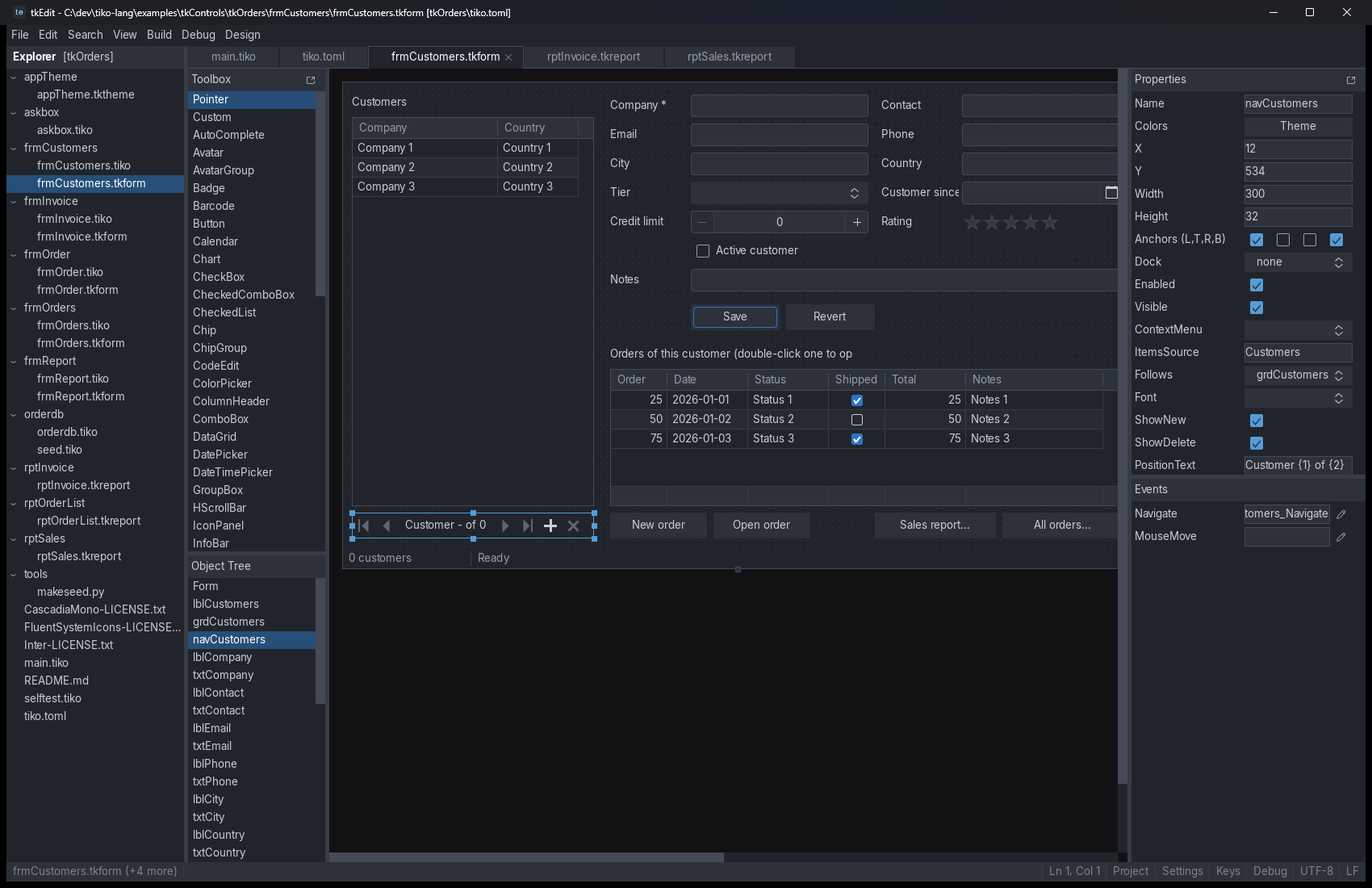
The generated half now has the navigator's procedures:
| Procedure | What it does |
|---|---|
navCustomers_Refresh( ) |
refills the list, counts the records, shows the current one (or blanks the form) |
navCustomers_MoveTo( i ) |
what the buttons and a click in the list do. If the record on show was changed, SaveTo writes it into the array first, and if that refuses, the navigator stays put |
navCustomers_Current( ) |
the index on show, -1 for none |
New (+) appends a blank record and shows it; Delete (×) removes the one on show. The navigator's Navigate event runs before any of it and can say no.
All of that moves values between the boxes and the array. Nothing generated knows about SQLite.
Your half of the form adds the database: it reads Customers from it, keeps a copy as the database
has it (Saved), and writes back every record that changed:
public partial type Form
DataFile as ustring ' the database; "" for orders.db in the data folder
Customers as Array( of orderdb.Customer ) ' what the list, the navigator and the boxes show
Saved as Array( of orderdb.Customer ) ' as the database has them, to see what changed
...
end type
sub Form.Form_Load( )
...
orderdb.OpenData( DataFile )
cboTier_Fill( ) ' generated: the combo's items
Reload( )
end sub
sub Form.Reload( byval selectId as int64 = 0 )
orderdb.LoadCustomers( Customers )
Saved = Customers
navCustomers_Refresh( ) ' generated: list filled, count, record shown
...
end sub
' The boxes into the record on screen (if changed), then every changed record into the database.
function Form.Commit( ) as boolean
dim as int32 cur = Current( )
if (cur >= 0) andalso IsDirty( Customers[cur] ) then
if SaveTo( Customers[cur] ) = false then return false
navCustomers_ListRow_( cur ) ' generated: the list's row shows the new values
end if
return WriteChanges( ) ' orderdb.SaveCustomer for each record unlike Saved
end functionCommit runs before every navigator action, after every click in the list, on Save and on Close. So
moving to another customer saves the one you were on, as in a classic data form:
' Before the navigator moves, adds or deletes (the generated code does it after this, if Allow).
sub Form.navCustomers_Navigate( byval action as int32, byval target as int32, byref Allow as boolean )
if action = TKNAV_DELETE then
' ask first, then orderdb.DeleteCustomer( ... ); Allow = false if the user says no
...
exit sub
end if
if Commit( ) = false then Allow = false ' First, Previous, Next, Last, New: save first
end sub
' A click in the list has already moved the navigator (saving the boxes into the record it left).
sub Form.grdCustomers_CurrentCellChanged( byval row as integer, byval col as integer )
WriteChanges( )
end subRevert is one line: LoadFrom( Customers[Current( )] ) puts back what the record holds.
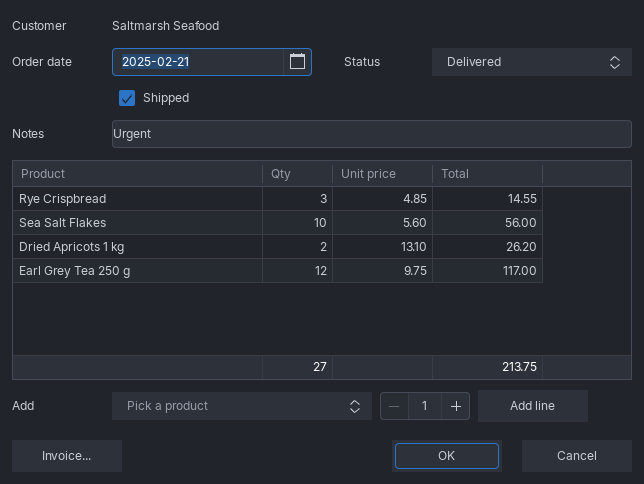
frmOrder's DataType is orderdb.Order. Its header binds like the customer's boxes: lblCustomer
(a Label: in only) to Customer, dtpDate to OrderDate, cboStatus to Status (items from
orderdb.Statuses( )), chkShipped to Shipped, txtNotes to Notes.
The lines grid, grdLines, is different: ItemsField Lines, ItemType orderdb.OrderLine,
and ItemsLive ticked. A live grid does not copy the array: it reads and writes the record's own
Lines. A quantity typed in a cell is in Ord.Lines at once, the Delete key removes a line from
it, and the footer sums follow. One column's Field is Total( ), a method of OrderLine: it
is shown, and it is read-only.
The caller fills the dialog and reads it back:
public partial type Form
Ord as orderdb.Order ' what the dialog shows; after OK, what was typed
Products as Array( of orderdb.Product ) ' cboProduct's items (its ItemsSource)
...
end type
sub Form.Edit( byref o as orderdb.Order )
if Products.Count( ) = 0 then orderdb.LoadProducts( Products )
cboStatus_Fill( )
cboProduct_Fill( )
Ord = o
LoadFrom( Ord ) ' the live grid binds Ord.Lines itself
end sub
sub Form.btnOK_Click( )
if SaveTo( Ord ) then EndModal( 1 ) ' (the example also refuses an order with no lines)
end subIn frmCustomers, New order and Open order show it modally and save the result:
sub Form.EditOrder( byref o as orderdb.Order )
if dlgOrder.IsOpen( ) = false then dlgOrder.Build( Handle )
dlgOrder.Edit( o )
if dlgOrder.ShowModal( Handle ) <> 1 then exit sub
orderdb.SaveOrder( dlgOrder.Ord ) ' (the example reports an error here)
orderdb.LoadCustomerOrders( Customers[Current( )].Id, Customers[Current( )].Orders )
LoadFrom( Customers[Current( )] ) ' the orders grid shows the change
end sub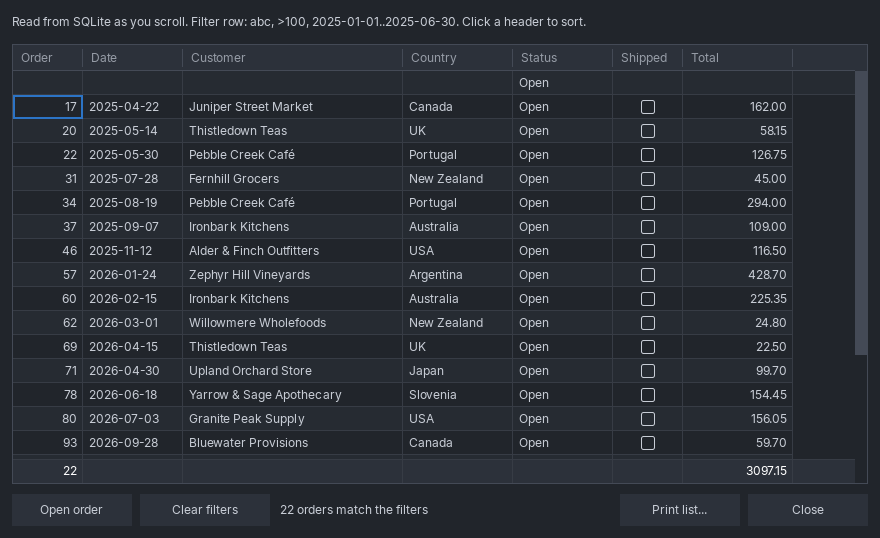
The All orders window shows every order, but it does not load them. Its DataGrid, grdAll, has
no ItemsSource: its columns are drawn in the designer (with ShowFilterRow and footer totals), and
at Load the grid is handed to an SQL query with vendor/tkControls/tkDataGridSqlite:
sub Form.Form_Load( )
' false: keep the designer's columns; the query's columns fill them in order
Query = tkDataGridSqlite_Open( grdAll.Handle, orderdb.Connection( ), orderdb.ORDERS_QUERY, false )
end subThe grid reads a block of rows at a time as you scroll. A header click becomes the query's
ORDER BY, the filter row a WHERE (Open, >100, 2025-01-01..2025-06-30, ^Bl), and the
footer's count and sum select count / sum over the same WHERE. SQLite does the work; the grid
never holds every row. Each column's kind comes from the table's declared type, which is why
orders.total is a stored column rather than an expression.
A report is a .tkreport file drawn in the Report Designer: bands down the page,
items in the bands, data sources, parameters. tkEdit generates a module from it with a type,
Report, that you use like any other. A data source is a name in the report; the program connects
it to real data through a setter the generator writes, one per source kind:
| Source kind | In the .tkreport
|
The program calls | In this program |
|---|---|---|---|
array |
item_type = "orderdb.Order" |
r.Set<Source>( rows ) with an Array( of T )
|
the invoice: the order on the dialog |
array, child |
parent, relation = "Lines"
|
nothing more: the child rows come from the master's Lines
|
the invoice's lines |
sqlite |
sql, params
|
r.SetDatabase( db ) |
sales by customer |
grid |
grid = "frmOrders.grdAll" |
r.Set<Source>Grid( hGrid ) |
the order list |
Each source lists its fields with their kinds (text, int, float, bool, date, time). That
list is a snapshot: when the report is made, the bound data's fields are checked against it, and a
mismatch refuses the report with a message rather than printing wrong data.
Parameters become typed fields of the Report (r.FromDate), and a viewer shows them in a strip
above the page with a Run button. The report is shown with r.ShowIn( viewer.Handle ), or
written with r.ExportPdf( path, errs ). The .tkreport is embedded in the generated module, so
the program needs no file at run time and no designer.
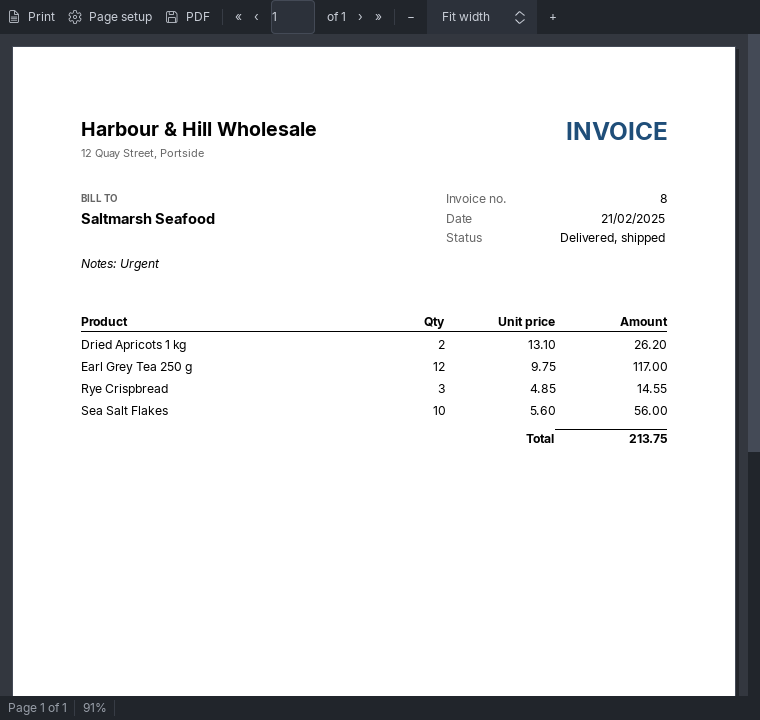
Design > New Report..., in a folder rptInvoice. In the wizard:
| Wizard field | Value |
|---|---|
| title | Invoice |
| source, kind |
Orders, array
|
| item_type | orderdb.Order |
| fields | Id:int, Customer, OrderDate:date, Status, Shipped:bool, Notes |
| layout | columnar |
| paper | A4 |
Set the report's data_module to ../orderdb (click the empty canvas for the report's properties),
so the generated module can name orderdb.Order.
An order's lines are an Array( of OrderLine ) inside each Order. Open Data sources... in the
Toolbox, press +, and make a second source:
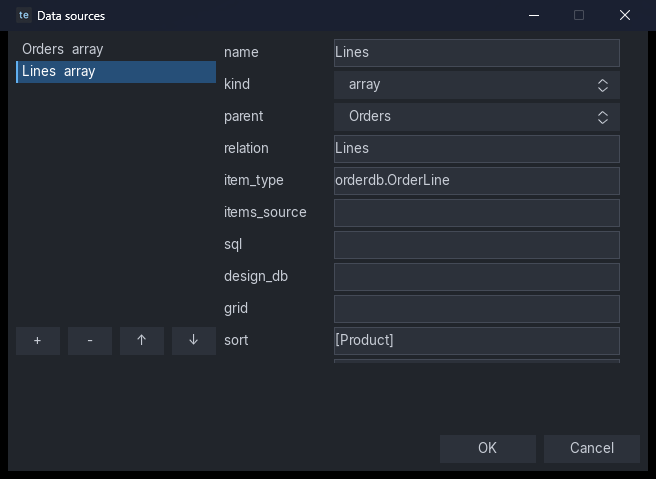
| Property | Value | |
|---|---|---|
| name | Lines |
|
| kind | array |
|
| parent | Orders |
it is a child: its rows belong to one order |
| relation | Lines |
the master's field that holds them |
| item_type | orderdb.OrderLine |
|
| sort | [Product] |
the lines print in product order, whatever order they are in |
Its fields are Product, Qty:int and UnitPrice:float.
A line's amount is not a field of OrderLine (Total( ) is a method, and a report reads fields). It
is a calculated field of the Lines source. Open Calculated fields... in the Toolbox, press
+, and fill it in:
| Property | Value |
|---|---|
| source | Lines |
| name | LineTotal |
| expr | [Qty] * [UnitPrice] |
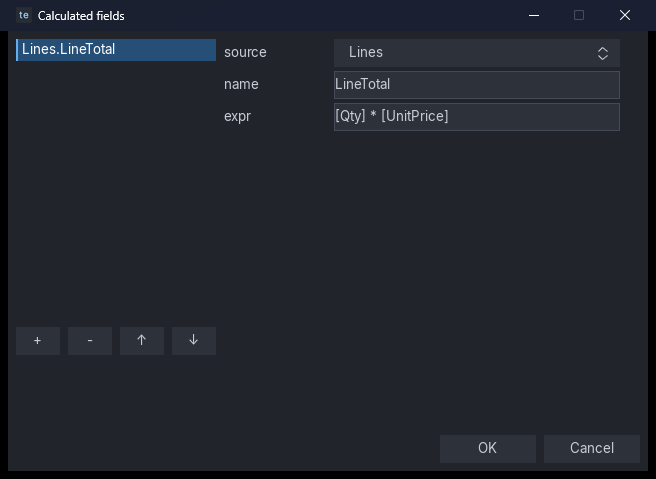
The expression is checked as you enter it, against the source's fields and the report's parameters.
LineTotal is then listed under Fields with the source's own fields and offered in the
expression editor; a band of Lines names it [LineTotal], like a field.
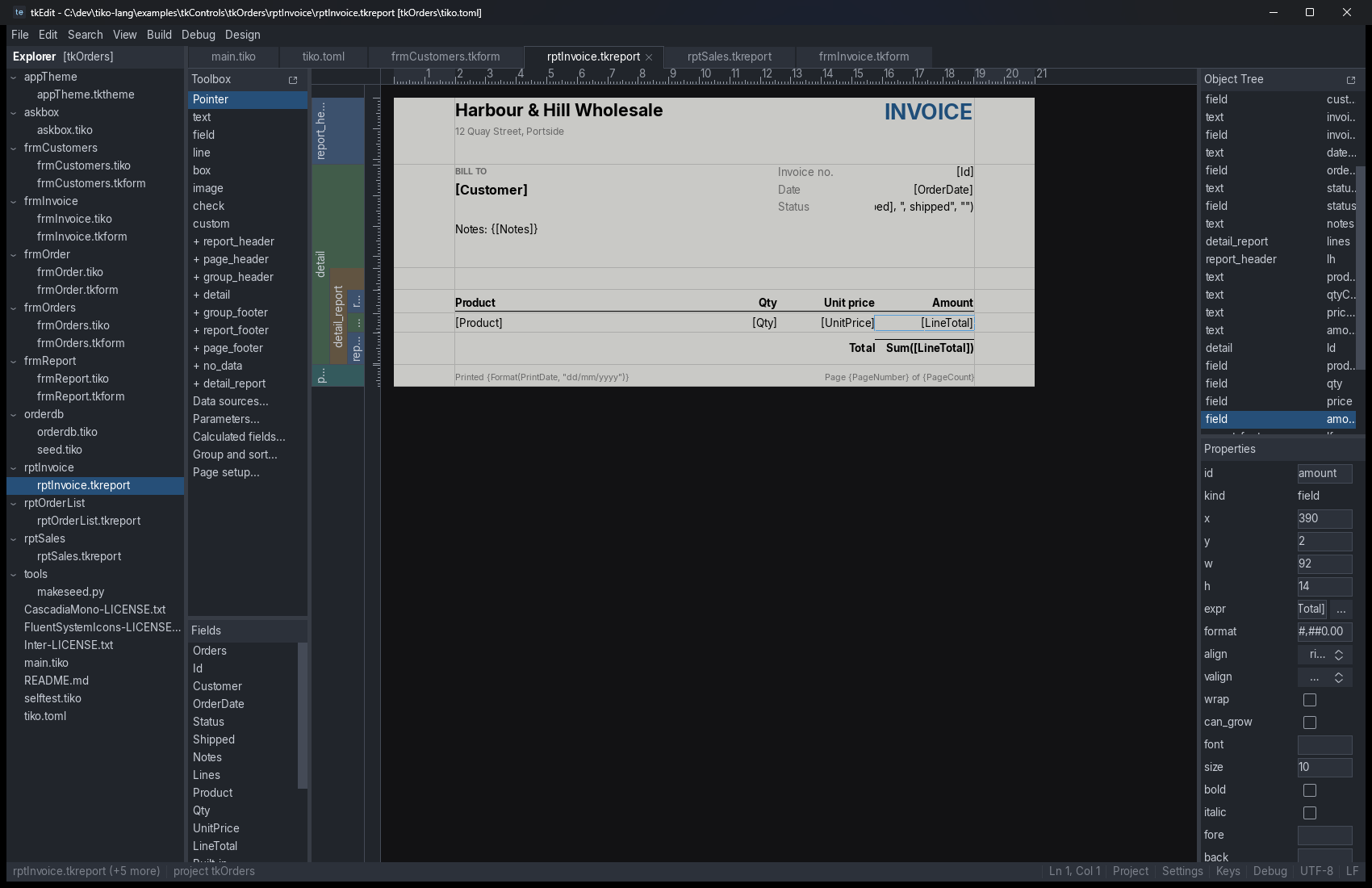
| Band | Kind | Shows |
|---|---|---|
rh |
report_header | the company's name and address, "INVOICE" |
d |
detail, source Orders
|
BILL TO [Customer]; Invoice no. [Id], Date [OrderDate] as dd/mm/yyyy, Status; the notes |
lines |
detail_report, parent d, source Lines
|
the child rows, under the master's detail band |
lh |
report_header of lines
|
the captions Product, Qty, Unit price, Amount, a line under them |
ld |
detail of lines
|
[Product], [Qty], [UnitPrice] and [LineTotal] as #,##0.00
|
lf |
report_footer of lines
|
Total Sum([LineTotal]): a total in a footer covers what the footer closes, here one order's lines |
pf |
page_footer |
Printed {Format(PrintDate, "dd/mm/yyyy")}, Page {PageNumber} of {PageCount}
|
The wizard made the top-level bands: a report header, the detail, a report footer and a page footer.
The example renamed them rh, d and pf (click a band's caption; its id is in Properties) and
deleted the report footer (Del).
The master-detail bands come from the Toolbox too. Click the detail band's caption, then
+ detail_report: it adds a detail_report under the selected detail, over the child source of
the detail's source (Lines, the child of Orders), with its own report header, detail and report
footer inside it. The canvas shows them under the detail band, one step in, and they are edited like
any other band. The example renamed them lines, lh, ld and lf and set their heights (22, 18
and 30). With no child source left to show, the entry says so in the status bar.
Click a field in Fields, then click in a band: a field placed in a detail band also places its bold caption in the header band above (hold Shift to place it alone).
Three item settings worth knowing, all in Properties:
- The status is one field item whose expression joins two fields:
[Status] & iif([Shipped], ", shipped", ""). Its rules (...beside the row) add a conditional style:[Status] = "Cancelled"prints it bold red. - The notes item has visible
[Notes] <> "", so an order without notes prints no empty line; with wrap and can_grow a long note takes as many lines as it needs. - Money uses a format:
#,##0.00.
Save, and tkEdit writes rptInvoice.design.tiko. For an array source it writes a setter that hands
the report your array, and the procedures that read a row's fields, one case per field of the
snapshot:
public partial type Report
declare sub SetOrders( byref rows as Array( of orderdb.Order ) )
declare function ShowIn( byval hViewer as TK_WIDGET ptr ) as boolean
declare function ExportPdf( byref path as ustring, byref errs as ustring ) as boolean
...
end type
private sub Lines_Value_( byval p as any ptr, byval m as int32, byval row as int32, byval f as int32, byref v as TK_VALUE )
dim byref as Array( of orderdb.Order ) a_ = *cast( Array( of orderdb.Order ) ptr, p )
dim byref as orderdb.OrderLine r_ = a_[m].Lines[row] ' master m's line row
select case f
case 0 : tkBind_ToValue( r_.Product, @v )
case 1 : tkBind_ToValue( r_.Qty, @v )
case 2 : tkBind_ToValue( r_.UnitPrice, @v )
end select
end subThe report reads the rows from your array as it lays the pages out, without copying them, so the array must outlive the report's use of it.
Make a form, frmInvoice, with one ReportViewer (in Other), Dock Fill, named rvInvoice. A
ReportViewer has a Report property that names a report module: the form then gets a member of
that report's type. Its ... lists the project's reports as the form's folder imports them; pick
../rptInvoice (or type it). In the .tkform it is the control's report = "../rptInvoice".
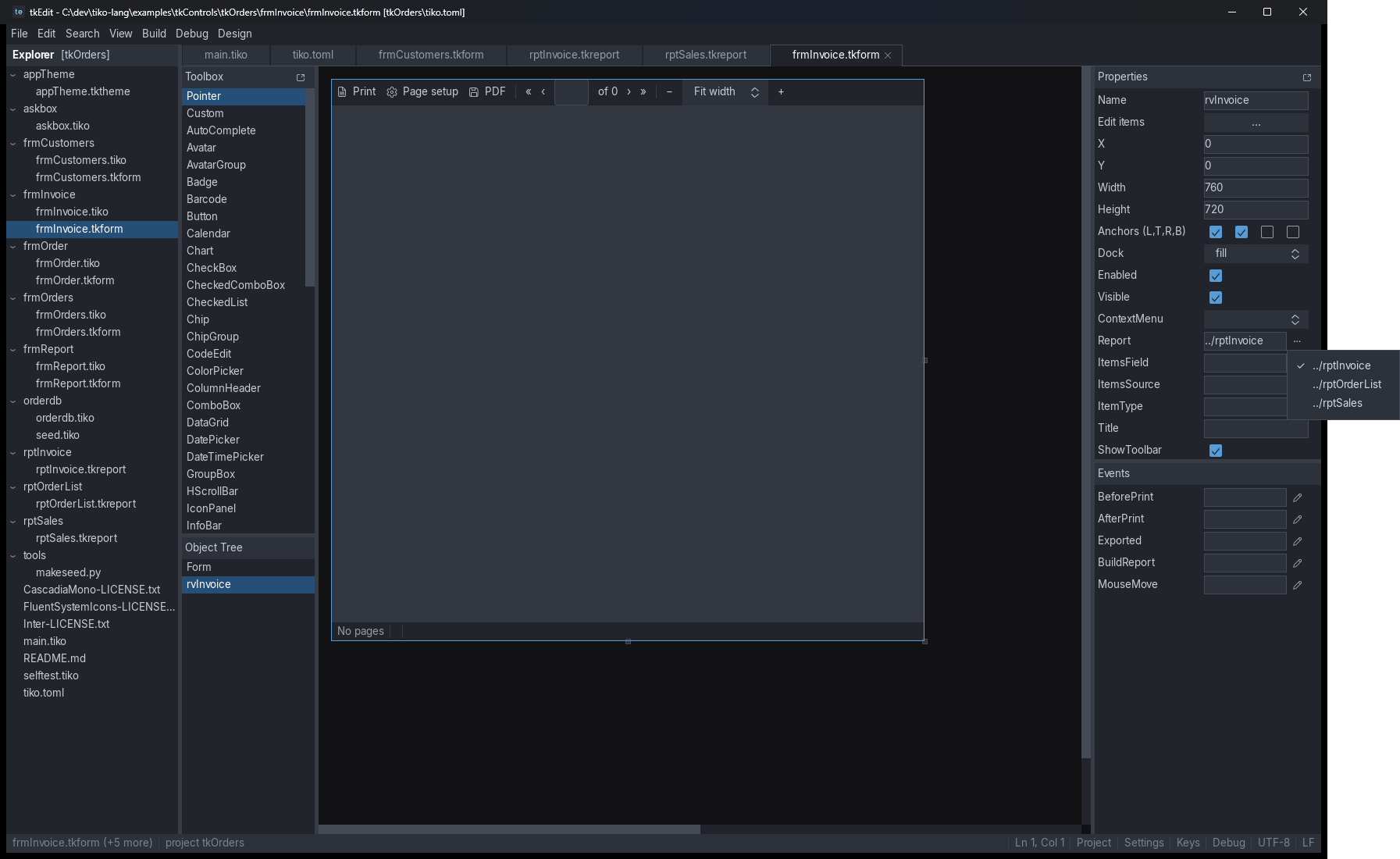
Save, and the generated half declares rvInvoiceReport as rptInvoice.Report. Your half gives it the
order:
#module "frmInvoice"
#import "std/containers"
#import "../orderdb"
using containers
public partial type Form
Orders as Array( of orderdb.Order ) ' the report's rows: it reads them, it doesn't copy them
declare sub ShowOrder( byref o as orderdb.Order )
end type
sub Form.ShowOrder( byref o as orderdb.Order )
Orders.Clear( )
Orders.Push( o )
rvInvoiceReport.SetOrders( Orders ) ' generated from the .tkreport's source Orders
rvInvoiceReport.ShowIn( rvInvoice.Handle )
end subOn the order dialog, Invoice... prints the order as the dialog shows it. SaveTo into a copy
collects the header boxes without touching Ord, and the lines are already in the copy (the grid is
live):
sub Form.btnPrint_Click( )
dim as orderdb.Order o = Ord
if SaveTo( o ) = false then exit sub
dim as frmInvoice.Form f
f.Build( Handle )
f.ShowOrder( o )
f.ShowModal( Handle )
end sub(frmOrder imports ../frmInvoice.) The viewer's toolbar prints it, sets up the page, and writes a PDF.
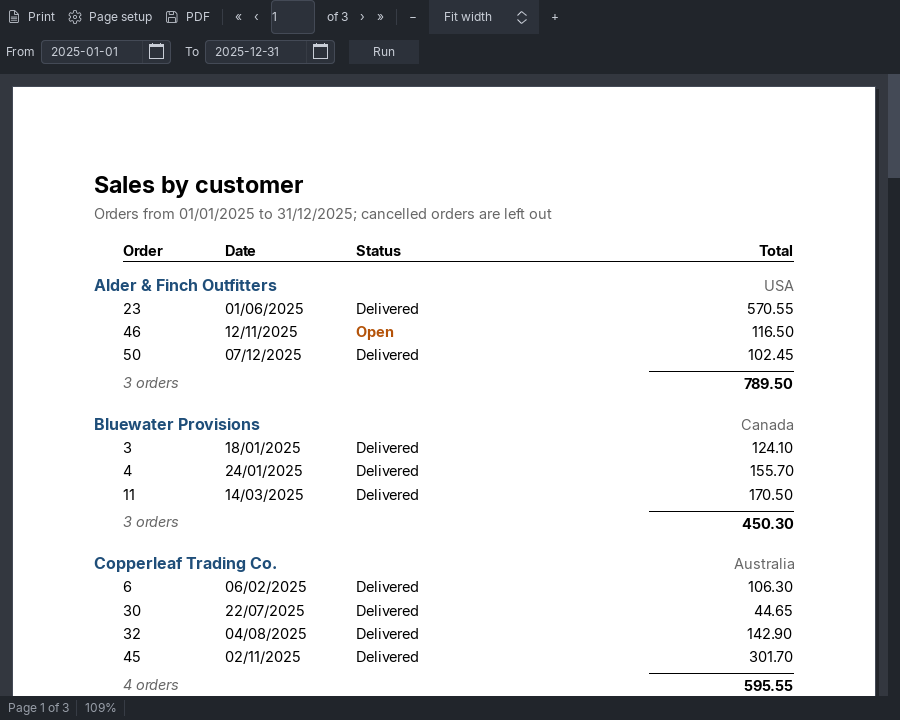
This report reads the database itself. Make it with the wizard: source Sales, kind sqlite,
parameters FromDate:date, ToDate:date, group_by Company, layout tabular. The source's sql:
select c.company as Company, c.country as Country, o.id as OrderId, o.order_date as OrderDate,
o.status as Status, o.total as Total
from orders o join customer c on c.id = o.customer_id
where o.order_date between :FromDate and :ToDate and o.status <> 'Cancelled'
order by c.company, o.order_date, o.idThe query's :FromDate and :ToDate are filled from the report's parameters by the source's
params, { FromDate = "@FromDate", ToDate = "@ToDate" }: each is an expression, so a parameter
could also be computed. Values are bound as SQL parameters, never pasted into the text; a date goes
in as yyyy-mm-dd, the way the table stores it. The fields are Company, Country, OrderId:int,
OrderDate:date, Status, Total:float, named by the query's as. A column's kind comes from its
table's declared type, so name table columns, not expressions.
The parameters, in Parameters...: FromDate (date, default #2025-01-01#, prompt From) and
ToDate (date, default #2025-12-31#, prompt To). A parameter becomes a field of the generated
Report, so it can't be named after a keyword: the Parameters dialog refuses To, and says why.

| Band | Kind | Shows |
|---|---|---|
rh |
report_header | the title; Orders from {Format(@FromDate, "dd/mm/yyyy")} to {Format(@ToDate, "dd/mm/yyyy")}; the column captions |
ph |
page_header, print_on_first_page off | the column captions again, on every page after the first |
g1h |
group_header, group [Company]
|
[Company], [Country]
|
d |
detail, source Sales
|
[OrderId], [OrderDate], [Status], [Total]
|
g1f |
group_footer |
{Count()} orders, Sum([Total]): totals in a group footer cover the group |
rf |
report_footer |
All customers: {Count()} orders, Sum([Total]): here, the whole report |
nd |
no_data |
No orders between these dates., printed instead when the query returns nothing |
pf |
page_footer | Page {PageNumber} of {PageCount} |
The wizard made all of these but the no-data band, which + no_data in the Toolbox adds.
On the first page, the page header prints above the report header, so captions in a page header would sit over the title. Hence the captions are in the report header too, and the page header is left off the first page.
The status item has a rule, [Status] = "Open", that prints open orders bold amber.
The program hands the report its connection and shows it in the generic report window, a form with
one ReportViewer and no report property:
sub Form.btnSalesReport_Click( )
if Commit( ) = false then exit sub ' the report reads the database: write the edits first
dim as rptSales.Report r ' declared before the window, so it outlives it
r.SetDatabase( orderdb.Connection( ) )
dim as frmReport.Form f
f.Build( Handle )
r.ShowIn( f.rvReport.Handle )
f.ShowModal( Handle )
end subThe viewer's strip shows From and To as date pickers; change them and press Run, and the
query runs again. In code, the parameters are fields: r.FromDate.wYear = 2026 before ShowIn.
frmCustomers imports ../frmReport, ../rptSales, and also vendor/sqlite3 itself: see
Troubleshooting.
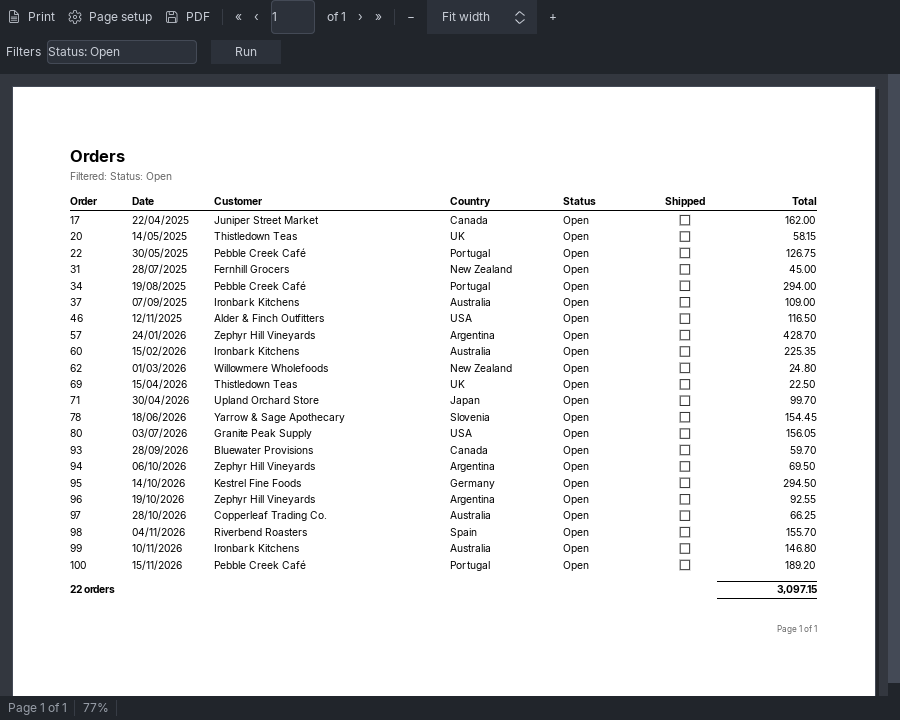
Print list... on the All orders window prints what the grid shows: only the rows its filter row lets through, in the order its header clicks chose. The report's source is the grid itself:
| Property | Value |
|---|---|
| name, kind |
Orders, grid
|
| grid |
frmOrders.grdAll: the designer reads the grid's columns from the form |
A grid source's fields are the grid's visible columns in display order, named by their captions,
typed by the column's kind: Order:float, Date:date, Customer, Country, Status,
Shipped:bool, Total:float. A DataGrid's number column holds a float, even when the database
column was an integer, so Order is float and its item has the format 0. The rows are read from
the grid as the report lays out, in view order; the source does not sort.
The report has one text parameter, Filters, printed under the title with visible
@Filters <> "". The window fills it from the filter row:
sub Form.btnPrintList_Click( )
dim as rptOrderList.Report r
r.SetOrdersGrid( grdAll.Handle )
r.Filters = FilterText( ) ' "Status: Open": each filtered column's caption and text
dim as frmReport.Form f
f.Build( Handle )
r.ShowIn( f.rvReport.Handle )
f.ShowModal( Handle )
end subThe report is landscape (landscape in the report's properties): seven columns fit across.
selftest.tiko drives the program without a person: it makes a database in a temp folder, builds the
forms over it, and calls the handlers the way the generated code does. For the reports it makes each
document and reads back every piece of text it draws, then compares that with what SQLite says:
' Every text a report document draws, "|" after each, page by page.
function DocText( byval doc as TK_PRINTDOC ptr ) as string
dim as string s
if doc = 0 then return s
tkPrintDoc_Generate( doc )
dim as long np = tkPrintDoc_GetPageCount( doc )
for pg as long = 0 to np - 1
for i as long = 0 to tkPrintDoc_GetOpCount( doc, pg ) - 1
dim as TKPRINT_OPINFO oi
tkPrintDoc_GetOp( doc, pg, i, oi )
if oi.op = TKREC_TEXT then s &= oi.text & "|"
if oi.op = TKPRINT_OP_LATE then s &= PrLateText( oi.text, pg, np, doc ) & "|" ' PageCount
next
next
return s
end function
' rptSales over the sample data: every 2025 order that is not cancelled, and their sum
dim as rptSales.Report r
r.SetDatabase( orderdb.Connection( ) )
dim as ustring errs
dim as string s = DocText( r.CreateDoc( errs ) )
dim as string w = "from orders where order_date between '2025-01-01' and '2025-12-31' and status <> 'Cancelled'"
tkTest_Check( "every 2025 order not cancelled, and their sum", _
instr( s, "|All customers: " & SqlNum( "select count(*) " & w ) & " orders|" _
& Thousands( SqlNum( "select sum( total ) " & w ) ) & "|" ) > 0, s )The invoice is checked line by line against the order's array, the order list against the grid's filter, and the sales report again after its parameters change, and with dates that have no orders (the no-data band).
Open the project's tiko.toml in tkEdit and build the orders target, or from a shell in the
project's folder:
tiko build orders
orders.exe
tiko build selftest
selftest.exe
The first start makes orders.db in your data folder (%APPDATA%\tkOrders\ on Windows) with the
sample data: 25 customers, 16 products, 100 orders and 242 order lines, all made up. Delete the file
to start again.
main.tiko is the whole start-up:
#import "vendor/tkControls/tkApp"
#import "./appTheme"
#import "./frmCustomers"
using tkApp
dim as TKAPP_OPTIONS options
appTheme.ApplyOptions( options )
if tkApp_Init( options ) = false then end 1
appTheme.Install( )
dim as frmCustomers.Form mainForm
mainForm.Build( )
end tkApp_Run( mainForm.Handle )| Symptom | Cause and fix |
|---|---|
lld-link: undefined symbol: ...SETDATABASE(SQLITE3*) (or TKDATAGRIDSQLITE_OPEN) |
A module that passes an sqlite3 ptr sees sqlite3 only through orderdb's #import "vendor/sqlite3" public. Add #import "vendor/sqlite3" to that module itself. |
parameter 'To': a reserved word of tiko can't name the report's field when the report is generated |
A parameter named in the .tkreport text after a keyword (the Parameters dialog refuses one). Rename it (ToDate). |
The viewer says source 'Orders': field 'Order' is float in the data and int in the report
|
The data's kind and the source's field list disagree. A grid's number column is float; make the field float and give its item a format. |
| A report's column captions print above its title on page 1 | The page header prints before the report header. Repeat the captions in the report header and turn the page header's print_on_first_page off. |
| An edit made in the designer doesn't show in the program | The .tkreport / .tkform is embedded in the generated .design.tiko: save in tkEdit (or tkedit --generate-forms <folder>), then rebuild. |
| The invoice is empty, or shows another order | The array given to SetOrders must outlive the report's use of it: keep it in a member (Orders in frmInvoice), not a local of a procedure that has returned. |
| Moving to another customer loses an edit | The navigator saves into the array; the database is your half's job. Call Commit from the Navigate event and the list's CurrentCellChanged, as in step 5. |
- Form Designer: every bound control, lists, the navigator, validation
- Report Designer: the canvas, the palettes, expressions, data sources
- tkReport, tkReportViewer: the engine and the viewer
- tkDataGrid, tkNavigator, tkComboBox
- Contacts Tutorial: menus, toolbar, the Resource Center and themes in the designer
- SQLite Tutorial: SQLite's C interface in more depth