Repository navigation
Notepad2 Tutorial
Home › tkControls › Notepad2 Tutorial
📘 Start with: tkControls and tkApp, the controls and the framework these steps use.
🪟 The same program on PsControls: the Notepad Tutorial. This page follows it step by step, so the two can be read side by side.
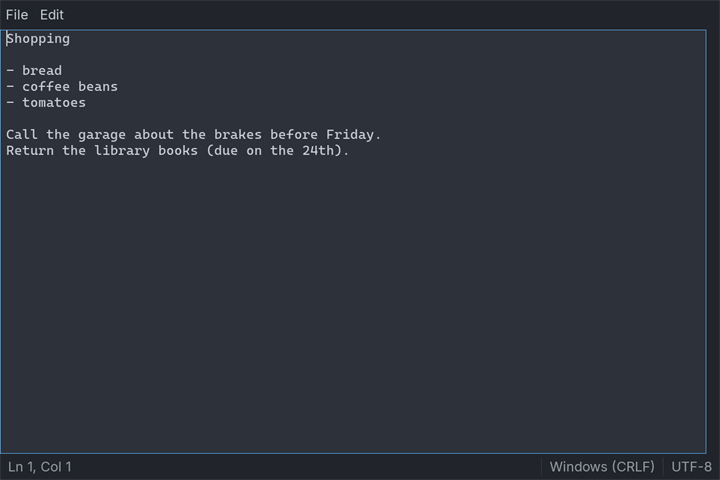
This tutorial builds tpad again, the plain-text editor of the Notepad Tutorial: a menu bar, the text, a scroll bar, a status bar with the line and column, Find, and a question before unsaved work is thrown away. This time it is built on tkControls, which draw into SDL3 windows, so one source builds and runs on Windows, Linux and macOS.
Most of the program does not change. The document module is the same file, word for word. The Editor, the commands and the one Execute are the same. What changes is what a window is made of: widgets instead of window handles, SDL events instead of Win32 messages. The program is about 900 lines of tiko, a fifth of them a self-test, and the self-test begins by printing exactly what the PsControls one prints. Three things are new, because they only show up on other systems or in other languages: a text control that counts in bytes, a file dialog that does not stop the program, and a Quit that comes from the system.
tpad/
tiko.toml the package, and the target tpad
textfile/textfile.tiko the document: load, save, find, line and column
offsets/offsets.tiko UTF-8 bytes and ustring units
pad/pad.tiko the window: controls, menus, commands
tpad.tiko the program, and its self-test
expected.txt what the self-test prints
The toolchain ships it as examples/tkControls/tpad. textfile and offsets import no controls at all, pad is the window, and tpad.tiko starts it.
# tpad on tkControls: `tiko build tpad` writes tpad.exe
[package]
name = "tpad"
[target.tpad]
main = "tpad.tiko"
output = "tpad.exe"There is no UNICODE define, no resource file and no manifest. SDL3's strings are UTF-8 on every system, and SDL3 makes the window DPI-aware itself.
The module keeps text with one LF per line break, so an offset in a Document is an offset in the text control. It is the Notepad Tutorial's textfile unchanged: nothing in it knew which controls would show it.
#module "textfile"
#import "std/fs"
#import "std/strings"
'' Nothing here knows about windows: this module is the part of tpad
'' that compiles, and is tested, on every target.
''
'' Unchanged from the Notepad Tutorial (the PsControls tpad): the
'' document never knew which control family would show it.
public enum LineEnding
CrLf
Lf
end enum
'' A text file as the editor sees it. Inside, every line break is one
'' LF, so an offset into Text is an offset into the editor control,
'' which also counts a line break as one character.
public type Document
as ustring path '' "" until the first Save As
as ustring text
as LineEnding ending = LineEnding.CrLf
as boolean hasBom '' the file began with a byte-order mark
as boolean lossy '' some bytes were not UTF-8
end type
'' CR LF and a lone CR both become LF.
public function ToLf( byref s as const ustring ) as ustring
return strings.Replace( strings.Replace( s, !"\r\n", !"\n" ), _
!"\r", !"\n" )
end functionTextOf in the window module still passes the control's text through ToLf, so the rule holds whatever the control hands back.
Loading and saving keep a file the way it was written: its line ending, and its byte-order mark if it had one. fs.ReadAllText removes a mark and turns bytes that are not UTF-8 into U+FFFD, so the module reads the first three bytes itself and records a lossy load. fs.WriteAtomic replaces the old file only when the new one is complete.
'' Did the file start with a byte-order mark? Only its first three
'' bytes are read.
private function StartsWithBom( byref p as const ustring ) as boolean
dim as fs.File f
if f.OpenRead( p ).IsOk( ) = false then return false
dim as ubyte b( 0 to 2 )
var got = f.Read( @b( 0 ), 3 )
if got.IsOk( ) = false then return false
dim as longint n = got.Value( )
if n >= 3 andalso b( 0 ) = &hEF andalso b( 1 ) = &hBB andalso _
b( 2 ) = &hBF then return true
return n >= 2 andalso b( 0 ) = &hFF andalso b( 1 ) = &hFE
end function
'' Reads a file into doc. Returns "" or what went wrong; on failure doc
'' is left as it was.
public function Load( byref p as const ustring, _
byref doc as Document ) as ustring
var r = fs.ReadAllText( p )
if r.IsOk( ) = false then return r.Failure( ).Message( )
dim as Document d
d.path = p
dim as ustring raw = r.Value( )
'' The first line break says how the file writes them.
dim as int32 lf = instr( raw, !"\n" ), cr = instr( raw, !"\r" )
if lf > 0 andalso cr <> lf - 1 then d.ending = LineEnding.Lf
d.text = ToLf( raw )
d.hasBom = StartsWithBom( p )
d.lossy = instr( d.text, wchr( &hFFFD ) ) > 0
doc = d
return ""
end function
'' Writes doc.text to doc.path in the file's own line ending. The old
'' file is replaced only once the new one is complete on disk.
public function Save( byref doc as Document ) as ustring
dim as ustring s = doc.text
if doc.ending = LineEnding.CrLf then
s = strings.Replace( s, !"\n", !"\r\n" )
end if
if doc.hasBom then s = wchr( &hFEFF ) & s
var r = fs.WriteAtomic( doc.path, s )
if r.IsOk( ) = false then return r.Failure( ).Message( )
return ""
end function
⚠️ fs.ReadAllBytes( p, buf, 3 )does not read three bytes. The third argument is a size limit: any larger file is refused and nothing is read. Read a prefix with aFile, asStartsWithBomdoes.
The title, the search and the status bar's numbers:
'' The file's name without its folder, or "Untitled".
public function DisplayName( byref doc as Document ) as ustring
if len( doc.path ) = 0 then return "Untitled"
dim as int32 i = len( doc.path )
do until i = 0
dim as ustring c = mid( doc.path, i, 1 )
if c = "\" orelse c = "/" then exit do
i -= 1
loop
return mid( doc.path, i + 1 )
end function
'' The title bar: "*notes.txt - tpad" while there are unsaved changes.
public function Caption( byref doc as Document, _
byval modified as boolean ) as ustring
return iif( modified, "*", "" ) & DisplayName( doc ) & " - tpad"
end function
'' The offset of the next match at or after start, wrapping around to
'' the top; -1 when there is none. Offsets count from 0, as the editor
'' control's do.
public function FindNext( byref text as const ustring, _
byref needle as const ustring, _
byval start as int32, _
byval matchCase as boolean ) as int32
if len( needle ) = 0 then return -1
dim as ustring hay = text, pin = needle
if matchCase = false then
hay = lcase( hay )
pin = lcase( pin )
end if
dim as int32 at = instr( start + 1, hay, pin )
if at = 0 then at = instr( hay, pin )
return at - 1
end function
'' The 1-based line and column of an offset, for the status bar.
public sub LineColumn( byref text as const ustring, _
byval offset as int32, _
byref ln as int32, byref col as int32 )
ln = 1
dim as int32 lineStart = 1, at = instr( text, !"\n" )
do until at = 0 orelse at > offset
ln += 1
lineStart = at + 1
at = instr( at + 1, text, !"\n" )
loop
col = offset + 2 - lineStart
end subA tkTextBox holds UTF-8, and GetSel and SetSel count bytes, snapped to character boundaries. A ustring counts UTF-16 units, and so do len, instr and everything in textfile. While the text before an offset is ASCII the two numbers are equal; after the first character that is not, they differ. offsets converts between them:
#module "offsets"
'' Two ways of counting the same position in a text. A ustring counts
'' UTF-16 units; a tkTextBox counts UTF-8 bytes. They agree only while
'' everything before the position is ASCII.
''
'' A string assigned from a ustring holds its UTF-8 bytes, and a ustring
'' assigned from a string decodes them, so each conversion is a prefix
'' turned into the other form and measured.
'' How many ustring units the first `count` UTF-8 bytes of text make.
public function UnitsIn( byref text as const ustring, _
byval count as int32 ) as int32
dim as string utf8 = text
dim as ustring head = left( utf8, count )
return len( head )
end function
'' How many UTF-8 bytes the first `count` ustring units of text make.
public function BytesIn( byref text as const ustring, _
byval count as int32 ) as int32
dim as string head = left( text, count )
return len( head )
end function
⚠️ ASCII text hides this completely. Without the conversions, Find Next forlaitin a file that startscafé au laitselectslai: the search is right and the selection is one byte early for each two-byte character before it.padconverts wherever an offset crosses between the control andtextfile, and the self-test searches text that is not ASCII.
#module "pad"
#import "../textfile"
#import "../offsets"
#import "vendor/tkControls/tkApp"
#import "vendor/tkControls/tkMenuBar"
#import "vendor/tkControls/tkPopupMenu"
#import "vendor/tkControls/tkTextBox"
#import "vendor/tkControls/tkVScrollBar"
#import "vendor/tkControls/tkStatusBar"
#import "vendor/tkControls/tkMessageBox"
#import "vendor/tkControls/tkButton"
#import "vendor/tkControls/tkCheckBox"
using tkApp
using tkHost
using tkPaint
using tkTheme
using tkMenuBar
using tkPopupMenu
using tkTextBox
using tkVScrollBar
using tkStatusBar
using tkMessageBox
using tkButton
using tkCheckBox
'' The window of tpad, the Notepad Tutorial's editor, on tkControls: the
'' same Editor, the same commands, the same one Execute. What changed is
'' only what a window is made of.
'' Every command the menus and the keyboard can give.
public enum Cmd
CmdNew = 1000
CmdOpen
CmdSave
CmdSaveAs
CmdExit
CmdUndo
CmdCut
CmdCopy
CmdPaste
CmdSelectAll
CmdFind
CmdFindNext
end enum
'' The two things a person answers: a question in a message box, and
'' a file name in a file dialog. Each is reached through a pointer, so
'' a test can answer in the person's place.
public type AskProc as function( byval f as TK_FORM ptr, _
byref text as ustring, byval buttons as long ) as long
public type PickProc as function( byval f as TK_FORM ptr, _
byval saving as boolean, byref suggest as ustring ) as ustring
'' One open file and its window. The form's Tag points here.
public type Editor
as TK_FORM ptr form
as TK_WIDGET ptr bar, text, scroll, status
as textfile.Document doc
as ustring findWhat
as boolean matchCase
as boolean picking '' a file dialog is waiting for an answer
as AskProc ask
as PickProc pick
end type
'' The Find box's controls. Its form's Tag points here.
type FindBox
as Editor ptr ed
as TK_WIDGET ptr what, matchCase, ok, cancel
end type
public declare sub Execute( byval ed as Editor ptr, byval id as long )
public declare sub ShowTitle( byval ed as Editor ptr )
public declare sub ShowStatus( byval ed as Editor ptr )
'' A control's callback receives only the control: its form's Tag is
'' the Editor.
function EditorOf( byval w as TK_WIDGET ptr ) as Editor ptr
return tkForm_FromWidget( w )->Tag
end functionEverything about one window is an Editor, allocated with new, and the form's Tag points at it. A control is a TK_WIDGET ptr, and the Editor keeps one for each control it talks to: there is no f->Item( id ) to look a control up by its id. A control's callback receives only the control; tkForm_FromWidget finds the form, and its Tag finds the Editor. The Find box works the same way with a FindBox.
ask and pick are the two places a person answers: a message box and a file dialog. They are procedure pointers so that a test can answer instead.
'' The real answers come from a person.
function AskPerson( byval f as TK_FORM ptr, byref text as ustring, _
byval buttons as long ) as long
return tkMessageBox_Show( tkForm_Widget( f ), text, "tpad", _
iif( buttons = MBX_BTN_OK, MBX_ICON_INFO, MBX_ICON_QUESTION ), _
buttons )
end function
'' SDL's file dialogs are asynchronous: the answer arrives in a callback,
'' perhaps on another thread. PickFile waits for it, pumping, so its
'' caller sees a plain function -- as a modal Win32 dialog was.
type PickWait
as SDL_AtomicInt answered '' 0 waiting, 1 answered
as zstring ptr path '' SDL's copy of the answer, or null
end type
'' May run on another thread, so it touches nothing but C memory.
sub PickAnswered( byval userdata as any ptr, _
byval filelist as const zstring const ptr ptr, _
byval filter as long )
dim as PickWait ptr w = userdata
if filelist <> 0 then
if filelist[0] <> 0 then w->path = SDL_strdup( filelist[0] )
end if
SDL_SetAtomicInt( @w->answered, 1 )
end sub
function PickFile( byval f as TK_FORM ptr, byval saving as boolean, _
byref suggest as ustring ) as ustring
dim as SDL_DialogFileFilter filters( 0 to 1 )
filters( 0 ).name = @"Text files" : filters( 0 ).pattern = @"txt"
filters( 1 ).name = @"All files" : filters( 1 ).pattern = @"*"
dim as string where = suggest
dim as PickWait w
dim as SDL_Window ptr win = tkForm_Host( f )->win
if saving then
SDL_ShowSaveFileDialog( @PickAnswered, @w, win, @filters( 0 ), 2, _
iif( len( where ), strptr( where ), 0 ) )
else
SDL_ShowOpenFileDialog( @PickAnswered, @w, win, @filters( 0 ), 2, _
0, false )
end if
do until SDL_GetAtomicInt( @w.answered ) = 1
tkApp_Pump( )
SDL_Delay( 10 )
loop
dim as ustring picked
if w.path <> 0 then
picked = *w.path
SDL_free( w.path )
end if
return picked
end function
'' Every question for a path comes through here. The event loop runs
'' while the dialog is up, so nothing else may start until it answers.
function PickPath( byval ed as Editor ptr, byval saving as boolean, _
byref suggest as ustring ) as ustring
ed->picking = true
dim as ustring p = ed->pick( ed->form, saving, suggest )
ed->picking = false
return p
end functionSDL's file dialogs do not block: they return at once and answer later, in a callback that may run on another thread. PickFile waits for that answer and keeps the window alive while it does, so its callers see a plain function that returns a path, as they would with a modal dialog.
Because of that other thread, the callback touches nothing but C memory: it copies the path with SDL_strdup into the PickWait it was handed, and then sets the atomic, which tells the waiting code that the copy is ready. The copy becomes a ustring only back on the waiting side.
⚠️ The event loop keeps running under the dialog. Whether the window beneath it takes input is the system's decision. If it does, File > Exit could destroy the form and delete theEditorwhilePickFile's caller is still waiting to use it. So whilepickingis set,Executestarts nothing and the form refuses to close.
'' What the message callback saw is acted on once the box has moved its
'' caret: tkApp_RunOnUI does what PostMessage did.
sub CaretMoved( byval payload as any ptr )
ShowStatus( payload )
end sub
sub BuildText( byval f as TK_FORM ptr, byval ed as Editor ptr )
ed->text = tkTextBox_Create( tkForm_Widget( f ), 101, true )
tkTextBox_SetFont( ed->text, tkForm_Font( f, TKFONT_MONO ) )
tkTextBox_SetLimitText( ed->text, &h7FFFFFFE )
tkTextBox_SetMargins( ed->text, tkForm_Scale( f, 6 ), tkForm_Scale( f, 6 ) )
'' The person typed, cut, pasted or undid something.
tkTextBox_SetChangeCallback( ed->text, _
sub( byval h as TK_WIDGET ptr )
ShowTitle( EditorOf( h ) )
ShowStatus( EditorOf( h ) )
end sub )
'' The caret may have moved: look once the control has acted.
tkTextBox_SetMessageCallback( ed->text, _
function( byval m as TKTEXTBOX_MESSAGEINFO ptr ) as boolean
select case m->msg
case TKM_KEYDOWN, TKM_KEYUP, TKM_LBUTTONDOWN, TKM_LBUTTONUP
tkApp_RunOnUI( @CaretMoved, EditorOf( m->hTextBox ) )
end select
return false
end function )
'' The control draws no scroll bar unless asked; like the tutorial,
'' tpad gives it one of its own and wires the two together.
ed->scroll = tkVScrollBar_Create( tkForm_Widget( f ), 102 )
tkTextBox_SetScrollChangedCallback( ed->text, _
sub( byval h as TK_WIDGET ptr )
dim as integer total, page, top
tkTextBox_GetVScrollInfo( h, total, page, top )
tkVScrollBar_SetRange( EditorOf( h )->scroll, total, page, top )
end sub )
tkVScrollBar_SetScrollCallback( ed->scroll, _
sub( byval h as TK_WIDGET ptr, byval newPos as integer )
tkTextBox_ScrollToLine( EditorOf( h )->text, newPos )
end sub )
end sub-
The change callback fires only for the person's edits. Setters such as
tkTextBox_SetTextare silent. -
The message callback runs before the box acts on a key or a click.
tkApp_RunOnUIqueuesCaretMovedto run once the event has been handled, when the caret has moved. -
The box draws no scroll bar unless asked. It reports its line count, page and top line, and a
tkVScrollBarreports where it was dragged.
sub BuildStatus( byval f as TK_FORM ptr, byval ed as Editor ptr )
ed->status = tkStatusBar_Create( tkForm_Widget( f ), 103 )
tkStatusBar_AddPanel( ed->status, "" ) '' Ln, Col: springs
tkStatusBar_AddPanel( ed->status, "" ) '' line ending
tkStatusBar_AddPanel( ed->status, "" ) '' encoding
tkStatusBar_SetExpandPanel( ed->status, 0 )
'' No paint callback: tkStatusBar draws its panels itself.
end sub
'' The editor's text, with one LF per line break, as textfile wants.
function TextOf( byval ed as Editor ptr ) as ustring
return textfile.ToLf( tkTextBox_GetText( ed->text ) )
end function
public sub ShowTitle( byval ed as Editor ptr )
dim as string t8 = textfile.Caption( ed->doc, tkTextBox_GetModify( ed->text ) )
SDL_SetWindowTitle( tkForm_Host( ed->form )->win, strptr( t8 ) )
end sub
public sub ShowStatus( byval ed as Editor ptr )
dim as integer first, last
tkTextBox_GetSel( ed->text, first, last )
dim as ustring body = TextOf( ed )
dim as int32 ln, col
textfile.LineColumn( body, offsets.UnitsIn( body, last ), ln, col )
tkStatusBar_SetText( ed->status, 0, "Ln " & ln & ", Col " & col )
tkStatusBar_SetText( ed->status, 1, _
iif( ed->doc.ending = textfile.LineEnding.CrLf, _
"Windows (CRLF)", "Unix (LF)" ) )
tkStatusBar_SetText( ed->status, 2, _
iif( ed->doc.hasBom, "UTF-8 with BOM", "UTF-8" ) )
end subA tkStatusBar draws its panels itself, so setting a panel's text is all there is to do. The window title goes to SDL as UTF-8: t8 is a string holding the caption's bytes.
sub Main_OnSize( byval f as TK_FORM ptr, byval cx as long, byval cy as long )
dim as Editor ptr ed = f->Tag
dim as long barH = tkForm_Scale( f, 30 ), statusH = tkForm_Scale( f, 26 )
dim as long sbW = tkForm_Scale( f, 14 )
dim as long textH = cy - barH - statusH
tkWidget_SetPos( ed->bar, 0, 0, cx, barH )
tkWidget_SetPos( ed->text, 0, barH, cx - sbW, textH )
tkWidget_SetPos( ed->scroll, cx - sbW, barH, sbW, textH )
tkWidget_SetPos( ed->status, 0, cy - statusH, cx, statusH )
end subControls start with no size; OnSize places them. Every literal goes through tkForm_Scale, which turns a design value into pixels at the form's scale.
function AddMenu( byval f as TK_FORM ptr, byval bar as TK_WIDGET ptr, _
byref title as ustring ) as TK_MENU ptr
dim as long i = tkMenuBar_AddItem( bar, title, 0 )
dim as TK_MENU ptr m = tkPopupMenu_Create( tkForm_Host( f ) )
tkMenuBar_SetDropDown( bar, i, m )
return m
end function
'' The command key, as the menus spell it: Cmd on macOS, Ctrl
'' elsewhere. TK_KMOD_PRIMARY is the same key as a modifier mask.
#if defined( TIKO_OS_MACOS )
const PrimaryKey = "Cmd+"
#else
const PrimaryKey = "Ctrl+"
#endif
sub BuildMenus( byval f as TK_FORM ptr, byval ed as Editor ptr )
dim as TK_WIDGET ptr bar = tkMenuBar_Create( tkForm_Widget( f ), 100 )
ed->bar = bar
tkMenuBar_SetCommandCallback( bar, _
sub( byval h as TK_WIDGET ptr, byval id as long )
Execute( EditorOf( h ), id )
end sub )
dim as TK_MENU ptr m = AddMenu( f, bar, "File" )
tkPopupMenu_AddItem( m, CmdNew, "New", PrimaryKey & "N" )
tkPopupMenu_AddItem( m, CmdOpen, "Open...", PrimaryKey & "O" )
tkPopupMenu_AddItem( m, CmdSave, "Save", PrimaryKey & "S" )
tkPopupMenu_AddItem( m, CmdSaveAs, "Save As...", PrimaryKey & "Shift+S" )
tkPopupMenu_AddSeparator( m )
tkPopupMenu_AddItem( m, CmdExit, "Exit" )
m = AddMenu( f, bar, "Edit" )
tkPopupMenu_AddItem( m, CmdUndo, "Undo", PrimaryKey & "Z" )
tkPopupMenu_AddSeparator( m )
tkPopupMenu_AddItem( m, CmdCut, "Cut", PrimaryKey & "X" )
tkPopupMenu_AddItem( m, CmdCopy, "Copy", PrimaryKey & "C" )
tkPopupMenu_AddItem( m, CmdPaste, "Paste", PrimaryKey & "V" )
tkPopupMenu_AddItem( m, CmdSelectAll, "Select All", PrimaryKey & "A" )
tkPopupMenu_AddSeparator( m )
tkPopupMenu_AddItem( m, CmdFind, "Find...", PrimaryKey & "F" )
tkPopupMenu_AddItem( m, CmdFindNext, "Find Next", "F3" )
'' There is no accelerator table: the text box handles Ctrl+Z, X, C,
'' V and A (Cmd on macOS) and leaves every other key unclaimed, so the
'' keys only tpad knows bubble up to the form.
tkForm_OnKeyDown( f, _
function( byval f as TK_FORM ptr, byval key as long, _
byval mods as long ) as boolean
dim as boolean primary = (mods and TK_KMOD_PRIMARY) <> 0
dim as boolean shift = (mods and SDL_KMOD_SHIFT) <> 0
dim as long id = 0
if primary then
select case key
case SDLK_N : id = CmdNew
case SDLK_O : id = CmdOpen
case SDLK_S : id = iif( shift, CmdSaveAs, CmdSave )
case SDLK_F : id = CmdFind
end select
elseif key = SDLK_F3 then
id = CmdFindNext
end if
if id = 0 then return false
Execute( f->Tag, id )
return true
end function )
end subThe text box handles Ctrl+Z, X, C, V and A itself, and leaves every other key unclaimed, so a key it does not use bubbles up to the form. tkForm_OnKeyDown turns Ctrl+N, Ctrl+O, Ctrl+S, Ctrl+Shift+S, Ctrl+F and F3 into commands; returning true says the key was used. On macOS the command key is Cmd instead of Ctrl: TK_KMOD_PRIMARY, from tkHost, is Cmd there and Ctrl elsewhere, the text box tests it too, and PrimaryKey spells the menus to match. Menus, keys and the self-test all end in the one Execute:
'' The one place a command is carried out, wherever it came from.
public sub Execute( byval ed as Editor ptr, byval id as long )
if ed->picking then exit sub
select case id
case CmdNew
if MayDiscard( ed ) then
dim as textfile.Document blank
ShowDocument( ed, blank )
end if
case CmdOpen
if MayDiscard( ed ) then
dim as ustring p = PickPath( ed, false, "" )
if len( p ) then OpenPath( ed, p )
end if
case CmdSave
SaveDocument( ed, false )
case CmdSaveAs
SaveDocument( ed, true )
case CmdExit
tkForm_Close( ed->form )
case CmdUndo
tkTextBox_Undo( ed->text )
case CmdCut
tkTextBox_Cut( ed->text )
case CmdCopy
tkTextBox_Copy( ed->text )
case CmdPaste
tkTextBox_Paste( ed->text )
case CmdSelectAll
tkTextBox_SelectAll( ed->text )
case CmdFind
AskWhatToFind( ed )
case CmdFindNext
if len( ed->findWhat ) then
FindAgain( ed )
else
AskWhatToFind( ed )
end if
end select
end sub'' Puts doc in the window, replacing what was there.
sub ShowDocument( byval ed as Editor ptr, byref doc as textfile.Document )
ed->doc = doc
tkTextBox_SetText( ed->text, doc.text )
tkTextBox_SetModify( ed->text, false )
tkTextBox_SetSel( ed->text, 0, 0 )
ShowTitle( ed )
ShowStatus( ed )
end sub
'' Opens path; says why not if it cannot.
public function OpenPath( byval ed as Editor ptr, byref path as ustring ) as boolean
dim as textfile.Document doc
dim as ustring e = textfile.Load( path, doc )
if len( e ) then
ed->ask( ed->form, e, MBX_BTN_OK )
return false
end if
ShowDocument( ed, doc )
if doc.lossy then
ed->ask( ed->form, textfile.DisplayName( doc ) & _
" is not UTF-8. Characters that could not be read show" & _
" as U+FFFD, and saving writes them that way.", MBX_BTN_OK )
end if
return true
end function
'' Saves, asking for a name when there is none (or when asked to).
function SaveDocument( byval ed as Editor ptr, byval newName as boolean ) as boolean
if newName orelse len( ed->doc.path ) = 0 then
dim as ustring p = PickPath( ed, true, textfile.DisplayName( ed->doc ) )
if len( p ) = 0 then return false
ed->doc.path = p
end if
ed->doc.text = TextOf( ed )
dim as ustring e = textfile.Save( ed->doc )
if len( e ) then
ed->ask( ed->form, e, MBX_BTN_OK )
return false
end if
tkTextBox_SetModify( ed->text, false )
ShowTitle( ed )
return true
end function
'' True when it is all right to throw the text away: it is saved,
'' the person saved it now, or said not to.
function MayDiscard( byval ed as Editor ptr ) as boolean
if tkTextBox_GetModify( ed->text ) = false then return true
select case ed->ask( ed->form, "Do you want to save changes to " & _
textfile.DisplayName( ed->doc ) & "?", _
MBX_BTN_SAVE_DONTSAVE_CANCEL )
case MBX_IDYES
return SaveDocument( ed, false )
case MBX_IDNO
return true
end select
return false
end function
sub FindAgain( byval ed as Editor ptr )
if len( ed->findWhat ) = 0 then exit sub
dim as integer first, last
tkTextBox_GetSel( ed->text, first, last )
dim as ustring body = TextOf( ed )
dim as int32 at = textfile.FindNext( body, ed->findWhat, _
offsets.UnitsIn( body, last ), ed->matchCase )
if at < 0 then
ed->ask( ed->form, "Cannot find """ & ed->findWhat & """", MBX_BTN_OK )
exit sub
end if
'' SetSel scrolls the caret into view itself (no EM_SCROLLCARET).
tkTextBox_SetSel( ed->text, offsets.BytesIn( body, at ), _
offsets.BytesIn( body, at + len( ed->findWhat ) ) )
ShowStatus( ed )
end subtkTextBox_SetSel scrolls the caret into view itself, so FindAgain needs nothing after it.
'' The Find box: a modal form that only collects the search.
sub FindBox_OnSize( byval f as TK_FORM ptr, byval cx as long, byval cy as long )
'' Two rows, each as tall as a button: the search and its button,
'' then the option and Cancel.
dim as FindBox ptr box = f->Tag
dim as long pad = tkForm_Scale( f, 12 ), bw, bh
tkButton_GetIdealSize( box->ok, bw, bh )
dim as long w = cx - 3 * pad - bw
tkWidget_SetPos( box->what, pad, pad, w, bh )
tkWidget_SetPos( box->matchCase, pad, 2 * pad + bh, w, bh )
tkWidget_SetPos( box->ok, cx - pad - bw, pad, bw, bh )
tkWidget_SetPos( box->cancel, cx - pad - bw, 2 * pad + bh, bw, bh )
end sub
sub FindBox_Accept( byval box as FindBox ptr )
box->ed->findWhat = tkTextBox_GetText( box->what )
box->ed->matchCase = tkCheckBox_GetChecked( box->matchCase )
tkForm_EndModal( tkForm_FromWidget( box->what ), TKAPP_IDOK )
end sub
sub AskWhatToFind( byval ed as Editor ptr )
dim as TK_FORM ptr f = tkApp_NewForm( "Find", 420, 112, ed->form )
dim as FindBox box
box.ed = ed
f->Tag = @box
box.what = tkTextBox_Create( tkForm_Widget( f ), 104 )
tkTextBox_SetText( box.what, ed->findWhat )
tkTextBox_SetSelectOnFocus( box.what, true )
'' Enter in the search is the default button's job in Win32; here the
'' single-line box reports Enter, and that is Find Next.
tkTextBox_SetEnterPressedCallback( box.what, _
sub( byval h as TK_WIDGET ptr )
FindBox_Accept( tkForm_FromWidget( h )->Tag )
end sub )
box.matchCase = tkCheckBox_Create( tkForm_Widget( f ), 105 )
tkCheckBox_SetText( box.matchCase, "Match case" )
tkCheckBox_SetChecked( box.matchCase, ed->matchCase )
box.ok = tkButton_Create( tkForm_Widget( f ), TKAPP_IDOK )
tkButton_SetText( box.ok, "Find Next" )
tkButton_SetClickCallback( box.ok, _
sub( byval h as TK_WIDGET ptr, byval id as long )
FindBox_Accept( tkForm_FromWidget( h )->Tag )
end sub )
box.cancel = tkButton_Create( tkForm_Widget( f ), TKAPP_IDCANCEL )
tkButton_SetText( box.cancel, "Cancel" )
tkButton_SetClickCallback( box.cancel, _
sub( byval h as TK_WIDGET ptr, byval id as long )
tkForm_EndModal( tkForm_FromWidget( h ), TKAPP_IDCANCEL )
end sub )
tkForm_OnSize( f, @FindBox_OnSize )
'' Esc ends a modal form with IDCANCEL by itself.
if tkForm_ShowModal( f ) = TKAPP_IDOK then FindAgain( ed )
end subThe Find box is a modal form. tkForm_ShowModal returns only once the box is closed, so its FindBox can live on the stack of AskWhatToFind. Enter in the search box is Find Next, through the box's Enter callback, and Esc closes a modal form with TKAPP_IDCANCEL by itself.
'' The event hook is handed only the event, so the one window it
'' protects is kept where the hook can reach it.
function MainEditor( byval ed as Editor ptr = 0 ) as Editor ptr
static as Editor ptr kept
if ed <> 0 then kept = ed
return kept
end function
'' The system asking the whole program to quit (Cmd+Q, logging out)
'' becomes an ordinary close, which asks first.
function QuitHook( byval e as SDL_Event ptr ) as boolean
if e->type <> SDL_EVENT_QUIT then return false
tkForm_Close( MainEditor( )->form )
return true
end function
'' Builds the main window, with an empty, untitled document.
public function Create( byval forcedScale as single = 0 ) as Editor ptr
dim as Editor ptr ed = new Editor
ed->ask = @AskPerson
ed->pick = @PickFile
dim as TK_FORM ptr f = tkApp_NewForm( "tpad", 720, 480, 0, forcedScale )
ed->form = f
f->Tag = ed
BuildMenus( f, ed )
BuildText( f, ed )
BuildStatus( f, ed )
tkForm_OnSize( f, @Main_OnSize )
'' Asked before the window closes, however it is closed.
tkForm_OnClose( f, _
function( byval f as TK_FORM ptr ) as boolean
dim as Editor ptr ed = f->Tag
if ed->picking then return false
return MayDiscard( ed )
end function )
'' No OnScaleChanged: a scale change re-sizes the fonts a control was
'' given; it never hands every control the UI font, so the text stays
'' monospaced by itself.
tkForm_OnDestroy( f, _
sub( byval f as TK_FORM ptr )
tkHost_RemoveEventHook( @QuitHook )
delete cast( Editor ptr, f->Tag )
f->Tag = 0
end sub )
MainEditor( ed )
tkHost_AddEventHook( @QuitHook )
ShowTitle( ed )
ShowStatus( ed )
return ed
end functionMayDiscard asks Save, Don't Save or Cancel before New, Open or closing; returning false from OnClose keeps the window open.
⚠️ Closing the window is not the only way to end the program. Cmd+Q on a Mac reaches it asSDL_EVENT_QUIT, an event that belongs to no window, and left alone it closes every window without asking.tkHost_AddEventHooksees each event first, andQuitHookturns this one into an ordinary close.
A change of display scale re-sizes the fonts the controls were given and changes nothing else, so the text stays monospaced without any code. forcedScale pins a scale instead of the display's; the self-test uses it, so its layout is the same on every machine.
#cmdline "-s gui"
#import "std/fs"
#import "std/strings"
#import "./pad"
#import "vendor/tkControls/tkApp"
#import "vendor/tkControls/tkTextBox"
#import "vendor/tkControls/tkStatusBar"
#import "vendor/tkControls/tkMessageBox"
using tkApp
using tkHost
using tkTextBox
using tkStatusBar
using tkMessageBox
'' tpad, the Notepad Tutorial's editor, on tkControls (SDL3 + SDL_ttf):
'' the same program on Windows, Linux and macOS.
''
'' tpad [file] run it
'' tpad --selftest drive the real window, print what it saw
'' tpad --shot out.bmp [file] render once (dark theme) and save it
' ... the self-test, in the next section ...
'' ---- the program ----
dim as string cmd1 = command( 1 )
dim as TKAPP_OPTIONS opts
if (cmd1 = "--selftest") orelse (cmd1 = "--shot") then opts.ThemeMode = TKAPP_THEME_DARK
if tkApp_Init( opts ) = false then print "tkApp_Init: " & *SDL_GetError( ) : end 1
' the self-test runs at 1.0, a shot at 1.75 (so shots from two platforms compare), and the
' program at the display's own scale unless TPAD_SCALE pins one
dim as single scale_ = val( environ( "TPAD_SCALE" ) )
if cmd1 = "--selftest" then scale_ = 1.0
if cmd1 = "--shot" then scale_ = 1.75
dim as pad.Editor ptr ed = pad.Create( scale_ )
if cmd1 = "--selftest" then
dim as long r = SelfTest( ed )
tkApp_Shutdown( )
end r
end if
if cmd1 = "--shot" then
if len( command( 3 ) ) then pad.OpenPath( ed, command( 3 ) )
tkForm_Show( ed->form )
dim as Uint64 t0 = SDL_GetTicks( )
while SDL_GetTicks( ) - t0 < 300
tkApp_Pump( )
SDL_Delay( 10 )
wend
dim as TK_HOST ptr h = tkForm_Host( ed->form )
tkHost_Render( h )
tkHost_RenderTo( h, false )
dim as SDL_Surface ptr s = SDL_RenderReadPixels( h->renderer, 0 )
dim as string shot = command( 2 )
if s then SDL_SaveBMP( s, strptr( shot ) ) : SDL_DestroySurface( s )
tkApp_Shutdown( )
end 0
end if
if len( cmd1 ) then pad.OpenPath( ed, cmd1 )
end tkApp_Run( ed->form )-s gui means no console window on Windows. tkApp_Run shows the main window and runs the event loop until it closes.
--shot renders the window once, in the dark theme at a scale of 1.75, and saves it as a bitmap: the picture at the top of this page was made with it. TPAD_SCALE pins the scale of an ordinary run, which is useful for trying the layout at a scale the display does not have.
Build and run it from the project folder:
tiko build tpad
./tpad.exe notes.txt
The first build compiles the tkControls modules the program imports; later builds compile only what changed. The build copies what the program needs at run time beside it: the bundled fonts and their licences and, on Windows, the SDL3, SDL3_ttf and SDL3_image libraries. On Linux and macOS the program uses the system's SDL3 libraries (on macOS, Homebrew's: brew install sdl3 sdl3_ttf sdl3_image); see tkControls for what to install. tiko build tpad --profile release writes an optimised build: on Windows tpad.exe is 331,776 bytes, and that folder is the whole installation.
tpad --selftest drives the real window and prints what it saw. The message box and the file dialog are scripted through ask and pick; keys and typed text are SDL events, pushed onto the queue where the system would put them:
'' ---- the self-test (the Notepad Tutorial's, with SDL events for Win32 messages) ----
'' The person, scripted: what the test answers to each question.
function ScriptedAsk( byval f as TK_FORM ptr, byref text as ustring, _
byval buttons as long ) as long
static as long replies( ... ) = { MBX_IDCANCEL, MBX_IDNO, _
MBX_IDCANCEL, MBX_IDNO }
static as int32 n
print " asked: "; text
if buttons = MBX_BTN_OK then return MBX_IDOK
n += 1
print " answered: "; iif( replies( n - 1 ) = MBX_IDNO, _
"Don't Save", "Cancel" )
return replies( n - 1 )
end function
function ScriptedPick( byval f as TK_FORM ptr, byval saving as boolean, _
byref suggest as ustring ) as ustring
print " picked: lf.tmp"
return "lf.tmp"
end function
'' A person who tries to close the window while the dialog is up.
function ImpatientPick( byval f as TK_FORM ptr, byval saving as boolean, _
byref suggest as ustring ) as ustring
pad.Execute( f->Tag, pad.CmdExit )
tkForm_Close( f )
print " window closed: "; cbool( tkForm_Host( f )->bQuit )
return ""
end function
'' Lets queued events arrive, as the loop would.
sub Pump( )
tkApp_Pump( )
end sub
'' A key, delivered where the keyboard would deliver it.
sub Press( byval ed as pad.Editor ptr, byval key as long )
dim as SDL_Event e
e.type = SDL_EVENT_KEY_DOWN
e.key.windowID = tkForm_Host( ed->form )->winId
e.key.key = key
e.key.down = true
SDL_PushEvent( @e )
Pump( )
end sub
'' Typed text, as the OS hands it over after the keys: UTF-8. The event
'' points at this string, so it lives until the event has been handled.
dim shared as string gTyped
sub Type_( byval ed as pad.Editor ptr, byref s as ustring )
gTyped = s
dim as SDL_Event e
e.type = SDL_EVENT_TEXT_INPUT
e.text.windowID = tkForm_Host( ed->form )->winId
e.text.text = strptr( gTyped )
SDL_PushEvent( @e )
Pump( )
end sub
sub Report( byval ed as pad.Editor ptr )
dim as ustring title = *SDL_GetWindowTitle( tkForm_Host( ed->form )->win )
print " title: "; title
print " status: "; tkStatusBar_GetText( ed->status, 0 ); " | "; _
tkStatusBar_GetText( ed->status, 1 ); " | "; _
tkStatusBar_GetText( ed->status, 2 )
end sub
function SelfTest( byval ed as pad.Editor ptr ) as long
ed->ask = @ScriptedAsk
ed->pick = @ScriptedPick
fs.WriteAllText( "lf.tmp", !"one\ntwo\nthree\n" )
dim as TK_HOST ptr h = tkForm_Host( ed->form )
tkForm_Show( ed->form )
Pump( )
print "== a new window"
Report( ed )
print "== the layout, at 600 x 400"
SDL_SetWindowSize( h->win, 600, 400 )
dim as Uint64 t0 = SDL_GetTicks( )
while SDL_GetTicks( ) - t0 < 300
Pump( )
SDL_Delay( 10 )
wend
print " text meets the scroll bar: "; _
cbool( ed->text->x + ed->text->cw = ed->scroll->x )
print " text meets the status bar: "; _
cbool( ed->text->y + ed->text->ch = ed->status->y )
print " status bar is as wide as the window: "; _
cbool( ed->status->cw = h->root->cw )
print "== File > Open"
pad.Execute( ed, pad.CmdOpen )
Report( ed )
print "== Down, Down, End, and type ""!"""
tkHost_SetFocus( h, ed->text )
Press( ed, SDLK_DOWN )
Press( ed, SDLK_DOWN )
Press( ed, SDLK_END )
Type_( ed, "!" )
Report( ed )
print "== Find Next, for ""T"", twice"
ed->findWhat = "T"
pad.Execute( ed, pad.CmdFindNext )
Report( ed )
pad.Execute( ed, pad.CmdFindNext )
Report( ed )
print "== Find Next, for ""four"""
ed->findWhat = "four"
pad.Execute( ed, pad.CmdFindNext )
print "== File > Save"
pad.Execute( ed, pad.CmdSave )
Report( ed )
dim as ustring saved = fs.ReadAllText( "lf.tmp" ).Value( )
print " on disk: "; strings.Escape( saved )
print "== type, then File > New, twice"
Type_( ed, "?" )
pad.Execute( ed, pad.CmdNew )
Report( ed )
pad.Execute( ed, pad.CmdNew )
Report( ed )
'' Win32 sent WM_DPICHANGED; here the surface's scale doubles and
'' SDL says so.
print "== moved to a monitor at twice the DPI"
h->fScaleForced = 2 * h->fScale
dim as SDL_Event e
e.type = SDL_EVENT_WINDOW_DISPLAY_SCALE_CHANGED
e.window.windowID = h->winId
SDL_PushEvent( @e )
Pump( )
print " the text is still monospaced: "; _
cbool( tkTextBox_GetFont( ed->text ) = _
tkForm_Font( ed->form, TKFONT_MONO ) )
print "== text that is not ASCII, Find Next for ""lait"", twice"
fs.WriteAllText( "lf.tmp", "caf" & wchr( &hE9 ) & !" au lait\n" & _
"na" & wchr( &hEF ) & "ve lait" )
pad.Execute( ed, pad.CmdOpen )
ed->findWhat = "lait"
pad.Execute( ed, pad.CmdFindNext )
print " selected: "; tkTextBox_GetSelText( ed->text )
Report( ed )
pad.Execute( ed, pad.CmdFindNext )
print " selected: "; tkTextBox_GetSelText( ed->text )
Report( ed )
print "== File > Exit while the file dialog is open"
ed->pick = @ImpatientPick
pad.Execute( ed, pad.CmdOpen )
ed->pick = @ScriptedPick
print "== type, then the system asks the program to quit"
Type_( ed, "x" )
e.type = SDL_EVENT_QUIT
SDL_PushEvent( @e )
Pump( )
print " window closed: "; cbool( h->bQuit )
print "== type, then close the window"
Type_( ed, "x" )
tkForm_Close( ed->form )
print " window closed: "; cbool( h->bQuit )
fs.RemoveFile( "lf.tmp" )
return 0
end functionIts output is the same on Windows, Linux and macOS. Up to the section on text that is not ASCII it is, line for line, the same as the Notepad Tutorial's; the sections from there on are the three things new in this program:
== a new window
title: Untitled - tpad
status: Ln 1, Col 1 | Windows (CRLF) | UTF-8
== the layout, at 600 x 400
text meets the scroll bar: true
text meets the status bar: true
status bar is as wide as the window: true
== File > Open
picked: lf.tmp
title: lf.tmp - tpad
status: Ln 1, Col 1 | Unix (LF) | UTF-8
== Down, Down, End, and type "!"
title: *lf.tmp - tpad
status: Ln 3, Col 7 | Unix (LF) | UTF-8
== Find Next, for "T", twice
title: *lf.tmp - tpad
status: Ln 2, Col 2 | Unix (LF) | UTF-8
title: *lf.tmp - tpad
status: Ln 3, Col 2 | Unix (LF) | UTF-8
== Find Next, for "four"
asked: Cannot find "four"
== File > Save
title: lf.tmp - tpad
status: Ln 3, Col 2 | Unix (LF) | UTF-8
on disk: one\ntwo\nthree!\n
== type, then File > New, twice
asked: Do you want to save changes to lf.tmp?
answered: Cancel
title: *lf.tmp - tpad
status: Ln 3, Col 2 | Unix (LF) | UTF-8
asked: Do you want to save changes to lf.tmp?
answered: Don't Save
title: Untitled - tpad
status: Ln 1, Col 1 | Windows (CRLF) | UTF-8
== moved to a monitor at twice the DPI
the text is still monospaced: true
== text that is not ASCII, Find Next for "lait", twice
picked: lf.tmp
selected: lait
title: lf.tmp - tpad
status: Ln 1, Col 13 | Unix (LF) | UTF-8
selected: lait
title: lf.tmp - tpad
status: Ln 2, Col 11 | Unix (LF) | UTF-8
== File > Exit while the file dialog is open
window closed: false
== type, then the system asks the program to quit
asked: Do you want to save changes to lf.tmp?
answered: Cancel
window closed: false
== type, then close the window
asked: Do you want to save changes to lf.tmp?
answered: Don't Save
window closed: true
-
Size the window, then wait. The system applies a new window size when it gets to it, so
SelfTestpumps for a moment before it checks the layout. A key sent to a text box with no size moves nothing. -
An event's text must outlive the event.
SDL_EVENT_TEXT_INPUTpoints at its string;gTypedkeeps the string until the event has been handled. -
Pump after every event.
SDL_PushEventonly queues it;tkApp_Pumphands it to the window, as the loop would. -
Look at the window too. The self-test checks commands, callbacks and files, not pixels:
tpad --shotis for that.
| Notepad Tutorial (PsControls) | Here (tkControls) |
|---|---|
PsApplication, PsForm, f->hWindow, f->Item( id )
|
tkApp_Init, TK_FORM, tkForm_Widget( f ); the Editor keeps its widget pointers |
PsForm.FromHwnd( h )->Tag |
tkForm_FromWidget( w )->Tag |
PostMessageW( WM_CARETMOVED ), handled in OnMessage
|
tkApp_RunOnUI( @CaretMoved, ed ) |
| An accelerator table |
tkForm_OnKeyDown: keys the text box leaves unclaimed reach the form |
CISaveFileDialog and CIOpenFileDialog
|
SDL_ShowSaveFileDialog and SDL_ShowOpenFileDialog, waited for by PickFile, with picking guarding the window meanwhile |
Selection offsets that match ustring units |
UTF-8 byte offsets, converted by offsets
|
| Closing the window | Closing the window, and SDL_EVENT_QUIT through QuitHook
|
SetWindowTextW and GetWindowTextW
|
SDL_SetWindowTitle and SDL_GetWindowTitle, in UTF-8 |
EM_SCROLLCARET after SetSel
|
Nothing: tkTextBox_SetSel scrolls the caret into view |
| A status bar paint callback | Nothing: tkStatusBar draws its panels |
OnDpiChanged puts the monospaced font back |
Nothing: a scale change keeps each control's font |
| The Find box's default button takes Enter | The search box's Enter callback |
IDYES, IDNO
|
MBX_IDYES, MBX_IDNO; the same MBX_BTN_*
|
tpad.rc and a manifest |
Nothing: SDL3 makes the window DPI-aware |
WM_KEYDOWN and WM_CHAR in the self-test |
SDL_EVENT_KEY_DOWN and SDL_EVENT_TEXT_INPUT
|
WM_DPICHANGED in the self-test |
A doubled scale and SDL_EVENT_WINDOW_DISPLAY_SCALE_CHANGED
|
- Notepad Tutorial: the same program on PsControls
- tkApp
- tkTextBox, tkStatusBar, tkMenuBar, tkMessageBox
- SDL3 Tutorial
- tiko build
- Filesystem