Repository navigation
Search and Ask Contrack
Contrack has three ways to find people: the search box on the Network list, the command palette, and the Ask Contrack page. Ask Contrack also searches what you wrote in your notes.
| Where | How to open it | Use it to |
|---|---|---|
| The Network search box | Select the box, or press / on the Network list |
Narrow the list you are looking at |
| The command palette | Press Cmd+K (Ctrl+K on Windows and Linux) on any page |
Jump to a person or a page, and act on a person |
| Ask Contrack | Select Ask Contrack in the sidebar, or press Cmd+Shift+S (Ctrl+Alt+S on Windows and Linux) |
Ask a question in plain words, or search your notes |
All three read the same facets, such as tag:investor or tracked:no.
Type in the search box at the top of the Network list. It matches names, companies, roles, locations, industries, tags, email addresses and phone numbers. Name matches come first, and the list shows the count, for example "12 matches".
The box reads facets too, except near:. The page address keeps your search, so the address /?q=tracked:no opens the list already filtered. The box does not read street addresses. To find a person by a street or a postcode, use the command palette or Ask Contrack. See The Network list.
Press Cmd+K on any page to open the palette, and press it again to close it. With a mouse, the Command palette button at the foot of the sidebar opens it too. The palette opens with an empty box each time.
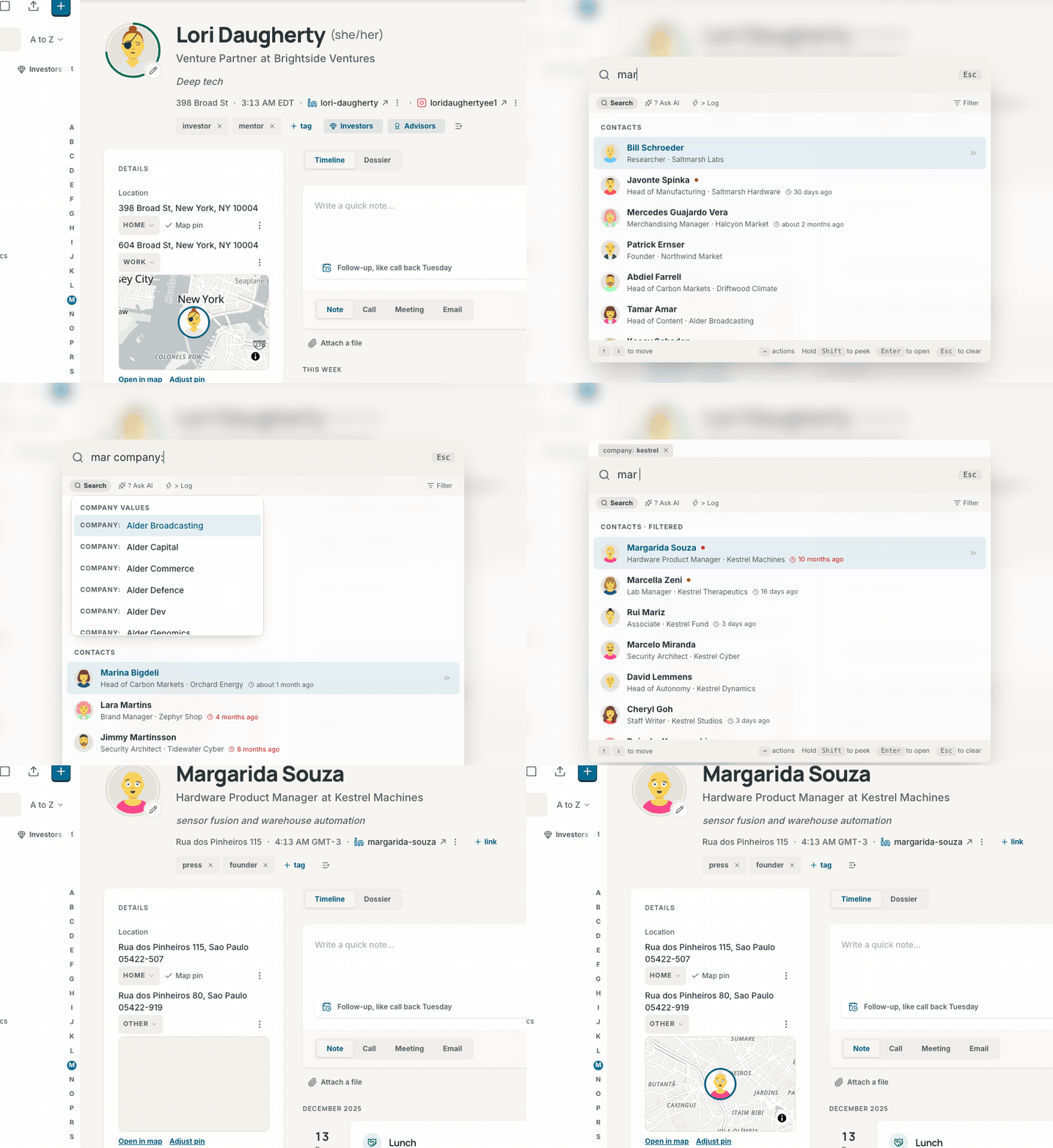
Esc steps back one layer at a time:
- It closes the facet values, the actions menu or Filter by.
- On a typed note, it asks once before it discards the note.
- It clears the box and its pills.
- On an empty box, it closes the palette.
On a touch screen, press Command palette, the ⌘ button in the page header. An open contact has it at the top right, and the map has it in its top bar. The X beside the box closes the palette, and Android's Back steps back as Esc does. The palette sits at the top of the screen, and its list stops above the on-screen keyboard.
The first character you type sets the mode. The chips under the box show the mode. A click or a tap on a chip switches to that mode and keeps the words you typed.
| You type | Mode | What happens |
|---|---|---|
| Words | Search | Contacts and pages appear as you type |
? and a question |
? Ask AI | Ask Contrack answers inside the palette |
> |
> Log | You log a note, a call, a meeting or an email |
Filter, after the mode chips, lists the facets (see Facets).
The footer names the keys that work on the highlighted row: what Enter does to it, → and Shift on a contact, and what Esc does next. A touch screen shows no keys.
Type part of a name, company, role, place, industry or tag. The first results come from your browser at once. A moment later, the server's keyword search replaces them, and the top row stays highlighted until you move the highlight.
The server search also reads the headline, the about text, interests, email addresses and phone numbers. It reads every address a contact has too, at the lowest rank, so a street name finds a person without burying the people whose name or company matches. It also finds:
- misspelled and sound-alike names, marked Approximate
- nicknames, so "Bob Castellanos" finds Robert Castellanos
- phone numbers in any common form, with or without the country code
Each result takes two lines: the name, a dot in the band color for a tracked contact, then the role, the company and how long ago you were last in touch. That time turns red after 60 days. A chip such as "7mo old" marks a contact that nobody has updated in six months or more. Its actions can refresh it from the web (see Act on a result).
Use ↑/↓ to move and Enter to open the contact. While the box holds text, Home and End move the cursor in it.
The palette lists up to 20 people. Show all in Network, under them, opens the Network list with the same words and pills.
The words also find pages: "pulse" lists Pulse, and "backup" lists Settings → Export. Each word must start a word of the page's name or of a word it is known by. A Settings page needs three letters, and at most five Settings pages show.
Create contact makes a contact with the name you typed. It is not there when a contact already has that name, when pills are set, or when the words read as a question, such as "who works at Stripe".
Ask AI, last, asks the words as a question with the pills (see Ask from the palette). It needs three characters or more, and it is not there for a name a contact already has.
The groups keep this order as you type: the people, Show all in Network, the pages, Create contact and Ask AI. When the words are the whole name of one of the five places, such as "map", the pages come first.
Press → on a result, in the people search or in AI's answer, to open its actions. With a pointer or a finger, select the double arrow at the end of the row.

| Key | Action | What it does |
|---|---|---|
Enter |
View profile | Opens the contact |
N |
Log note | Opens a small composer in the palette. Cmd+Enter or Save saves the note |
C |
Log call | The same, for a call |
B |
Catch me up | Opens the contact on its Dossier tab, at the Briefing card. With AI on, it writes a briefing when there is no recent one |
L |
Add to list | Shows your lists, with a check on each list the contact is in. Enter adds or removes the contact |
R |
Refresh from the web | Researches the contact on the web (see Research contacts). Only for an admin, when AI is on and web research is set up |
T |
Track or Stop tracking | Tracks the contact at your default cadence, or stops tracking it, with Undo. A ghost has no Track row |
↑/↓ move through the actions. ← or Esc goes back to the results.
The composer keeps your text as a draft in this browser until you save it. If the palette closes first, the draft comes back the next time you open the composer for that contact.
Hold Shift for a moment while a result is highlighted. A card opens beside the palette. It shows the role and company, the score and its band (or "Not tracked"), the last contact and up to five tags. Let go of Shift to close it.
Type >, or select the > Log chip. The palette leads you one step at a time:
- It lists the kinds: note, call, meeting and email. Pick one. Words you typed before you chose > Log become the name.
- It lists your contacts, the recently viewed ones first. Type part of a name to narrow the list, and pick one. On a touch screen, this opens a composer with room for a longer note and a Save button.
- Type the text after the colon. The palette shows a row such as "Log note for Julian Moreau". Press
Enterto log it. When other contacts also match the name, they are listed under Or for.
You can also type the whole line at once:
> note Julian: Left a voicemail about the Q3 targets
For the name, the palette takes the contact with that whole name, then the first name that starts with your words, then the first that contains them. The row names the contact, so check it before you press Enter. Esc on a typed note asks you to press it again before it discards the note. A logged interaction is not kept as a recent search.
With the box empty, the palette shows these groups:
- Start here, until you have opened a contact or searched: Ask AI about your network and Log a note, call, meeting or email.
-
Recent: up to three contacts you opened last, then your latest searches from the palette and from Ask Contrack, six rows at most. A question shows its
?, and a notes search starts with "Notes:". Select a search to run it again. - Insights: how many follow-ups are due today or late, and the two tracked contacts furthest past their cadence. It also names the ghost that your notes mention most, once they mention it twice. It counts the contacts with stale data and the possible duplicates. Select a row to go where you act on it.
- Go to: the five destinations. Type a word to find a page in Settings.
With ? and nothing after it, the palette shows four questions drawn from the same pool as Try asking on the Ask Contrack page. Press ↓ to one and press Enter, or select it.
To ask your own question, type ? and a question of three characters or more, then press Enter on the Ask row. The palette asks only when you press Enter, never while you type, and it shows "Asking AI…" while it waits.
The answer is the same as on the Ask Contrack page, under AI answer. When AI did not check the list, the heading reads Not verified by AI, with one line that says why. A list cut at 30 people shows the total in its heading, for example "AI answer · 30 of 1,501".
When no AI model is set up, or AI is off for the instance or for your account, the palette says so:
- An answer that Contrack proved by itself, such as a name or facets, has the heading Answer, not AI answer.
- Any other answer holds the closest matches to your words, which may not fit, under Not verified by AI.
- A row under Set up AI opens the page that fixes it. For your own switch, it reads Turn AI on in Settings → Privacy and AI. An admin gets a row such as Connect a provider in Settings → Administration → AI. A member reads a line such as "No AI model is set up. Ask an admin to set one up".
- The palette offers no brief.
Facet pills go with the question. When you add or remove a pill, press Enter to ask again. Under the answer, Search notes opens the same words in Notes mode, and Open in Ask Contrack opens the Ask Contrack page.
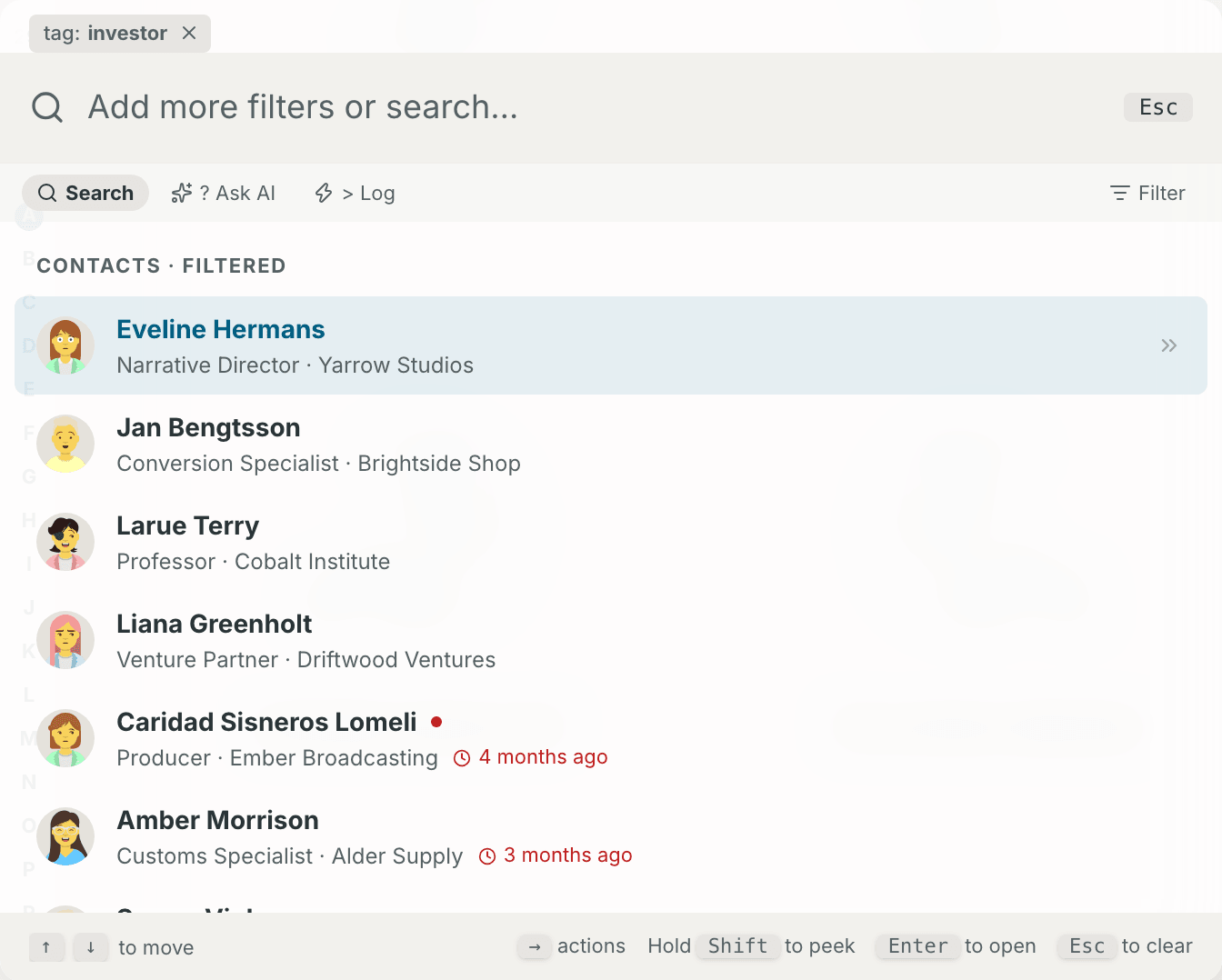
A facet is a filter that you type as name:value. In the palette and on the map, a facet becomes a pill when you type a space after it, and it leaves the box. Backspace in an empty box removes the last pill. Select the × on a pill to remove it. In the palette, Filter lists every facet except added: and near:, each with what it keeps. Pick one to type it into the box.
Type a facet name and its colon to see values to pick. The text facets list the values in your contacts. score:, updated:, contacted:, tracked: and missing: offer set choices. Use ↑/↓ to choose, Enter or Tab to pick a value, and Esc to close the list. Type again to see it again.
| Facet | Example | Keeps the contacts |
|---|---|---|
role: |
role:engineer |
whose role contains the word |
company: |
company:stripe |
whose company contains the word |
location: |
location:lisbon |
whose location contains the word |
industry: |
industry:fintech |
whose industry contains the word |
tag: |
tag:investor |
with a tag that contains the word |
score: |
score:>70 |
with a score of 70 or more. score:<40 keeps 40 or less |
updated: |
updated:>6m |
that nobody edited for more than six months. updated:<1m keeps the ones edited in the last month |
added: |
added:<30d |
added in the last 30 days. added:>1y keeps the ones added more than a year ago |
contacted: |
contacted:>90d |
last contacted more than 90 days ago, or never. See Last contact |
missing: |
missing:email |
with no company, location, email or phone
|
list: |
list:investors |
in a list. Name the list, or write its name with dashes for spaces (list:board-members), or use its id |
near: |
near:London/50km |
within a distance of a place, 25 km when you give none. It works on the Map only |
tracked: |
tracked:yes |
that you track. tracked:no keeps everybody else |
- Text facets ignore case and match any part of the value:
company:acmefinds "Acme Corp". - A value with a space goes in double quotes, for example
industry:"Venture Capital"orlist:"Board members". In the palette, the facet becomes a pill at the space after the closing quote. - A contact must match every facet you add.
-
score:reads the score a contact shows. Only a tracked contact with a logged interaction has one. -
near:needs the Map's place lookup, so it narrows only the Map (see Filter the map). Everywhere else it keeps everyone.
contacted: reads the date of the last logged interaction.
| Value | Keeps |
|---|---|
contacted:>90d |
contacts last contacted more than 90 days ago, and contacts never contacted |
contacted:<30d |
contacts contacted in the last 30 days |
contacted:never |
contacts with no logged interaction |
The units are d (days), w (weeks), m (30 days) and y (365 days). updated: and added: take the same units. A value with no > or < means >. The list of values offers Within 30 days, Over 90 days ago, or never and Never.
Open Ask Contrack in the sidebar, or press Cmd+Shift+S (Ctrl+Alt+S on Windows and Linux). The switch at the top chooses People or Notes. On a computer the cursor starts in the box. On a touch screen it does not, so the keyboard opens only when you tap the box. / puts the cursor in the box, and Esc in the box clears the search.
- Type a question in the box, with at least three characters. A shorter one shows "Type 3 or more letters to ask".
- Press
Enter, or select the search button. - Select a result to see the contact in a card over the page. Open in Network in the card opens the contact's own page, and
Esccloses the card.
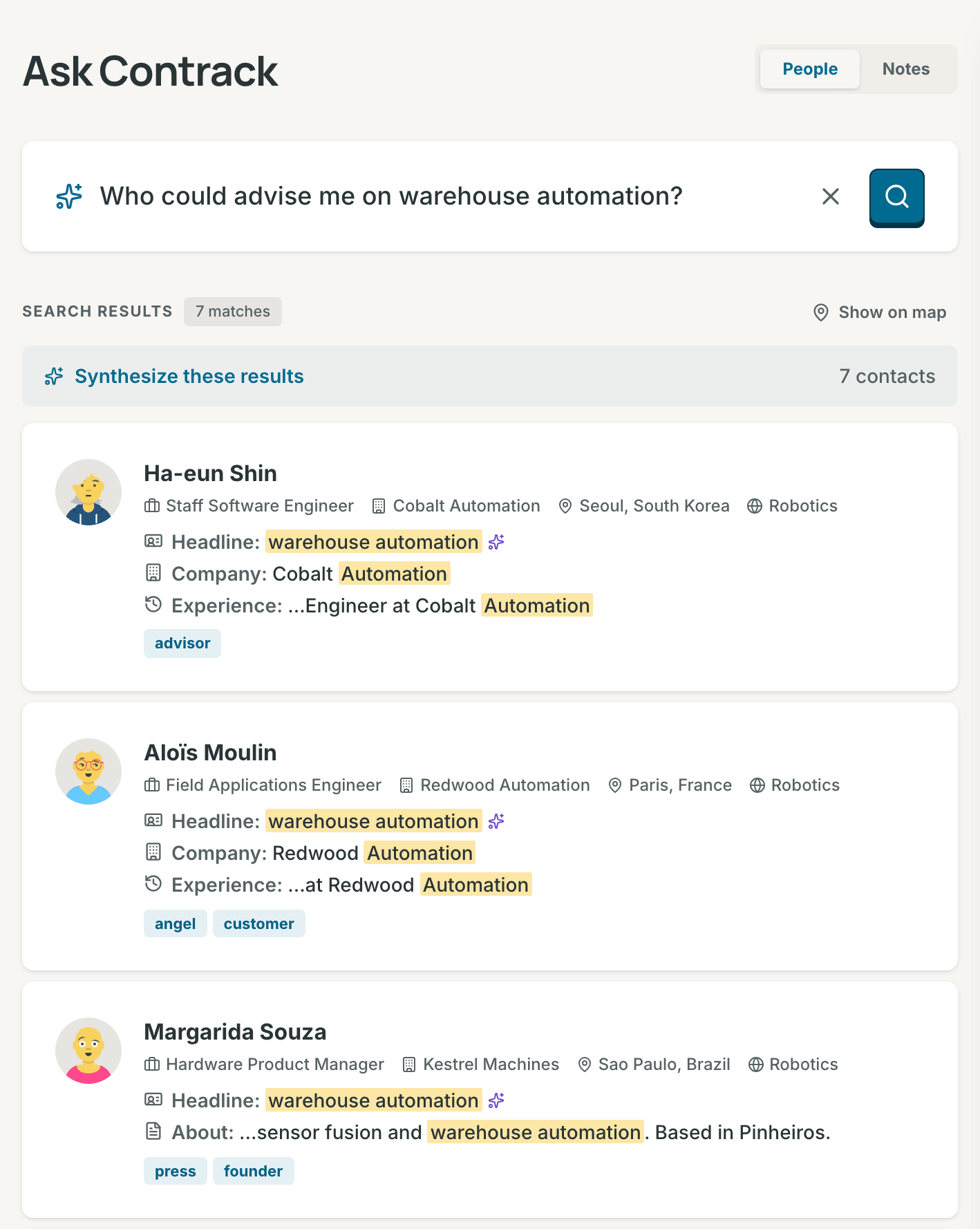
The results are one Tab stop: ↑/↓ move between them, and Home and End go to the first and the last. The count over the results says how many matched, for example "12 matches". Show on map, beside it, opens the map on these people (see Show Ask results on the map). When nobody fits, the page says "No one matches". When the search fails, it says "Could not search" and offers Try again.
Before a search, Try asking shows six questions to start from. Select one to ask it. Contrack draws them from a pool of up to 500 questions, built from your own contacts:
- the industries, cities, companies, roles, interests and tags your contacts hold, and an industry with a city. In a network of 10 people or more, two contacts must share a value.
- seven questions that any network can ask: who you have not contacted in over 3 months, who you track and who you do not, whose details are over 6 months old, and who is missing an email address, a phone number or a location.
A question is in the pool only when it finds someone. The pool holds no more questions than you have contacts, except the general questions that find some of your people and not all. Each set of six takes one question from each of six different kinds when it can, so the general questions show up among the long lists of companies and roles. A new set shows each time you open the page and after you clear the box. With no one in your network yet, the page offers Import contacts instead.
Questions that work well:
- A place, a company or an industry: "Who do I know in Lisbon?", "Who works at Northwind Logistics?"
- A topic or a trait: "Find people interested in AI or machine learning", "Who likes espresso?"
- A name, even misspelled: "Jonathon Smyth" finds Jonathan Smith, marked Approximate.
- A nickname: "Peggy Ellington" finds Margaret Ellington.
- A phone number in any form: "+1 (415) 555-1234" or "4155551234".
- Facets, alone or with words:
tag:investor contacted:>90d.
For a question about when you last spoke, the contacted: facet gives an exact answer.
Contrack answers these questions on your server, with no AI call, and every match is verified:
- a name, an email address, a phone number, or a phrase in quotes
- a question made only of facets, such as
tag:investor contacted:>90d - a place, a company or an industry from your contacts, with nothing else asked: "people in Lisbon", "who works at Northwind Logistics", "who works in fintech"
- one of the seven general questions, written as Try asking writes it, such as "Who do I track?" or "Who is missing an email address?". Case and punctuation do not matter. Each is the same list as its facet:
tracked:yes,missing:email
Facets, places, companies, industries and the general questions can find more than 30 people. The count then says so, for example "30 of 1,501 matches", and See all in Network opens the whole list there.
Under the count of such a long answer, the Narrow row offers up to six chips. Each chip is a facet that splits the list, with the number of people it keeps: tracking, the most common industries, cities, companies and tags, and a contact in the last 30 days. A press asks the question again with that facet added, for example "Who do I track? industry:Fintech".
For every other question, Contrack first finds candidates by their words and their meaning, on your server. Then AI checks which of them fit. AI checks a contact's addresses too. A street or a postcode in a question, such as "Who lives on Kastanienallee?", finds the people whose address names it, and the reason names that address.
An answer holds at most 30 people. Each match is verified: it passed a check. The check is an exact match, a filter, or evidence from AI that Contrack found in the contact's own fields.
Under each name, one line for each field that answers the question says why the person is there, with your words marked in the contact's own text. "Who is interested in machine learning?" can show Interests: Machine Learning for one person and Role: Machine Learning Engineer for another. A field that a filter or the AI check proved comes first, and a field that the AI check cited carries the sparkle. (similar meaning) marks a passage that matches in meaning but holds none of your words. A name match needs no line.
Approximate marks a name that matched by its spelling or its sound, not exactly.
When AI is off for your account, no AI model is set up, or AI could not answer, you get the list that Contrack found by itself. Not verified by AI shows over the list, and each card has an orange question mark. Select the mark to read why: the person matches your words or their meaning, but AI did not check the match. With AI off for your account, the mark beside Not verified by AI says where to turn it on. When AI is on for your account, Ask AI again beside the words asks once more.
If you leave Ask while it searches, the search goes on, and the answer is there when you come back. A quick answer shows nothing in between. A longer wait shows "Searching your network…" and "AI is checking who fits your question", or "Finding people who fit your question" with AI off.
The corvid leaves the search box and hunts beside or above the search column, never over the results, until the answer lands. With Corvid motion at Subtle or Off in Settings → Appearance, with reduced motion, or in a window with no room beside the column, a still bird shows over the words instead.
People search reads an index of your contacts. One line shows under the box while contacts are missing from the index, while indexing runs, or after a contact failed. It says, for example, "12 of 30 contacts indexed", "Indexing 12 of 30…" or "Updating the search index…". Failed contacts add, for example, "· 2 failed" to the line.
- Index missing adds the missing contacts to the index.
- Retry failed takes its place when a contact failed. It tries the failed contacts again, and adds any missing ones.
- Show failed opens Contacts not in the search index, with each failed contact, its error and how many tries it took.
When your instance indexes with a paid AI provider, Contrack asks first in Update the search index, because the provider may charge for it. With AI off for your account, that provider does not index your contacts, and the line does not show. When the index is complete, the line goes away.
Synthesize these results writes two or three sentences about the people in an answer: who they are, where they are and what they share. It shows over a verified answer of three people or more, and it runs only when you press it. It needs AI. The palette offers the same button.
Switch to Notes to search what you wrote. Notes search reads the title and the text of every timeline entry: notes, calls, meetings, emails and messages. It runs on your server and never calls AI, so the same question over the same notes always gives the same results.
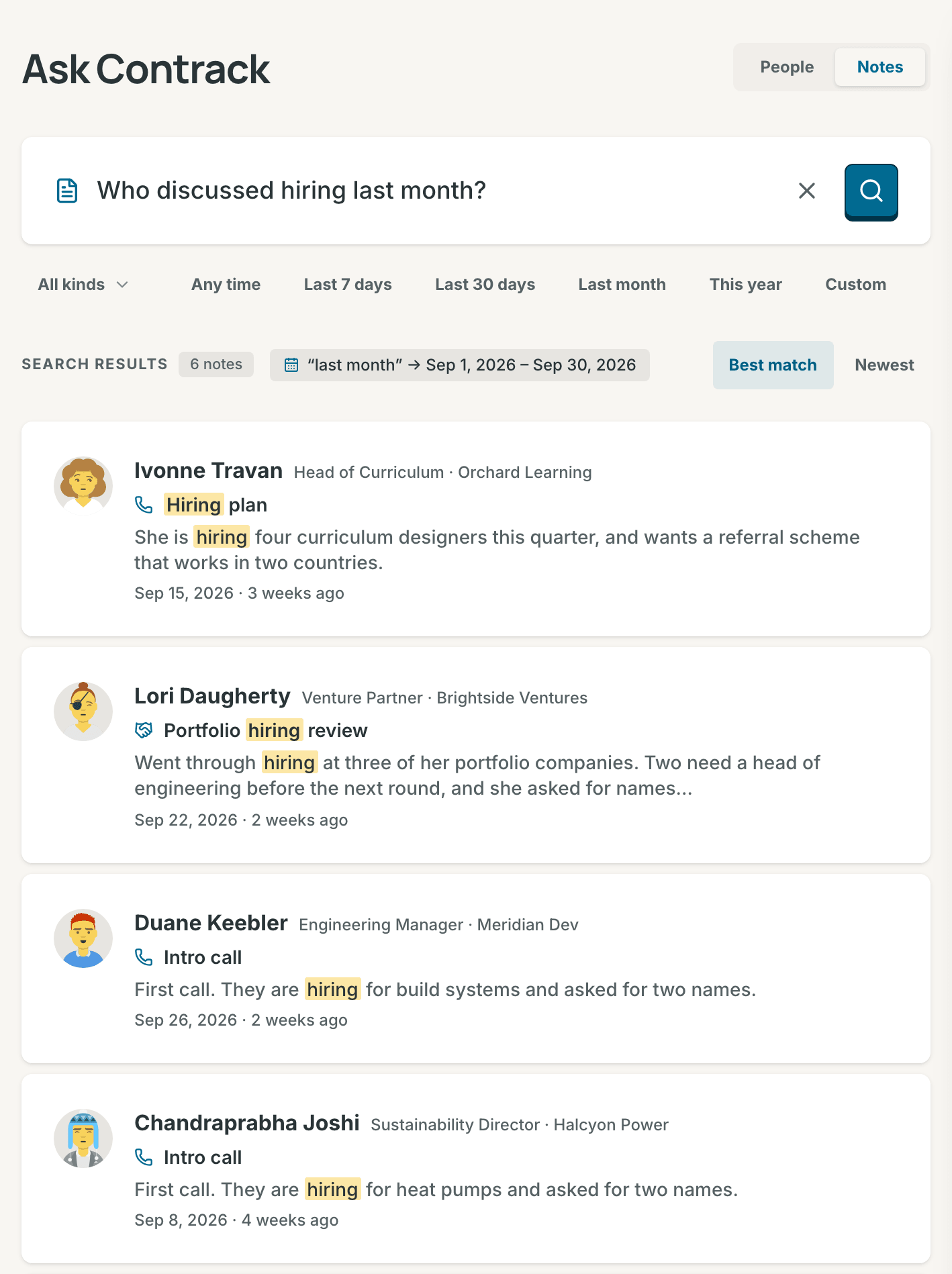
- Type words or a question, for example "Who discussed hiring last month?"
- Press
Enter, or select the search button. - Select a result to open the note on its contact's timeline.
Each result shows the contact, the title of the note, the passage that matched with your words marked, and the date.
- Words match by their stem:
hirefinds "hiring" and "hired". - Accents do not matter:
cafefinds "café". - A word also matches the start of a longer word:
berlfinds "Berlin". - Question words are left out: who, what, when, did, discussed, talked, mentioned and others like them.
Contrack first looks for notes with every word. When no note has them all, it shows the notes with any of them, those with more of the words first. The page then says "No note has every word, showing notes with any of them". With two words or more, All words and Any word let you choose.
Contrack reads one date phrase from the question, the most specific one, in your own time zone. It shows what it understood, for example “last month” → Aug 1, 2026 – Aug 31, 2026.
| Phrase | Period |
|---|---|
today, yesterday
|
That day |
this week, last week
|
The calendar week, Monday to Sunday |
this month, last month, previous month
|
The calendar month |
this quarter, last quarter
|
The calendar quarter |
this year, last year
|
The calendar year |
in the last 30 days, past two weeks
|
That many days, weeks, months or years, up to this moment |
in March, March 2026, in Sept 2025
|
That month. Without a year, the most recent one |
in 2025 |
That year |
on 2026-08-12 |
That day |
since March, after March, before 2026-08-01
|
A period open at one end |
between March and May, from March to May
|
From the start of the first month to the end of the last |
"May" on its own stays a word, because it is also a verb. Write "in May" or "May 2026" instead. A phrase that is not in the table stays in the question as words to search for.
- All kinds narrows the search to Notes, Calls, Meetings, Emails or Messages.
- The period chips are Any time, Last 7 days, Last 30 days, Last month, This year and Custom. Custom opens a From date and a To date. A period you choose wins over a date phrase in the question. On a phone, the periods are one menu.
- Best match or Newest sets the order.
- Results come in pages of 20, for example "Showing 1–20 of 45".
With a kind or a period and no words, you get every note in it, the newest first. With no words and no filter, the page stays empty.
When nothing matches, the page says "No notes match" and gives a hint. When you chose a kind, Search all kinds widens the search again. The X in the box, or Esc, clears the words and every filter.
- Notes on archived, trashed or merged contacts, and notes on ghosts. When you restore a contact, its notes come back.
- Attachments. Contrack finds an imported email by the text of its timeline entry.
- Word stems in languages other than English. A note in another language matches by whole word and by the start of a word.
- The people a note mentions with @. A note belongs to the contact whose timeline holds it, and it shows under that contact only.
Ask Contrack keeps the questions you ask. It keeps them on your account, so they follow you to every device.

- On a wide screen, the History button in the top right corner opens the panel at the right of the page. On a narrow screen, the History button beside the switch opens the history as a sheet.
-
Hopens the history. On a wide screen, it also closes the panel.Escinside the panel closes it. Contrack remembers whether you left the panel open. - The questions come in groups: Pinned, Today, Yesterday, This week, and then one group for each month.
- Each row shows the question and a line such as "7 people · 18 hours ago". The line says "no matches" when nothing matched, and "not verified by AI" when AI did not check the answer. "×3" means that you asked the question three times.
- Select a row to ask the question again.
- The pin and delete buttons show when you point at a row or focus it, and always on a touch screen. A pinned question stays at the top. Delete offers Undo for 10 seconds.
- Filter questions narrows the list by words. All, People and Notes narrow it by mode.
- Clear deletes every question in the mode you chose, after you confirm in Clear search history?. You cannot undo it.
The command palette shares this history. A palette search goes into the history when you open a result from it, and it shows under All. A question you ask with ? in the palette shows as a People question. Your Ask Contrack questions show in the palette under Recent.
To delete the whole history, open Settings → Privacy and AI and select Clear history under Search history.
Most search works with no AI at all:
- The Network search box, the palette's search, the facets and Notes search never use AI.
- Ask Contrack answers names, email addresses, phone numbers, quoted phrases, facets, known places, companies and industries, and the seven general questions by itself. See Questions Contrack answers without AI.
- For every other question, you get the list that Contrack finds by words and meaning, marked Not verified by AI.
- A built-in model on your server finds people by meaning, with no key. When your instance indexes with a provider's model instead, AI off for your account leaves search with words only.
The AI check, Synthesize these results and Refresh from the web need AI. To turn AI off for your account, see Turn AI off. Architecture describes how people search works inside.
GET /api/search runs the keyword search, POST /api/search/semantic asks Ask Contrack about people, and GET /api/search/interactions searches notes. See Search in the REST API reference.